
How Much Does Base44 Cost Monthly & Yearly?


Base44: Official Pricing Screenshot
Base44’s pricing starts at $20/month, or $16/month if billed yearly. However, because it can cost $16/month means you have to pay $192 upfront and it doesn’t mean you should always go for that plan.
Don’t miss the best tips on how to optimize your Base44 bill.

If you’re in a rush, check out the image 👆👆.
It’s the fastest way to understand Base44’s pricing, because it’s a screenshot of their actual pricing plans.
But if you’ve got a few minutes, stick around. I’ll walk you through:
- The real cost of Base44
- What you do and don’t get on each plan
- The hidden limitations as your app grows
- Tips on which plan might be the best fit depending on your use case
Think of this as the ultimate buyer’s guide to Base44 pricing.
Context: I’ve been testing Base44 and similar apps for the past couple of years. I’ve gone through the plans, tried exports, bumped into their limits, and compared the value against other tools in the same space.
By the end of this guide, you’ll know not only how much Base44 costs, but also whether it makes sense for you.

What is Base44? Who is it for?
Answer: Base44 is an AI-powered app builder that turns your prompts into working web apps.
It’s designed for non-technical people who want to build apps without writing much (or any) code. You describe what you want, and Base44 generates the structure, frontend, and connects things through its SDK(definition) behind the scenes.

It’s mainly for solo founders, makers, and small teams who need to move fast: think MVPs(definition), side projects, or prototypes where speed matters more than having the deepest level of control.
So if you’re someone who doesn’t want to spend months learning to code, Base44 makes it possible to get an app live quickly. But if your long-term goal is to own every part of your codebase and host it fully yourself, you’ll want to keep reading to understand where Base44’s export limits come in.
→ Do you need to know how to code for Base44?
Pricing Overview: What Do I Get?
If Base44’s pricing feels a little confusing, you’re not the only one 🙂
There are credits, limits, and features mixed into each plan, so let’s break it all down in plain English so you can actually compare what makes sense for your project.
Summary: Base44 Plans
- Free, $0/month: 25 message credits per month, 500 integration credits.
- Starter, $20/month: 100 message credits, 2,000 integration credits.
- Builder, $50/month: 250 message credits, 10,000 integration credits.
- Pro, $100/month: 500 message credits, 20,000 integration credits.
- Elite, $200/month: 1,200 message credits, 50,000 integration credits.
Extras & Add-Ons
Unlike some SaaS(definition) tools, Base44 doesn’t sell add-ons separately.
Everything is bundled into your monthly credits. That means there aren’t hidden costs for things like authentication, databases, or payments.
The two “extra” levers you’ll want to keep in mind are:
- Message credits → These control how many requests your app can make each month. Each plan comes with a fixed number, from 25 on Free up to 1,200 on Elite.
- Integration credits → These are spent whenever your app hits an integration (like an LLM call, image generation, file upload, database query, email, or SMS).
Each plan includes a monthly pool.
If you burn through it, you’ll need to upgrade.
Beyond credits, the higher tiers unlock perks:
- Custom domains (Builder and up)
- GitHub integration (Builder and up)
- Beta features + early access (Pro)
- Premium support + higher limits (Elite)
The key takeaway: there’s no pay-as-you-go or “buy more credits” option.
Once you hit your limits, you either wait for the reset or move to the next plan.
Detailed Breakdown: Base44 Pricing Plans
1. Base44 Free Plan: $0/month
Base44’s Free plan is their entry point.
A sandbox for non-technical builders to test what the platform can do.
You get 25 message credits per month (with a daily cap of 5) and 500 integration credits. Messages power interactions inside your app (like user actions), while integration credits are used when the app calls external tools (like LLMs, file uploads, or email sending).
That’s enough to build a small demo app and see how authentication, databases, and workflows work inside Base44.
But, the 5 messages per day cap means you’ll hit walls fast if you’re trying to test seriously.
What Free Includes:
- 25 message credits per month (max 5 per day)
- 500 integration credits
- Database + authentication system
- Visual editor & analytics dashboard
- Core integrations enabled
Cost of Free As You Grow:
| Usage Level | What Happens | Cost |
|---|---|---|
| 0–5 messages/day | Works as intended | $0 |
| 6+ messages/day | Blocked until reset next day | $0 |
| 25+ messages/month | Blocked until new billing cycle | $0 |
| 500+ integration credits/month | Blocked until new billing cycle | $0 |
So technically, there’s no “cost” but the limits can stall your app at any moment.
Who the Free Plan is Best For:
This plan is best if you’re experimenting or learning no-code.
It gives you a taste of Base44’s editor + integrations without spending.
But here’s the catch: code export isn’t included — not even partial. And since export is locked to higher tiers (and even then it’s only frontend code), you’ll outgrow Free as soon as you want control over your project.
If your goal is to prototype quickly and still keep your code, tools like Shipper let you export frontend + backend from day one.
→ How to export code (for free) in Base44
2. Base44 Starter Plan: $20/month
The Starter plan is Base44’s first paid tier. It removes the harsh daily limits of the Free plan and gives you more breathing room to actually build and test.
You get a larger allowance of messages and integration credits, plus all the core Base44 features like authentication, database, analytics, and collaboration tools.
But, a big catch: Starter does not unlock code export.
Even though you’re paying, you’re still locked into Base44’s infra.
If you’re thinking long-term, this is where frustration usually starts.
What Starter Includes:
- Higher monthly cap on messages (above Free)
- Higher monthly cap on integration credits
- Authentication, database, analytics
- Collaboration & visual editor
- Payment processing + email tools
Cost of Starter As You Grow:
| Usage Level | What Happens | Cost |
|---|---|---|
| Up to plan’s message limit | Included | $20/month |
| Hit monthly message cap | Upgrade required | $50+ |
| Run out of integration credits | Upgrade required | $50+ |
Who the Starter Plan is Best For:
The Starter plan works for hobby projects or early prototypes that need more room than Free, but don’t need heavy usage yet.
That said, paying $20/month without code export means you’re essentially renting the right to keep building inside Base44’s walled garden. You can’t take your code with you, and when you grow, you’ll be nudged into Builder ($50/mo) anyway.
If you’re already paying, it’s worth considering alternatives like Shipper, where even the entry plan lets you own your code from day one — frontend and backend.
→ Full comparison: Base44 vs Shipper
3. Base44 Builder Plan: $50/month
The Builder plan is where Base44 really starts to open up.
Unlike Free and Starter, this is the first tier that unlocks code export, though with limitations. You’ll get the frontend (React, styling, project files), but the backend remains hidden behind the Base44 SDK and can’t be fully exported.
For many, this is the first “serious” tier since it’s the cheapest way to actually download code. You also get bigger allowances on messages and integration credits, making it possible to support real users in your app.
What Builder Includes:
- Code export (frontend only — backend still locked)
- Larger message limits for real usage
- More integration credits
- All core features: database, auth, analytics, payments, email, editor
- Collaboration for multiple users
Cost of Builder As You Grow:
| Usage Level | What Happens | Cost |
|---|---|---|
| Up to included limits | Included | $50/month |
| Exceed message or credit limits | Upgrade to Pro | $100/month |
| Need backend export | Not possible at any plan | — |
Who the Builder Plan is Best For:
Builder is for people who want more than a prototype and need their app to run with real users. It’s also the cheapest way to export code from Base44 and remove the badge.
That said, you should know you’re only getting half the stack.
Your backend still lives on Base44’s servers, and you can’t host it independently. This leaves you exposed to vendor lock-in if Base44 changes pricing or shuts down.
If true ownership is the goal, Builder may feel like a halfway step. On Shipper, even the entry plan gives you the full export (frontend + backend) — so you’re not stuck renting part of your app.
4. Base44 Pro Plan: $100/month
The Pro plan is Base44’s middle tier and the most common choice for teams who outgrow Builder. It doubles your limits, keeps all the same features, and is often pitched as the “scaling” plan.
Just like Builder, it offers code export — but only the frontend.
The backend still remains locked behind Base44’s SDK, so even at $100/month you can’t fully host your own app.
What Pro Includes:
- Frontend code export (backend still locked)
- Significantly higher message and integration limits
- Multi-user collaboration and team features
- Same core stack: DB, auth, payments, analytics, email
- Priority troubleshooting and debugging
Cost of Pro As You Grow:
| Usage Level | What Happens | Cost |
|---|---|---|
| Within limits | Included | $100/month |
| Above Pro limits | Upgrade to Elite | $200/month |
| Backend export | Not possible at any plan | — |
Who the Pro Plan is Best For:
Pro is designed for teams who are scaling quickly and need more breathing room than Builder allows. It’s Base44’s “sweet spot” before jumping into Enterprise-level pricing.
But the same limitation applies: no matter how much you pay, your backend isn’t really yours. For many teams, this becomes frustrating as soon as they want to host independently, connect with other infra, or ensure long-term ownership.
That’s where Shipper is different. Even at our base tiers, you can export both frontend and backend, run it anywhere, and never depend on a locked SDK.
If you’re serious about ownership, Pro still leaves you halfway in.
5. Base44 Elite Plan: $200/month
The Elite plan is Base44’s top published tier.
It’s marketed as the choice for larger teams that need the highest limits, smoother collaboration, and direct support.
At this level, you’re basically getting more headroom, not new features. The fundamentals are the same: you still can’t export your backend, and the platform continues to run critical logic on Base44’s infrastructure.
What Elite Includes:
- Frontend code export (backend stays locked)
- The highest message and integration credit limits available
- Full set of included tools: DB, auth, payments, analytics, email
- Expanded collaboration for bigger teams
- Priority access to Base44 support
Cost of Elite As You Grow:
| Usage Level | What Happens | Cost |
|---|---|---|
| Within limits | Included | $200/month |
| Above Elite limits | Custom enterprise pricing | Varies |
| Backend export | Not possible at any plan | — |
Who the Elite Plan is Best For:
Elite is made for teams that can justify $200/month to avoid hitting ceilings. It’s less about unlocking new functionality and more about avoiding the friction of hitting limits at lower tiers.
That said, the core lock-in issue remains: you own the frontend, but the backend is still off-limits. If Base44 ever changes pricing or policies, you’re still dependent on their servers.
If your team is at the Elite stage, it usually means you’re serious about your app’s future. At that point, most teams start caring a lot about independence and ownership.
That’s why many of them look at Shipper, where you don’t just get more limits.
You get the whole stack, and you truly own it.
6. Base44 Enterprise Plan: Custom Pricing
Like most SaaS platforms, Base44 doesn’t publicly share Enterprise pricing.
Instead, you’ll need to talk to their sales team to get a quote.
Enterprise is positioned as the plan for large organizations that want higher limits, compliance, and more direct support. In practice, it’s just an extension of the Elite plan with negotiable pricing and SLAs(definition).
What Enterprise Includes:
- Everything in Elite, but with custom usage limits
- Dedicated support and account management
- Compliance and security options for bigger orgs
- Negotiated SLAs and priority uptime guarantees
- Expanded collaboration for large teams
Cost of Enterprise As You Grow:
| Usage Level | What Happens | Cost |
|---|---|---|
| Within negotiated limits | Included | Custom (contact sales) |
| Beyond limits | Renegotiation | Varies |
| Backend export | Still not possible | — |
Who the Enterprise Plan is Best For:
Enterprise is for teams with budgets large enough to negotiate custom terms. If your organization needs compliance guarantees or can’t risk downtime, this is the only plan where Base44 can tailor things to your scale.
But even here, one major limitation doesn’t change: no plan (not even Enterprise) lets you export your backend. You’ll still be tied to Base44’s SDK and infrastructure.
That’s why serious teams looking at Enterprise-level commitments often weigh alternatives like Shipper, where backend code export and true ownership are part of every plan — no negotiation needed.
Is Base44 Good Value-For-Money?
Shortly: Yes, if you’re the right kind of builder.
Base44 gives you an all-in-one platform: AI app builder, backend, hosting, database, auth, payments, analytics, and more. For someone non-technical who wants to spin up an MVP quickly, it can feel like a dream — all the plumbing is already handled.
The free plan is generous enough to play around with. But once you want serious usage, you’ll need to move into the Starter ($20), Builder ($50), or higher.
And if you want to export your code?
That doesn’t even start until Builder.
Even then, you’re only getting the frontend.
At scale, those limits matter.
Integration credits, message caps, and hidden backend dependencies can creep up quickly. A $20 plan can become $200+ if you need more credits or reach export territory.
It’s not that Base44 is bad value – it’s just designed for a very specific audience: non-technical founders who want to build fast and don’t care about owning the backend.
But…
If you’re someone who does care about true code ownership (being able to run everything on your own servers without lock-in), the value starts to look shaky. That’s where alternatives like Shipper shine: backend export, no SDK lock-in, and predictable pricing across all plans.
So, Base44 is good value if:
- You want speed over control
- You’re fine living inside their ecosystem
- You don’t mind paying more as usage grows
But if your long-term plan is independence and flexibility, you might end up paying for a platform that keeps you tied down.
Base44 Discounts & Special Offers
Not all of Base44’s pricing is set in stone.
If you’re willing to commit longer-term or do a little extra work, there are ways to save. From yearly discounts to free credits, here’s how to stretch your budget:
1. Yearly Plans: 20% Off
If you pay annually instead of monthly, Base44 knocks 20% off the total price. That means:
- Starter: $16/month (billed $192/year)
- Builder: $40/month (billed $480/year)
- Pro: $80/month (billed $960/year)
- Elite: $160/month (billed $1,920/year)
It’s a decent saving if you know you’ll stick with the platform — but keep in mind, you’re locked in for the full year. There’s no downgrade or refund flexibility mid-cycle.
2. Share Projects = Free Credits
Base44 also has a referral-style offer where you can earn 20 free integration credits just by sharing your project online.
Here’s what you need to do:
- Post about your project on LinkedIn (at least 200 characters)
- Tag @base_44 in your post
- Have an account with 100+ followers
- (Optional) Add a screenshot, video, or link to your project
- Open a support ticket with the link to your post to claim your credits
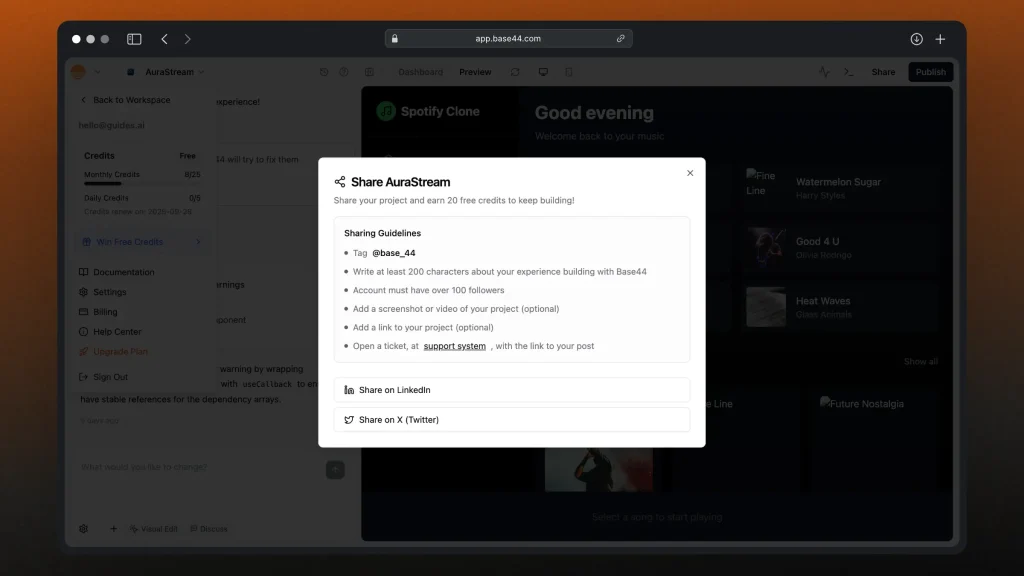
It’s not life-changing, but if you’re testing or running low on credits, it’s a quick way to keep building for free.
3. Affiliate Program
You might see mentions of 10–15% off coupons floating around online. Most of those are tied to affiliate links (not official Base44 offers), so take them with a grain of salt.
With that being said…
The yearly discount is the biggest way to save, but only makes sense if you’re confident Base44 will be your main tool for 12 months. The free credit program is a nice bonus, though it’s more of a marketing push than a real money-saver.
Are There Hidden Costs For Base44?
Yes, and they can creep up if you’re not paying attention.
Base44’s pricing page looks straightforward, but here’s where costs can add up:
- Integration credits — each action (LLM call, file upload, email, etc.) consumes 1 credit. Run out? You’ll need to buy more.
- Paid export — code export isn’t included in the free or Starter plan. You’ll need to be on Builder ($50/mo) or higher just to unlock it.
- Yearly lock-in — that 20% discount only applies if you pay for 12 months upfront. No refunds if you change your mind.
- Scaling costs — as your app (and users) grow, you’ll burn through credits faster. That means either upgrading to a higher plan or topping up credits.
Other possible “gotchas”:
- Free plan caps at just 25 messages/month — fine for testing, but useless for anything live.
- Extra users or heavy workloads may push you into higher tiers sooner than you expect.
- Some features (like advanced exports, backend control) are locked behind pricier plans.
If you’re building something small or just testing ideas, the free or Starter plan works. But if you’re serious about running an app, expect to spend at least $50–$100/month, plus more if your app sees real usage.
How Does Base44’s Pricing Compare to Other AI App Builders?
When you’re choosing an AI-powered app builder, the monthly price is only part of the story, what really matters is how much ownership and flexibility you get for that price.
Here’s how Base44 stacks up against some of the closest alternatives:
| # | Alternative | Best For | Starting Price (USD/mo) |
|---|---|---|---|
| 1 | Shipper | Non-devs & SaaS founders who want full code ownership | $25 |
| 2 | Base44 | Beginners wanting fast AI app building (but partial exports) | $20 |
| 3 | Lovable | Visual devs looking for collaborative AI app design | $25 |
| 4 | V0 (Vercel) | Developers who want AI to scaffold frontends | $20 |
| 5 | Bolt.new | Engineers comfortable with AI coding assistants | $25 |
| 6 | Replit | Beginners to intermediate devs coding with AI in the browser | $20 |
Base44 is one of the easier entry points for non-technical people, but you don’t truly own your app if you stick with them.
If long-term control and full export matter, Shipper gives you both at a lower starting price than most.
Base44 Support Options (by plan)
Base44 keeps support pretty simple across its plans.
You’ll mostly rely on docs, Discord, and tickets.
The only real jump in support quality comes at the very top tier.
| Plan | Support Type |
|---|---|
| Free | Docs + community Discord only |
| Starter | Same as Free + basic email support |
| Builder | Same as Starter + GitHub integration (not extra support) |
| Pro | Same as Builder (features increase, support unchanged) |
| Elite | Everything above + Premium support (priority help, faster responses, onboarding) |
In practice:
- Free and Starter users are on their own most of the time, with slow or community-based help.
- Builder and Pro don’t add much in terms of support — you’re paying for features and credits, not service.
- Elite ($200/mo) is where Base44 finally offers “Premium Support,” meaning you’ll actually get priority handling, faster ticket turnaround, and more hands-on guidance.
Bottom line
If you’re counting on Base44 support to keep your app running smoothly, the reality is you’ll need the Elite plan. Everything below it is basically self-serve.
Our Recommendation: Which Base44 Plan is Best For You?
The right Base44 plan depends on how big your projects are, and how much support you expect along the way.
If you’re just experimenting or building personal projects, the Free or Starter plans give you a solid playground. You’ll get the core features and enough credits to test ideas without paying upfront.
But if you’re building something real (like a SaaS app with paying users), you’ll probably need at least the Builder ($50/mo) plan. That’s the first tier where you unlock custom domains and GitHub integration, which are essential for taking your app beyond a prototype.
The Pro ($100/mo) plan adds more credits and early access to features, but support doesn’t really improve until Elite ($200/mo), where you finally get premium help.
That’s a steep jump if you just want reliable assistance.
That’s why we often recommend checking out Shipper if you care about scaling affordably. You get code export, GitHub integration, and direct support included, without needing to lock into a $200/mo plan just for help.
Bottom line: Base44 is fine if you’re willing to climb the ladder, but Shipper gives you ownership and support earlier, at a fraction of the cost.
A Cheaper & Better BASE44 Alternative
If you like the idea of building apps with AI but don’t want to get locked into hidden SDKs or pay $200/mo just to get decent support, there’s another option.

With Shipper ($25/mo) you get:
- Full code export (frontend + backend)
- GitHub integration from day one
- Live app hosting included
- No lock-in — your code still works even if you cancel
- Friendly support on every plan
That means you can experiment, launch, and scale without worrying that the most important parts of your app live on someone else’s servers.
Base44 is great for prototyping, but if your goal is owning your code and growing without pricing headaches, Shipper is built for exactly that.
FAQ: Base44 Costs
1. Does Base44 cost money?
Yes, but it depends on how much you’re building. Base44 uses a tiered pricing model:
- Free plan — Access all core features, but limited to 25 message credits and 500 integration credits per month. Good for experimenting, but runs out quickly.
- Starter ($20/mo) — Unlocks unlimited app creation, in-app code edits, and higher limits.
- Builder ($50/mo) — Adds GitHub integration, custom domains, and more credits.
- Pro ($100/mo) — Includes beta feature access, higher limits, and better support.
- Elite ($200/mo) — Designed for scale, with premium support and the most credits.
So yes, you can start for free — but if you’re building anything beyond a toy project, you’ll likely need to upgrade pretty quickly.
2. Is Base44 free to use?
Yes, Base44 has a free tier that gives you access to all core features, plus 25 message credits and 500 integration credits per month.
It’s mainly meant for testing ideas, hobby projects, or very small apps.
For anything serious, you’ll need to upgrade. Paid plans start at $20/month (Starter) and go up to $200/month (Elite), depending on how many credits and support options you need.
Think of the free plan as a sandbox — useful to explore, but too limited for production apps.
3. Was Base44 vibe coded?
Yes, Base44’s frontend was vibe coded by its founder, showcasing how quickly the platform can generate usable UIs without manual coding.
However, the backend was not vibe coded.
That part was built using more traditional development approaches to ensure stability and scalability for enterprise use cases.
Earn 50% + lifetime recurring commissions
Share Shipper with your audience and get paid every month, for life.
Earn 50% + lifetime recurring on every sale
Share Shipper with your audience and get paid every month, for life — no cap on earnings.
Earn 50% + lifetime recurring on every sale
Share Shipper with your audience and get paid every month, for life — no cap on earnings.


