
Tired of v0? My Top Vercel v0 Alternatives (2026)


Looking for a v0 alternative that doesn’t need babysitting? You’re gonna like this list.
v0 is a successful product from Vercel.
And… it works until it doesn’t.
The promise? Prompt your app into existence.
The reality? Hours fixing broken layouts, guessing tailwind classes, or rewriting prompts that never land right.
If you’ve tried v0, you already know the pain. It feels fast, but the moment you want structure, routing, or logic beyond UI fluff – things get messy quick.
This guide skips the hype and gets real. I’ve rounded up 8 serious v0 competitors that actually help you ship. Some are AI dev agents. Some are prompt-to-app builders. One lets you go from idea to live site in a single message.
Let’s break it down – and figure out which one’s really worth your time.
→ How to cancel V0 subscription
We’ve built full apps with v0, pushed its limits, and tested the tools that claim to do better. This isn’t a secondhand opinion – it’s a hands-on breakdown from actual builders.
No paid placements. No fluff. Just real-world picks based on speed, reliability, and how well these tools help you ship.
Read our full review methodology →Latest Updates
We re-checked all pricing, features, and platform screenshots to keep things current. If a tool changed their UI or added something new, it’s reflected here.
We also improved section clarity across the board: shorter paragraphs, clearer tables, and tighter comparisons between each alternative.
Finally, we fine-tuned how we talk about Shipper.now so it’s crystal clear who it’s for and what makes it different from dev-focused tools.
What is v0?
v0 is an AI UI builder from Vercel that turns text prompts into clean React components. Just describe what you want – a signup form, a hero section, a dashboard – and it instantly creates the code, styled with Tailwind and previewed live.
It’s a hit with frontend devs who want to move fast without staring at a blank file. You still need to copy, tweak, and deploy the code yourself – but v0 gets the visual part rolling in seconds.
What you get with v0:
• React components using Tailwind CSS
• Text-to-UI AI prompt system
• Live code preview inside the browser
• Vercel integration for deployment
• Prompt history and design variants
• GitHub export and copy-paste support

It’s a handy head start for developers – but if you’re not technical or need more than UI, it doesn’t take you all the way.
We tested v0 ourselves – here’s our full review.
Why look for a v0 alternative?
v0 makes UI code faster to generate – but only the UI. You still have to write the logic, wire up the backend, and figure out where it all runs. That’s fine if you code full-time – but limiting if you don’t.
If you’re building something real and want more than static components, here’s where v0 shows its limits:
1. Hard to customize at times
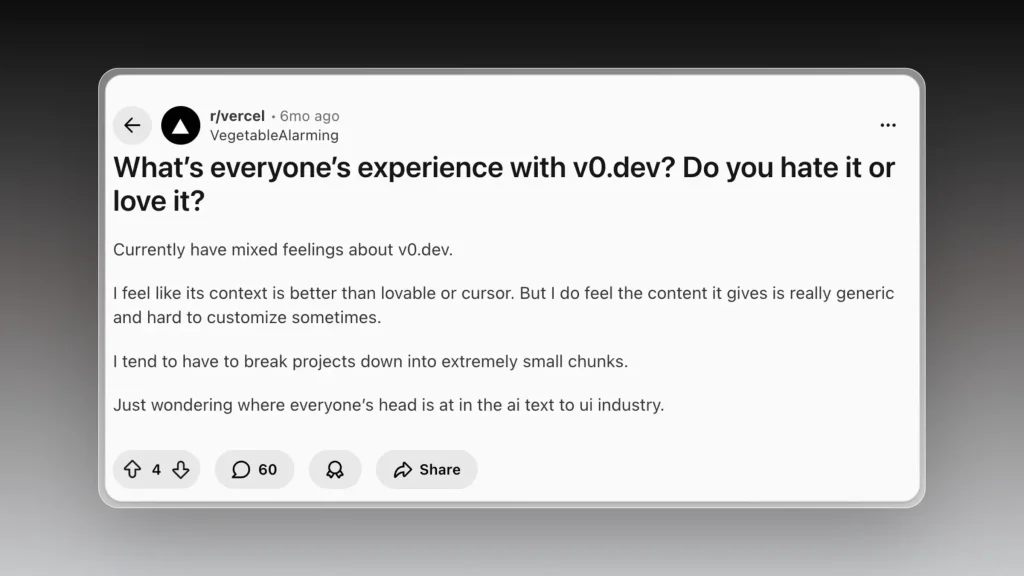
v0 works well for quick prototypes, but struggles once projects become more complex.
Small changes often cause unintended side effects, with unrelated components being rewritten or designs changing unexpectedly. The model frequently gets stuck in loops or claims updates were applied when nothing actually changed.
Because each retry consumes credits, iteration becomes expensive fast. Instead of refining code, projects tend to grow bloated, making future changes slower and less reliable.
For anything beyond simple demos, that unpredictability and cost are why many teams switch.
Besides, it’s annoying that they add a V0 watermark to your app.
2. It can get expensive
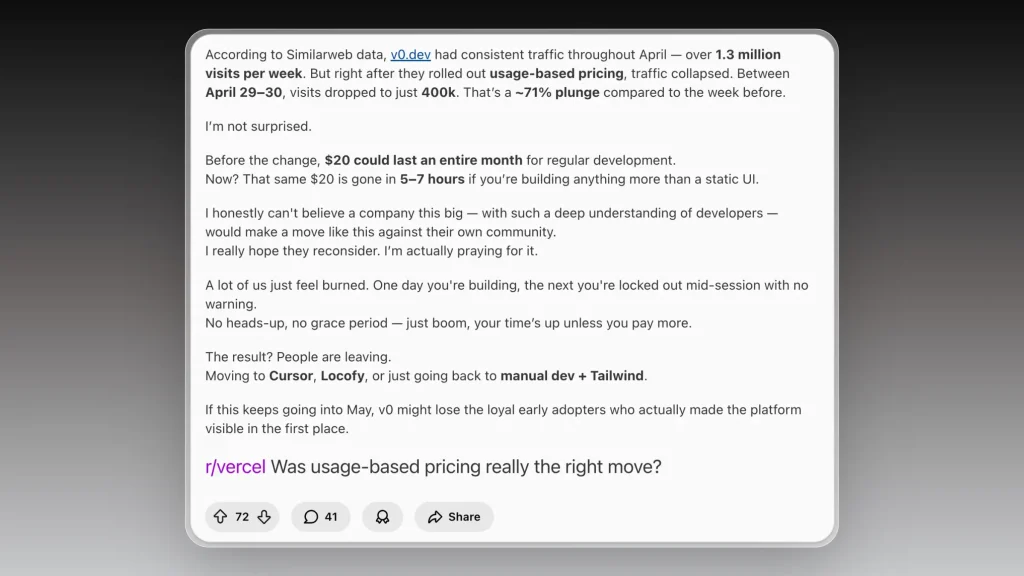
v0’s usage-based pricing made iteration unpredictable and expensive.
After the pricing change, credits began disappearing in hours instead of lasting a full month. Even simple workflows could burn through an entire plan, often just to fix mistakes or rerun failed prompts.
Users reported getting locked out mid-session with no warning, forcing payment to continue work. Combined with declining output quality on larger projects, this made costs hard to justify.
For many teams, the shift turned v0 from a fast prototyping tool into a high-friction, high-cost workflow, which is why they moved on.
3. Not built for non-devs
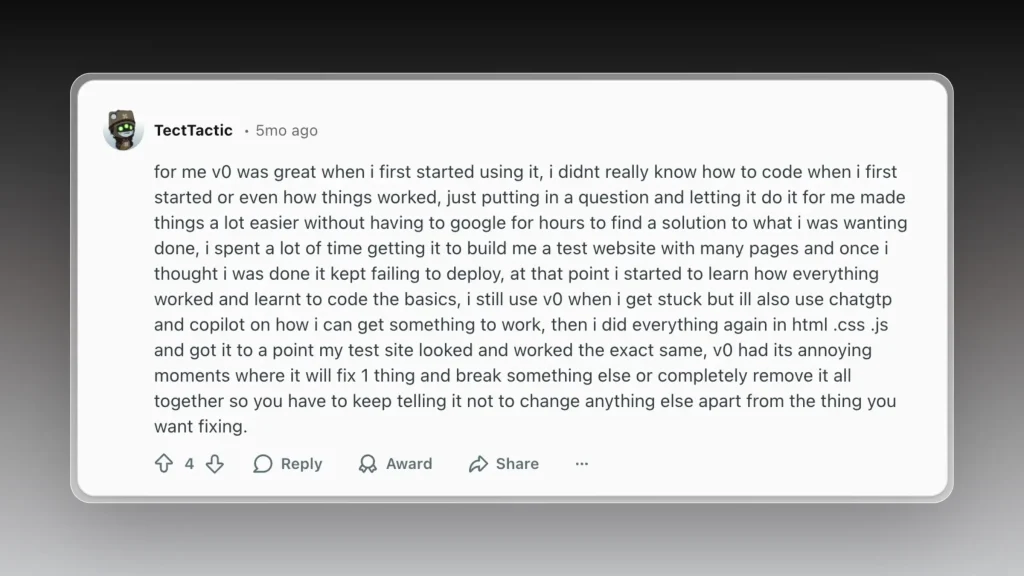
v0 is very approachable for beginners, especially early on.
For users with little or no coding background, being able to describe what they want and have it built without deep technical knowledge removes a lot of initial friction. It helps avoid hours of searching for basic solutions and makes early experimentation much easier.
Problems tend to appear later in the process. After investing time building multi-page projects, users often run into deployment failures or issues that v0 can’t resolve cleanly. At that stage, many are forced to learn how the underlying code actually works just to move forward.
As familiarity with HTML, CSS, and JavaScript grows, reliance on v0 drops. While it can still help when someone is stuck, iteration becomes frustrating because fixing one issue often breaks another, requiring repeated instructions to avoid unrelated changes.
That transition is where many users decide to rebuild outside v0 and only use it as a secondary aid, rather than a primary tool.

LIST: Best V0 Alternatives for AI App Building
The best v0 alternatives right now are: Shipper.now, Cursor, Bolt.new, Lovable, Windsurf, CoPilot, Claude, and ChatGPT.
That’s the shortlist.
But if you want to know why people are switching, how each one handles app generation, what they’re best at, and what they skip, you’ll want the full breakdown.
Let’s start with the top v0 alternative for shipping real products without the “build-then-deploy” loop, and that is:
1. Shipper.now – which takes you from idea to live site in seconds
- Rated: 4.8/5 ⭐ (107 reviews)
- Best for: Founders, makes, and devs who want to instantly turning ideas into live, editable web apps, without any coding skills needed

Shipper.now skips the whole dev environment setup. You just type what you want – “a landing page for my AI book coach,” “a SaaS dashboard with pricing and auth” – and it gives you a live app, not just a code preview.
Unlike v0, which mostly helps with UI snippets, Shipper handles the whole thing: pages, routing, components, SEO, metadata, even hosting.
You can edit it visually or dive into the code, and it’s actually structured cleanly. Shipper isn’t just spitting out fragments – it’s building something real.
It’s especially useful if you want a quick win without patching five tools together. And the live preview isn’t some slow iframe – it’s your working site, ready to tweak or ship.
It’s not built for devs only either. Whether you’re a solo founder, marketer, or side-hustler, you can get started without knowing what Tailwind or React even are. And if you are a dev? It’s still worth it – because even pros like skipping the boring parts.
How much does Shipper.now cost?
Shipper is pretty straightforward in its pricing:
- Standard: Free – Build with limited credits and Shipper badge
- Pro: $25/user/month – 100 credits/month, remove badge, teammates coming soon
- Enterprise: Custom – Dedicated support, custom integrations, SSO, opt out of data training
Why I picked Shipper over v0
v0 is great if you’re designing components. But I didn’t want a design system – I wanted a live product. With Shipper, I skipped Figma, skipped tokens, and just typed what I wanted. Ten minutes later, I had a working site I could share. It’s not just faster – it’s done.

👉 Shipper vs V0 full detailed comparison.
| Feature |

|

|
|---|---|---|
| AI Project Advisor | ||
| Made for beginners | ||
| Proactive Suggestions | ||
| AI Audience Research | ||
| App Starter Ideas | ||
| Foreign Language Support | ||
| AI Auto Bug Fixing | ||
| Lock Specific Code Files | (soon) | |
| App Cloning | ||
| AI-Improved Prompt | ||
| App Preview: Phone, Tablet, Computer | (soon) |
2. Cursor
- Rated: 4.4/5 ⭐️
- Best for: AI-powered coding with autocomplete, debugging, and refactors

Cursor has quietly become the favorite IDE for AI-assisted development. It’s like VSCode, but rebuilt from the ground up with a copilot inside every tab.
You can write code, highlight bugs, refactor components, and even ask questions about the codebase in plain English.
What makes Cursor stand out is how deeply integrated the AI is. It doesn’t just autocomplete – it reasons about your codebase, reads entire repos, and helps you figure out next steps.
For solo devs and fast-moving engineers, it’s a massive time saver.
That said, Cursor assumes you’re already comfortable in code. It’s not a builder tool – it’s an AI-powered editor for people who know how to write functions, manage dependencies, and fix broken tests.
If you don’t write code, you’re not going to ship anything here.
That’s where Shipper.now flips the model.
Cursor makes coding faster. Shipper skips it entirely.
We also published a full comparison of Cursor vs Shipper covering speed, UX, pricing, and ideal use cases.
How much does Cursor cost?
Cursor has 3 pricing tiers:
- Hobby: Free – Includes limited agent requests, limited tab completions, and a 2-week Pro trial.
- Pro: $20/month – Unlocks unlimited tab completions, extended agent limits, Bug Bot, Background Agents, and access to full context windows.
- Ultra: $200/month – Everything in Pro, plus 20x usage across OpenAI, Claude, and Gemini models, plus priority access to new features.
Is Cursor better than v0 by Vercel?
They’re totally different beasts. Cursor is a tool for devs who already live inside code. v0, on the other hand, is more about transforming prompts into UI fast.
If you want full control over code, Cursor is better. But if you’re building for speed, neither compares to Shipper.now.
You don’t need to choose between writing code or describing your app. Shipper lets you build actual products – fast – without switching tools or learning dev workflows. It wins on time, clarity, and simplicity.
If you’ve used other tools like Codev, check out its alternatives guide as well.
3. Bolt.new
- Rated: 4.1/5 ⭐
- Best for: Fast LLM agent scripting with flexible token usage

Bolt.new feels like a coder’s playground. It gives you a blank canvas where you can drop in agents, wire up APIs, and run full LLM workflows all in one place.
If you’re technical and want full control over how things work under the hood, Bolt is surprisingly flexible.
Unlike platforms that force you into a visual flowchart, Bolt keeps things code-centric while still being beginner-friendly if you’re used to working with prompts or small scripts.
Their “token-first” pricing model makes it great for iterating fast without hitting usage walls too early.
It shines for solo hackers or small teams building internal tools, smart agents, or lightweight apps. That said, it’s still very dev-oriented.
If your goal is launching apps with clean UIs, deploy-ready flows, and user auth – you’ll eventually need to leave Bolt and plug into something else.
That’s where platforms like Shipper.now quietly win. You can launch actual frontend+backend products without juggling multiple tools or handoffs.
If Bolt feels too developer-first, you might like our roundup of the best Bolt.new alternatives built for real product launches.
How much does Bolt.new cost?
Bolt offers 3 plans:
- Free: $0/month – Includes public & private projects, 1M tokens/month, and a 150K daily limit.
- Pro: $20/month – Starts at 10M tokens/month, removes daily limits, and rolls over unused tokens.
- Teams: $30/member/month – Adds centralized billing and team-level access controls.
Pretty fair if you’re running LLM-powered tools solo.
But if you want live, scalable apps with no glue code, Shipper.now gives you more in fewer steps.
Is Bolt.new better than v0?
Bolt.new is leaner, faster, and more open-ended than v0 – especially for developers who want to experiment. V0, by contrast, guides you with a more structured UI flow and native Vercel hosting.
That said, both fall short when it’s time to move from “prototype” to “product.” You’ll need to bolt on extras for auth, analytics, or a real frontend.
Shipper.now skips all that friction. You write the idea, it builds the product – frontend, backend, auth, payments and all. No extra tools, no glue code. That’s the real leap.
→ Check out our honest Bolt review.
4. Lovable
- Rated: 4.6/5 ⭐
- Best for: Fast prototyping with AI agents inside a design canvas

Lovable is what happens when AI meets Figma. You get a white canvas, you type in what you want (like “a pricing page for a travel app”), and boom – it appears, block by block, editable in real-time.
The experience is creative, fast, and surprisingly intuitive if you’re a visual thinker.
What makes Lovable stand out is the concept of “scenes.” These are modular sections you can remix, refine, or regenerate. It feels like playing with LEGOs but with AI doing most of the heavy lifting.
You can drag, reword, and restructure ideas without touching a single line of code.
That said, it’s still early. Some outputs feel off, and the editor isn’t always predictable. It’s clearly not built for developers or production-ready shipping – more of a playground to ideate faster and break creative blocks.
Still, for founders who think visually and want to explore ideas before committing to code or copy, Lovable is a refreshing take. Especially if you’re trying to break out of boring templates and get inspired by something weird or new.
Here’s what happened when we tried building with Lovable.
Want more tools that help you think and build like Lovable? We’ve explored a few Lovable alternatives that push ideas even further.
How much does Lovable cost?
- Free: $0/month – Public projects, up to 20 collaborators
- Pro: $25/month – 250 credits/month, private projects, remove badge, custom domains
- Enterprise: Custom – SSO, support, data opt-out
→ Lovable pricing explained into detail
Is Lovable better than v0 by Vercel?
They’re solving different problems. V0 feels like a code-focused builder for devs, while Lovable is all about visual creativity and exploring new ideas.
If you think in components and want full control, V0 fits better. But if you’re exploring layouts and need idea momentum, Lovable’s magic can be refreshing.
That said, if you want to ship instead of just experiment, Shipper.now gives you both – a no-code builder with live SEO-ready websites, all editable and production-ready.
5. Windsurf
- Rated: 4.5/5 ⭐️
- Best for: Experimenting with multiple AI models across one interface

Windsurf is a prompt-first playground that lets you interact with OpenAI, Claude, Gemini, and others from one place. It’s great for testing ideas fast across models, and even lets you deploy simple apps with a click.
While it’s not a full-on app builder like Vercel v0 or Shipper.now, it appeals to tinkerers who want a lightweight interface without needing to write or host code.
Think of it as a control panel for your favorite LLMs.
Windsurf also has its own SWE-1 model and no-data-retention privacy options, which make it appealing for devs at AI-conscious companies.
How much does Windsurf cost?
- Free: $0/month – 25 prompt credits, 1 app deploy/day
- Pro: $15/month per user – 500 credits, 5 app deploys/day, SWE-1 access
- Teams: $30/month per user – admin tools, priority support, SSO add-on
- Enterprise: From $60/month per user – 1000 credits, RBAC, hybrid hosting
Is Windsurf better than v0?
For model experimentation? Yes. For building apps? Not really.
Windsurf is like a control room for prompts. v0 is more like a workshop.
And if you want to go from “idea” to “live product” faster than both, Shipper.now gives you the best of both worlds.
6. Copilot
- Rated: 4.4/5 ⭐
- Best for: Devs who want AI inside their coding workflow

GitHub Copilot started as an autocomplete tool but has grown into a full AI agent for coding. With the new Copilot Agents, you can now ask it to fix bugs, generate code, or even review pull requests.
It’s more dev-focused than v0 or Shipper.now, and it lives inside your IDE (like VSCode). So it’s great for developers but not useful if you’re a founder or creator trying to build an app without writing code.
You also get access to GPT-4.1, Claude 3.5, Gemini, and more depending on the plan, with different limits for completions, chats, and “agent” actions.
How much does Copilot cost?
- Free: $0/month – 2,000 completions, 50 agent requests
- Pro: $10/month or $100/year – Unlimited completions, GPT-4.1 access
- Pro+: $39/month or $390/year – Full model access, Claude Opus, higher limits
Is Copilot better than v0?
If you live in VSCode and build with Git every day, Copilot is a great sidekick.
But if you want to launch working apps, it’s not even the same category.
Copilot edits code. v0 builds UI. And Shipper.now takes it a step further by turning your idea into a live app, no dev skills needed.
7. Claude
- Rated: 4.4/5 ⭐
- Best for: Natural writing, long context, and reasoning tasks

Claude is Anthropic’s conversational AI. Unlike v0, it’s not built to design or launch websites – but it shines when it comes to writing clearly, summarizing large docs, and chatting in a way that feels human.
You can also use Claude in tools like Slack, Notion, or inside dev agents like Copilot and Cursor. If you’re building something from scratch, Claude can help you think through logic or generate content.
But it won’t build the app for you.
Still, it’s one of the most accurate models for long-form context and safety-focused outputs.
How much does Claude cost?
- Free: $0/month – Chat with Claude on web and mobile, basic usage
- Pro: $17/month (billed annually) – More usage, Claude Code, Projects, and Google Workspace integrations
- Max: From $100/month – 5x to 20x more usage than Pro, early access, higher limits
- Team: $25/month per user (annual) – Admin tools, more usage, collaboration features
- Enterprise: Custom – SSO, SCIM, RBAC, logs, advanced usage
Is Claude better than v0?
For writing? Sure. For building something real? Not even close.
Claude helps with thinking and generating ideas, but v0 (and especially Shipper.now) helps you ship them.
If you want content + code in the same workflow, Shipper.now makes it all live and editable from day one.
8. ChatGPT
- Rated: 4.7/5 ⭐
- Best for: General AI usage, quick prototyping, and multi-modal tasks

ChatGPT is OpenAI’s flagship product and probably what you think of first when you hear “AI.” With GPT-4o, it now supports images, voice, code, and live browsing – making it one of the most powerful general-purpose tools.
But it’s still a chatbox. You can describe a UI, ask for HTML, or brainstorm copy – but you’ll have to copy, paste, and wire things together yourself.
v0 helps you actually ship that output. And Shipper.now skips the duct tape entirely.
That’s why even many ChatGPT users now layer on other tools to get things built.
How much does ChatGPT cost?
- Free: $0/month – GPT-4.1 mini, light usage of GPT-4o, limited tools
- Plus: $20/month – More access to GPT-4.5, image + voice, coding tools, Projects
- Pro: $200/month – Unlimited GPT-4o, research tools, Codex agent, Sora video generation
- Team: $30/user/month (or $25 annually) – Admin dashboard, SSO, connectors, shared projects
- Enterprise: Custom pricing – Full control, security, longer context, and SLAs
Is ChatGPT better than v0?
For general AI tasks? Yes. For app building? No.
ChatGPT is a great idea machine. v0 turns some of those ideas into code.
But Shipper.now? It turns them into real, working products – instantly editable and SEO-ready from day one.
If you’re exploring options beyond V0, don’t miss our picks for the top Softgen alternatives and Glide alternatives.
How to Choose Your Best v0 Alternative
Feel like v0 gets you mockups but not momentum? Maybe the UI looks slick, but turning it into something real still takes time and dev muscle.
This list is for builders who want to skip the handoff. Each tool here brings something different to the table – less prompt tweaking, more shipping.
- Do you need to copy code out to finish the app?
- Can you go live without switching tools?
- Are the UIs actually usable, or just mockups?
- Does it handle logic, state, and real data?
- Is the AI helping or just suggesting?
- Are you stuck explaining your prompts for 10 mins?
How We Test v0 Alternatives
We don’t just generate screens and call it a day. We build real, working apps – end to end – to feel what the full flow is like.
- From Prompt to Product: 30% – How fast can you go from idea to live build?
- Usefulness of Output: 20% – Does it generate working UI + logic, not just HTML fluff?
- Live Shipping Flow: 15% – Can you ship without leaving the tool?
- AI Quality & Guidance: 15% – Is the AI genuinely helpful or vague?
- Editing & Iteration: 10% – Can you easily tweak and extend your build?
- No-Code Friendliness: 10% – Can non-devs get something working too?
That’s how we separate prompt toys from real builders.
All V0 Alternatives Compared
Final Verdict: Which v0 Alternative Should You Pick?
v0 gives you a head start with UI, but that’s where it stops. No backend, no logic, no shipping flow. You’re left stitching together tools just to make something usable.
Shipper.now skips all that. One prompt gives you a working product – live, hosted, SEO-ready, and fully editable. No copying code, no waiting on devs. It just ships.
Best v0 Alternatives by Use Case:
- For shipping a live product instantly → Shipper.now
- For AI-assisted dev inside your editor → Cursor
- For full-stack AI agent scripting → Bolt.new
- For fast visual prototyping → Lovable
- For multi-model prompt workflows → Windsurf
- For devs coding with AI inside IDEs → Copilot
- For natural reasoning and idea drafting → Claude
- For general AI + quick prototyping → ChatGPT
→ We ranked Shipper above Bolt: here’s the full reasoning
If v0 feels like a fast mockup tool, Shipper.now feels like a launch button. It doesn’t give you parts, it gives you the product, already working.
You don’t need a dev stack to ship.
You just need Shipper.
v0 by Vercel Alternatives: FAQs
1. What is v0 by Vercel used for?
v0 by Vercel is an AI tool that generates front-end code from plain text prompts. It’s made for developers who want to speed up UI building without writing everything from scratch. You still need to know React, Tailwind, and how to deploy.
If you’re not a developer (or you want to skip the code entirely), Shipper.now is a better alternative. It creates full websites and apps, already live, without writing a single line of code.
2. Is there a free alternative to v0 that builds and publishes live sites?
Yes, Shipper.now offers a free plan that goes beyond what v0 provides. While v0 gives you code you still need to host, Shipper.now creates the actual product; live, hosted, and editable from day one.
| Feature | v0 by Vercel | Shipper.now |
|---|---|---|
| Free Plan Available | ✅ Yes | ✅ Yes |
| Output Type | Code only | Live, hosted product |
| Hosting Included | ❌ No | ✅ Yes |
| No-Code Editing | ❌ Dev-only | ✅ Full visual editor |
You can ship something real with Shipper.now – no GitHub, no Vercel, no deploy.
3. Do you need to know React to use v0?
Yes, v0 generates React + Tailwind code, so you’ll need to understand JSX, component logic, and styling conventions. It’s not a drag-and-drop builder. If you’re not fluent in modern front-end, you’ll hit roadblocks quickly.
Shipper.now skips the tech stack entirely. You don’t need React, Tailwind, or even a code editor. Just describe what you want, and it becomes a real, working site.
4. Why are people looking for v0 alternatives?
People look for v0 alternatives when they realize it’s still a dev tool at heart. You get faster code, sure, but you still have to deploy, style, and wire up logic yourself.
Many switch to Shipper.now because it offers the next step: not just code, but a complete live product. No manual deployment, no dev handoff, and no rebuilds just to tweak a headline.
5. Can I use v0 without knowing how to code?
Not really. v0 assumes you’ll take the generated code and plug it into your own dev environment. If you don’t know how to run, edit, and deploy React apps, you’ll likely get stuck.
That’s where Shipper.now is different – you don’t need a coding background. Just type what you want to build (like “a pricing page with testimonials”), and it’s live in seconds.
6. What’s the fastest way to go from idea to live product?
Right now, Shipper.now is the fastest way to turn an idea into a live product. You don’t write prompts, wait for code, then deploy it manually. You just say what you want, and it creates the whole thing: hosted, editable, and already online.
- Go to Shipper.now and describe your idea like “an onboarding flow for my SaaS app.”
- It builds the full site or app, with real content and live pages.
- You click publish and start sharing – no dev tools needed.
Speaking of SaaS, you might want to read next:
→ Top vibe coding tools for building a SaaS
Earn 50% + lifetime recurring commissions
Share Shipper with your audience and get paid every month, for life.
Earn 50% + lifetime recurring on every sale
Share Shipper with your audience and get paid every month, for life — no cap on earnings.
Earn 50% + lifetime recurring on every sale
Share Shipper with your audience and get paid every month, for life — no cap on earnings.






