
How to Export BASE44 Code


If you’ve ever tried exporting your project from Base44, you’ve probably felt the same frustration as one of our customers:
“I heard about BASE44, but since they don’t let you export your code, I didn’t want to be locked in. I started looking for alternatives where I could export my code and still fully own it.”
— former Base44 customer, now at Shipper
On paper, Base44 lets you download your app as a ZIP or push it to GitHub or Cursor.
But once you look inside, you’ll notice something important: you don’t actually get the whole thing. The frontend is there, but the backend is hidden behind a Base44 SDK that calls their servers.
In other words, you never really own your app, you’re renting access to it.
This guide will walk you through:
- How to get your project’s code in Base44
- What you get vs what you don’t.
- Why this matters if you want true code ownership.
- How to move your project to a platform where you control the full stack.
Exporting your project isn’t available on Base44’s free tier or the $20 Starter plan. The export feature only unlocks if you’re on one of the higher paid plans.
Builder — $50/month
Pro — $100/month
Elite — $200/month
Code export will not work for free users.
How to Export Code from Base44 (Paid)
Answer: You need to be on a paid plan to export your Base44 code. In your project, click the “> _” icon and select “Export project” to GitHub or as ZIP.
To simplify things, this is the step-by-step process:
- Open your project in Base44.
- In the top-right corner, click the “> _” icon.
- Select “Export project” to GitHub or as ZIP.
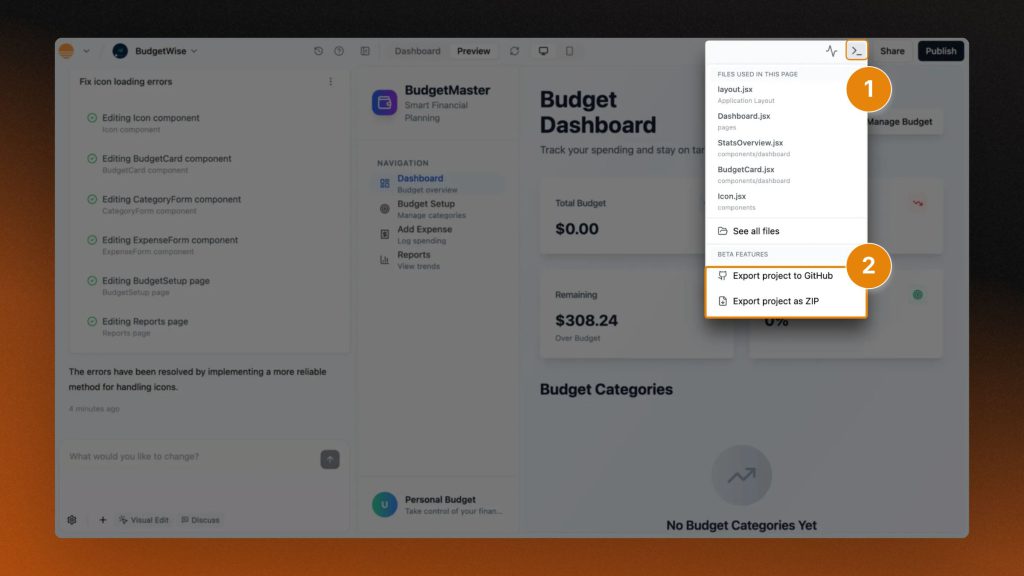
That’s it, your download will start!
At first glance, this looks promising: you’ll see React components, UI code, and project structure in the files… But that’s where things get tricky.
Own 100% of Your Code
Shipper exports the full stack, frontend and backend. No hidden SDKs, no lock-in. Keep the repo, host anywhere, stay in control.
- Frontend + backend export
- GitHub integration
- Deploy anywhere
- Your app, your rules
How to Export Code from Base44 (Free)
If you’re on the free tier or the $20 Starter plan, the export button won’t show up. The only option is to manually copy your files, and here’s how to do it:
- Open your project in Base44.
- Click the “> _” icon in the top-right.
- Select See all files.
- Open each file, copy its contents, and paste them into your code editor
- Repeat for every file until you’ve rebuilt the full project locally.

This method works, but it’s slow.
It’s also easy to miss smaller files or configs.
And even if you copy everything, you’ll still only get the frontend.
The backend logic lives inside the base44-sdk package…
Which keeps calling Base44’s servers.
So yes, there’s a free way to get your files.
But it won’t give you the whole app, and it quickly becomes a pain if your project is big.
What You Get & What You Don’t Get
When you unzip or open the repo, you’ll see code that looks complete at first glance. But it’s important to know what’s actually inside:
This means even if you export the “whole project,” you’re still relying on Base44’s servers to run your backend. If they shut down or change pricing, your app can break overnight.
Even if you pay for an export, what you actually own is just the frontend.
The backend, database logic, and core live inside Base44’s closed SDK.
That means:
- You can’t fully host the app on your own servers.
- If Base44 goes down or changes pricing, your backend stops working.
- You’re limited in how much you can customize or extend the app.
So while it looks like you “have the code,” in practice you’re still dependent on Base44 to keep your app alive.
Why This Matters for 100% Code Ownership
At first glance, getting the frontend code might feel like enough… But in practice, it leaves you dependent on Base44 for the parts of your app that really matter.
- Vendor lock-in: Because the backend is hidden inside the
base44-sdk, you can’t fully leave without rewriting critical parts of your app. - No real ownership: The exported code looks like “your project,” but the most important functionality still lives on Base44’s servers.
- Risk of shutdown: If Base44 changes pricing, shuts down, or simply decides to revoke access, your backend stops working overnight.
- Limited flexibility: You can’t extend or customize the backend beyond what their SDK allows. Scaling, debugging, or integrating with other tools isn’t truly in your control.
When people say they want to “own their code,” what they really mean is they want the freedom to host, modify, and grow their app independently. A partial export doesn’t give you that freedom.
How to Download & Export BASE44 Code With Back-End & Front-End (Workaround)
To get full-stack code from Base44, export via “Workspace → Code”, connect Supabase, add the community SDK + keys, then run “npm start”.
By default, Base44 only lets you export your frontend.
But thanks to the Reddit community, there’s now a workaround that helps you run your app with a real backend you control.
- Export your Base44 code
Click “Workspace → Code,” then “Export” or “Push to GitHub.” - Set up a free Supabase account
Copy your project URL and keys (they’ll be used like passwords to connect). - Add the community SDK
Download a few helper files from GitHub and drop them into your Base44 project. - Update your config
Paste your Supabase keys into a.envfile. - Run your app
Start your project (npm start) and it should work the same, now with Supabase as your backend.
That’s it. Instead of Base44’s backend running as a black box, Supabase takes over.
Big thanks to u/Love-Jesus-1 for sharing this method!
What is Supabase? Why use it?
Supabase is a free, open-source alternative to Firebase. It gives you a full backend (database, authentication, file storage, APIs) without needing to code it all from scratch.
Instead of relying on Base44’s hidden SDK, you can move your data and backend logic into Supabase. You still get hosting and integrations, but you’re no longer locked into Base44’s servers.
If Base44 ever changes pricing or shuts down, your app can keep running.
Heads-up ⚠️
This is a community solution, not an official Base44 feature. It’s great if you want more control, but it does take a little setup.
Base44 Alternative Where You Own The Code
Imagine you built your entire app with Base44 and you want to export it…
And after spending so many hours in the app, you realise you don’t own it.
Shipper is exactly the opposite: you work on your app, and you own it 100%.
| Feature | Shipper | Base44 |
|---|---|---|
| Pricing | $25/month | $20/month |
| Access | ✅ Open to everyone | ✅ Public access |
| Truly no-code | ✅ Designed for non-devs | ⚠️ Low-code focus (uses TypeScript & SQL) |
| Edits stay scoped | ✅ Only changes what you ask | ⚠️ Can overwrite previous work |
| Live app instantly | ✅ Hosted & deployed by default | ✅ Deployed on Base44 infra |
| Frontend + Backend | ✅ Handled by default | ✅ Built with db + code split |
| Export code | ✅ Full export anytime | ⚠️ Paid (and only FE) |
| Prompt editing stability | ✅ Predictable UX | ⚠️ Reports of resets, overwrite bugs |
| Best for | Non-devs, solo builders | Dev-leaning users who want AI to write code |
→ Full comparison: Shipper vs Base44
When you generate an app in Shipper, you can export both FE and BE.
You’re not tied to hidden SDK calls or a black box service.
The code is yours to run, host, and modify wherever you like.
Here’s what that means in practice:
- Fullstack export (frontend + backend).
- No hidden SDK dependencies.
- Deploy anywhere — your own server, GitHub, Vercel, or keep it inside Shipper.
- True ownership: if you stop paying, your code still runs.
If your goal is long-term control over your app, Shipper is built for exactly thatt, helping you ship quickly with AI but leaving you in charge of the final product.
Own 100% of Your Code
Shipper exports the full stack, frontend and backend. No hidden SDKs, no lock-in. Keep the repo, host anywhere, stay in control.
- Frontend + backend export
- GitHub integration
- Deploy anywhere
- Your app, your rules
FAQ: Base44 Code Export
1. Is it possible to export my Base44 app’s code?
Yes, but only if you’re on a paid plan (Builder $50, Pro $100, Elite $200).
No exports are available on the free tier or the $20 Starter plan.
What you get is the frontend code (React, styling, UI). What you don’t get is the backend – it’s hidden inside the base44-sdk and runs on Base44’s servers.
2. Does Base44 have access to my app’s code?
No. Base44 doesn’t automatically access your private codebase beyond what’s required to generate and run your project on their platform. The AI generates the structure and code, and you keep ownership of the applications you create.
The only Base44 thing you’ll see on your app is the watermark.
→ How to remove it
3. Do I have to pay to export my Base44 app code?
Yes. Code export is only available on paid plans.
The Builder plan starts at $50/month, Pro is $100/month, and Elite is $200/month.
The $20 Starter plan and the free tier do not include code export.


Earn 50% + lifetime recurring commissions
Share Shipper with your audience and get paid every month, for life.
Earn 50% + lifetime recurring on every sale
Share Shipper with your audience and get paid every month, for life — no cap on earnings.
Earn 50% + lifetime recurring on every sale
Share Shipper with your audience and get paid every month, for life — no cap on earnings.


