
Base44 vs Cursor: Which Platform Offers the Best Value for Money?


This is the ultimate Base44 vs Cursor comparison, fully up to date and stripped of the usual marketing fluff.
If you’ve been bouncing between Base44 and Cursor tabs trying to figure out which one’s right for you, you’re not alone. Product pages open, YouTube reviews playing in the background, Reddit threads full of mixed opinions… we’ve all been there.
Both tools look promising. Both seem to get the job done.
BUT, neither feels like an obvious choice.
This guide is here to fix that. We’ll go through what actually matters: how these tools fit into your workflow, how they differ in purpose, and what kind of builder each one really supports.
And if, by the end, you realize you might be looking for something a bit more complete, we’ll show you the option most people overlook.
Let’s make this decision easy.
TLDR: Base44 vs Cursor (My Summary)
Before we dive into the full comparison, we’re including Shipper in the mix too.
Why? Because if neither Base44 nor Cursor feels like the perfect fit, Shipper might be the smarter move, especially if you’re not just trying to build an app, but to turn that app into a full business from a single prompt.
| Feature |

|

|

|
Winner |
|---|---|---|---|---|
| Best for | Hobby app building | Developers & technical users | Non-technical creators | Depends on your background |
| Ease of Use | Base44, Shipper | |||
| AI Assistance | All | |||
| Learn Curve | Shipper | |||
| Build Speed | Shipper | |||
| Customization | All | |||
| Templates | Shipper, Base44 | |||
| Team Tools | Base44 | |||
| AI Bug Fixing | Cursor, Shipper | |||
| AI Advisor | Shipper | |||
| AI Researcher | Shipper | |||
| Pricing | $20/mo | $20/mo | $25/mo | Base44, Cursor |
The intersection of Base44 and Cursor… is Shipper 🙂
Shipper sits right where visual builders and coding assistants meet. Describe your idea once, and get a complete app that you can edit, refine, and launch – all in one place.
- • AI codes the app
- • Edit visually
- • AI Advisor helps you
- • Go live in 1 click
Overview of Base44 & Cursor
What is Base44?
Base44 is an AI-powered app builder that lets you create web apps without writing code. It’s built for founders, freelancers, and small teams who want to launch something functional fast, without needing to hire a developer.
You describe what you want, pick a few options, and Base44 handles most of the setup; from structure to styling. It’s simple enough for non-technical users, yet flexible enough for people who understand how an app should work.
For quick, visual app creation, Base44 keeps things fast and approachable.

Base44 is best known for…
- Visual AI app builder → Describe your idea, and it builds your app layout.
- Easy customization → Tweak your UI and flow without diving into code.
- Collaboration tools → Work with your team in shared projects.
- Affordable pricing → $20/month entry point.
- Solid for MVPs → Great for prototypes and small projects.
Why you might prefer Base44 over Cursor: If you want to build an app quickly without touching code, Base44 is the simpler option. It’s ideal for founders who care more about getting something live than about writing or reading the code behind it.
But if you want more control, like editing the underlying codebase or fine-tuning logic, Base44 might start to feel limited.
(Related post → Top Base44 alternatives)
However, That’s where Cursor comes in.
What is Cursor?
Cursor is an AI coding tool built directly for developers.
Think of it as a smarter VS Code – you write code, and AI helps you improve it, fix bugs, and generate features faster.
It’s designed for technical users who already know how to build, but want AI to handle the repetitive parts: boilerplate, debugging, refactoring, or suggesting code snippets.
If Base44 replaces the developer, Cursor assists the developer.

Cursor is best known for…
- AI code editing → Smart autocomplete, suggestions, and bug fixing.
- Deep customization → You own and modify every line.
- Built-in AI chat → Ask the model to refactor or extend your codebase.
- Familiar interface → Feels like VS Code, with extra intelligence on top.
- Great for teams with dev experience → Collaborative Git-based workflow.
Why you might prefer Cursor over Base44: If you’re comfortable with code and want full control over how things work, Cursor will feel more natural. It’s built for people who think in code and want AI as a co-pilot rather than a replacement.
But while it’s powerful, Cursor doesn’t handle everything.
It’s still a code editor, not a full business builder.
That’s where Shipper quietly fills the gap.
What are Base44 and Cursor best at?
- Base44 is best for founders or small teams who want to build functional apps visually, fast. Perfect if you want an MVP or prototype and don’t want to code.
- Cursor is best for developers who prefer working in code but want AI to make them faster and more efficient.
- Shipper is best for creators and entrepreneurs who want to go from idea → app → business with as little friction as possible.
If you start with Base44, you’ll get something working.
If you use Cursor, you’ll get something finely tuned.
But if you use Shipper, you’ll get something that’s ready to run as a business.
Quick breakdown of Base44 and Cursor’s best abilities:
| Top Abilities | Base44 | Cursor |
|---|---|---|
| Best for | Visual app building without code | Developer-focused AI coding |
| Ease of use | Simple, beginner-friendly | Steeper learning curve |
| AI capabilities | Turns prompts into working apps | AI-assisted code editing and bug fixing |
| Customization | Prebuilt layouts, limited flexibility | Full control over the codebase |
| Collaboration | Shared team projects | Git-based dev collaboration |
| Pricing | Starts at $20/month | Starts at $20/month |
→ Shipper vs Cursor
→ Shipper vs Base44
Differences between Base44 and Cursor
Base44 focuses on speed and simplicity.
Cursor focuses on control and depth.
The difference comes down to simplicity vs control:
- Base44 helps non-technical builders ship MVPs quickly.
- Cursor helps technical builders work faster on real codebases.
Where Shipper is different → it combines both ideas.
Instead of choosing between simplicity and control, Shipper handles everything from the first idea to a functioning, monetizable business (app, users, database, payments, and logic) from one prompt.
You don’t just get an app; you get the full setup needed to run it as a business.
Price Comparison: Base44 vs Cursor
Base44 and Cursor both start affordably, but they approach pricing in very different ways.
Base44 uses a tiered credit-based system, while Cursor charges by usage and plan level depending on how much AI power or collaboration you need.
This table should help you understand pricing easier:
| Plan |
|
|
|
|---|---|---|---|
| Free demo | Yes | Yes | Yes |
| Starter plan | $20 / mo | $20 / mo | $25 / mo |
| Higher tiers | $50–$200 / mo | $40–$200 / mo | Custom |
| Pricing model | Credit-based | Usage-based | Credit-based |
| Ease of scaling | Predictable | Flexible | Adaptive |
| Best for | No-code builders | Developers | Creators & founders |
Base44 pricing highlights
- Free plan: $0/mo – 25 message credits, 100 integration credits
- Starter: $20/mo – 100 message credits, basic backend + app tools
- Builder: $50/mo – 250 message credits, professional features
- Pro: $100/mo – 500 message credits, GitHub integration, beta access
- Elite: $200/mo – 1,200 message credits, 50k integration credits, premium support
All plans include app creation, backend functions, authentication, analytics, and collaboration tools.
You can start for free and upgrade as your projects grow.
Base44’s pricing is credit-based and predictable – good if you like to plan around consistent monthly usage.
→ Full guide about Base44’s pricing
Cursor pricing highlights
- Hobby: $0/mo – limited completions and AI agent requests
- Pro: $20/mo – unlimited completions, background agents
- Pro+: $60/mo – 3× usage on all AI models
- Ultra: $200/mo – 20× usage, priority access
- Teams: $40/user/mo – shared billing, usage analytics, SSO
Cursor is usage-based, so you pay more as your team or model consumption grows.
It’s made for developers who want control and scalability without leaving their code editor.
Cursor’s flexibility is great for dev-heavy teams, though costs can rise as usage scales.
While Cursor and Base44 focus on building apps, Shipper’s pricing reflects its broader scope – helping you go from idea to business without managing multiple tools or dev setups.
Feature Comparison: Base44 vs Cursor
As we just mentioned, Base44 and Cursor each play to different strengths.
Base44 leans into visual app building and no-code simplicity, while Cursor focuses on AI-assisted coding and giving developers full control.
Drawing from firsthand research and product data, here’s a breakdown of where each tool stands – and when Shipper starts to make more sense.
1. App Building
App generation is the core of how fast you can move from idea to product.
It’s the process that takes a blank page and turns it into something you can actually use – your structure, logic, and first usable version.
Each tool handles that process differently: Base44 focuses on visual speed, Cursor on precision and code-level control, and Shipper on full automation from a single prompt.
1.1. Base44’s app generation
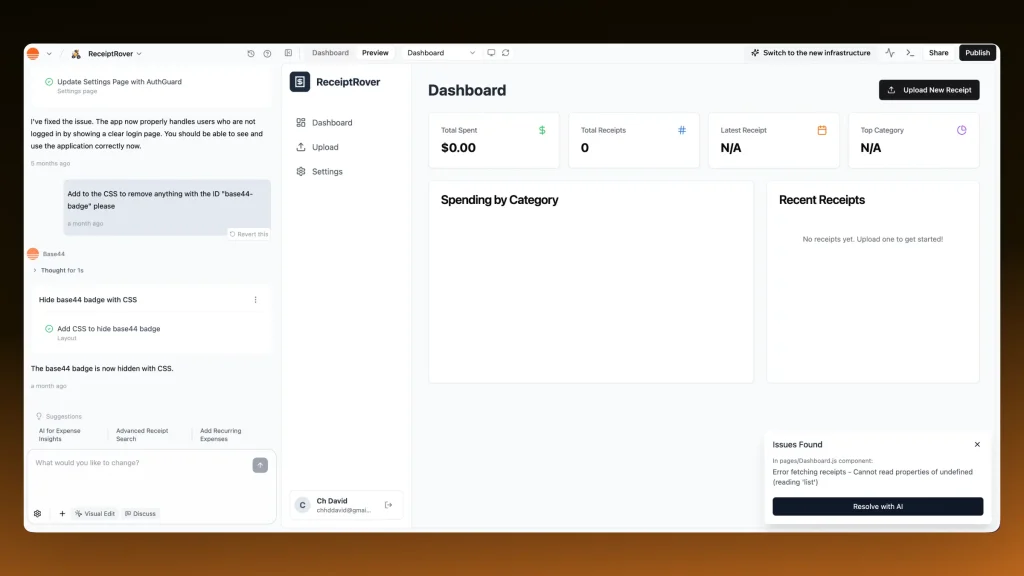
Base44 is built for people who want to build fast without getting stuck in technical details. You describe what you want, choose a few options, and it scaffolds the app automatically with ready-made screens, navigation, and database logic.
From there, you can customize visually using its editor.
In practice:
- Describe your app idea → get a working layout instantly
- Add and reorder components without coding
- Connect backend features from a panel interface
- Export code or expand into custom logic later
It’s the simplest way to create an MVP if you’re not technical. The tradeoff is that once you want deep customization or unusual app logic, you start running into limits.
1.2. Cursor’s app generation
Cursor approaches app building like a coding partner.
It’s not a visual builder, it’s a code editor enhanced with AI. You start from scratch, and Cursor’s model helps you write, fix, and refactor code in real time.
You may find this video useful:
In practice:
- Begin with a blank canvas (like VS Code)
- Use AI prompts to scaffold components or APIs
- Fix bugs or rewrite files automatically
- Keep full ownership and control over the entire stack
This approach is slower upfront but far more flexible long term. Cursor is ideal if you already know how to code or have a dev team – it’s an accelerator, not a replacement.
1.3. Shipper’s app generation
Shipper rethinks the process completely. You describe your idea in one natural-language prompt – and it builds everything: frontend, backend, database, user auth, and payments.
The AI Project Advisor then steps in to improve what you built, suggesting optimizations or new features as if it were a technical co-founder.
In practice:
- Type your idea once → full app generated automatically
- Preview instantly across desktop, tablet, and phone
- Refine the product with AI feedback (marketing, UX, architecture)
- Launch directly or export code later
It’s not just app generation, it’s also product generation.
You start with an idea and end with something you can ship.
1.4. Who does app generation better?
Here’s how I’d put it:
- Base44 is perfect if you want to test an idea visually.
- Cursor shines if you need code-level precision and control.
- Shipper combines both.
Verdict: Shipper wins for speed and completeness, while Base44 and Cursor each remain strong choices for their specific audiences.
2. AI Assistance Depth
AI is at the heart of all three platforms.
But the way it’s used changes the entire experience.
Base44 uses AI to guide beginners through app building, Cursor integrates it deep into the coding process, and Shipper blends both – turning AI into a creative partner that helps you refine and scale your product.
2.1. Base44’s AI assistance
Base44’s AI helps you get started fast.
It’s focused on turning text prompts into structure and visuals you can edit right away. It doesn’t try to be too smart, it’s more of a helpful assistant that gets you moving.
In practice:
- Converts your prompt into a layout and data model
- Suggests screens or components you might need
- Keeps things simple, no complex instructions required
It’s great for accessibility. You don’t get deep technical help, but you do get fast, practical guidance for turning ideas into working prototypes.
2.2. Cursor’s AI assistance
Cursor’s AI runs deep.
It’s essentially an always-on pair programmer that reads, writes, and refactors your code with you. You stay in full control, but AI speeds up everything.
In practice:
- Inline AI code suggestions and completions
- AI chat that understands your entire codebase
- Smart debugging, refactoring, and documentation help
- Model access (OpenAI, Claude, Gemini) depending on plan
It’s incredibly capable – but also technical. You’ll get the most out of Cursor if you’re already fluent in code and want precision, not abstraction.
2.3. Shipper’s AI assistance
Shipper turns AI into something more than an assistant, it becomes a co-builder. It uses something called The Advisor.
Its AI doesn’t just generate code or layouts; it understands the context of your product and helps you make smarter decisions while you build.
In practice:
- One-prompt app generation from idea to live version
- Built-in AI Project Advisor suggesting design, UX, and growth improvements
- Automatic bug fixing and AI-improved prompts
- Context-aware updates that preserve logic as you edit
You’re not just being helped, you’re being guided. It’s AI that builds, explains, and refines alongside you, whether you code or not.
2.4. Who does AI assistance better?
- Base44 offers a light, beginner-friendly experience.
- Cursor goes deep for engineers who want total control.
- Shipper combines both: broad creative intelligence with hands-on technical depth.
Verdict: Shipper wins for all-around usefulness – it acts as both builder and advisor, not just an assistant.
3. Speed to First App / MVP
How fast you can get to something real?
That’s the difference between dreaming and launching.
Each platform has its own rhythm here, from Base44’s visual flow to Cursor’s developer speed to Shipper’s instant generation.
3.1. Base44’s coding speed
Base44 is quick to get moving. You describe your idea, and within minutes you can see a functional structure taking shape.
It’s built for momentum, even if you don’t have a technical background.
In practice:
- AI creates layouts in seconds
- Drag-and-drop customization for screens and logic
- Simple publishing to test or share early versions
It’s fast enough for MVPs and prototypes, though scaling them takes more effort once complexity grows.
3.2. Cursor’s coding speed
Cursor’s speed depends on who’s behind the keyboard.
For experienced developers, it’s extremely efficient – you can build production-grade features in a fraction of the time thanks to instant AI code generation and debugging.
For non-coders, though, it’s not fast at all.
In practice:
- Generates full components or APIs in seconds
- Auto-fixes errors and optimizes code
- Ideal for teams already fluent in their stack
Cursor wins on technical velocity, not on accessibility.
3.3. Shipper’s coding speed
Shipper skips setup entirely. You enter one idea, and a working app is live in under a minute, complete with backend, database, and user system.
No environments, no dependencies, no code setup.
In practice:
- One-prompt builds with zero config
- Live preview across devices instantly
- Make edits or regenerate in real time
It’s the closest you can get to instant prototyping.
More like describing a product than building it.
3.4. Who builds faster?
Base44 wins for simplicity, Cursor for technical productivity, and Shipper for instant results.
Verdict: Shipper leads on speed to MVP, it takes you from concept to a live, functional product before others have even set up their editor.
4. Editing & Customization
Once your first version is built, the real work starts – editing, adjusting, and improving until it feels right.
Each platform handles this phase differently: Base44 focuses on visual tweaks, Cursor gives you full code control, and Shipper blends both into an AI-assisted editing flow that feels effortless.
4.1. Base44’s editing
Base44 makes editing approachable for anyone.
You work directly in a visual builder, dragging, dropping, and adjusting elements on the page. It’s fast, intuitive, and doesn’t require any code.

This image shows you how to edit in Base44 by prompting in the AI app builder. Above we’re using a trick to ask Base44 to remove the watermark.
In practice:
- Real-time visual editor for layout and styling
- Inline tweaks for colors, text, and components
- Simple logic controls for buttons, forms, and navigation
- Immediate preview inside the builder
You can ship design changes instantly, but when it comes to more advanced logic or external data connections, you’ll hit a ceiling. It’s ideal for front-end polish, less so for complex systems.
4.2. Cursor’s editing
Cursor gives you full creative freedom, but expects technical fluency.
You edit in code, with AI helping you move faster and cleaner.
Every edit is visible down to the line, and the AI assists rather than replaces.
In practice:
- Direct code editing with AI completions
- Refactor, rename, or rebuild entire modules in seconds
- Context-aware bug fixes and code explanations
- Seamless Git integration for version control
If you’re comfortable in code, Cursor is unmatched for flexibility. You can change anything, anywhere – but it’s not built for non-technical users.
4.3. Shipper’s editing
Shipper turns editing into a conversation.
You can adjust your app using natural language: ask it to rename sections, add features, change layouts, or refine logic, and it does it in seconds.
You still keep control, but the heavy lifting happens automatically.
In practice:
- Edit visually or by prompt (“add login page”, “move form to top”)
- See live updates instantly in desktop, tablet, and mobile views
- Adjust logic, content, and design through AI-guided steps
- AI Advisor suggests improvements or fixes as you edit
It’s a hybrid approach: fast like Base44, flexible like Cursor. You can go from “idea” to “edit” without context switching or coding fatigue.
4.4. Who edits better?
Base44 wins for simplicity: perfect for quick, visual adjustments.
Cursor wins for depth: full power, total control.
Shipper combines both: edit through prompts, see changes live, and refine logic without code.
Verdict: Shipper leads for everyday editing. It keeps the process creative, fast, and beginner-friendly, without sacrificing control for those who want to go deeper.
Customer Support (Reality Check)
When you’re stuck mid-build or an error pops up right before launch, good support makes all the difference. Now, here’s how each platform handles it.
Base44 support
All users get access to their documentation and tutorials, which cover most common setup and troubleshooting issues.
Email support is available on all paid plans, with faster responses starting from the Builder tier.
On higher tiers like Pro and Elite, you get premium support and early access to new features.

→ Support ticket: Delete Base44 account
In practice:
- Docs and tutorials for all plans
- Email support for paid users
- Premium support on higher tiers
- Early access to beta tools for top customers
It’s reliable but fairly standard – great if you’re on a paid plan, limited if you’re testing on free.
Cursor support
Cursor’s support model is focused around its developer community and documentation. You’ll find an active forum where users share fixes and workflows, and a comprehensive knowledge base that explains every feature in depth.
For business and enterprise customers, Cursor adds direct email and account management support.
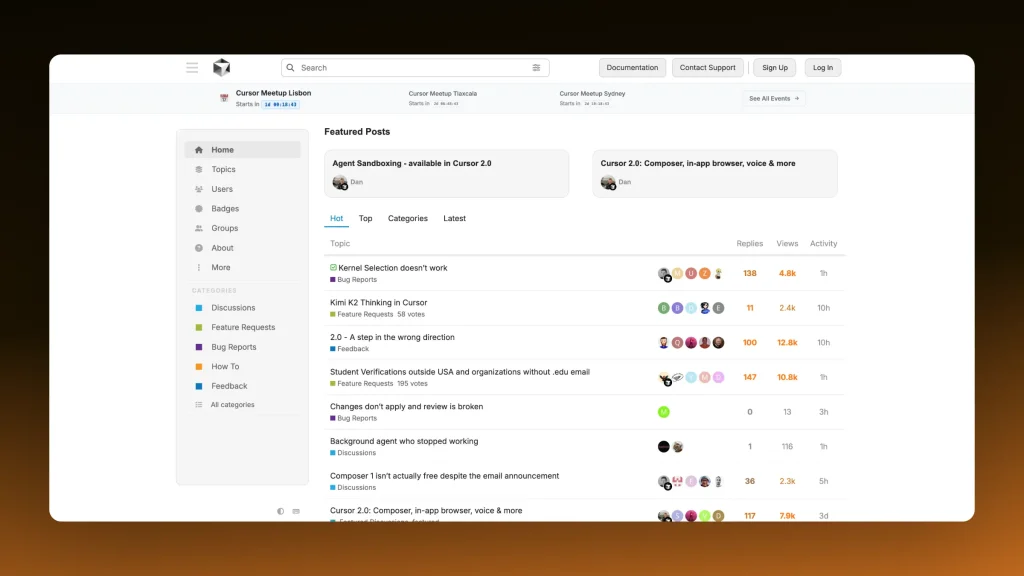
→ Cursor forum for customer support
In practice:
- Documentation and community forum for self-service
- Email support for Pro and team users
- Priority assistance for enterprise customers
It’s built around developers helping each other.
Fast if you know where to look, but not hand-holding.
Not every app builder is made for beginners,
but Shipper is.
If you’re stuck between the visual simplicity of Base44 and the developer-power of Cursor…
There’s a third option that skips the friction and focuses on what actually moves your idea forward. Shipper, the AI builder that turns prompts into real, working products.

Shipper isn’t trying to be everything.
It’s just built to make building effortless….
Whether you’re launching your first MVP or scaling something serious.
Why Shipper might be a better fit:
- Describe your idea once – Shipper builds the app, backend, and logic automatically
- Refine it through natural-language edits or the AI Project Advisor
- Preview instantly on desktop, tablet, or phone
- Export code or keep building inside the platform
- No setup, no dependency management, no dev team required
Shipper offers chat and email support on all paid plans, with fast, personal responses from real people. It’s designed for founders, creators, and teams who want to launch ideas without waiting on developers.
If you care about turning ideas into something live (not just code snippets or templates), Shipper gives you the fastest path from vision to version one.
The intersection of Base44 and Cursor… is Shipper 🙂
Shipper sits right where visual builders and coding assistants meet. Describe your idea once, and get a complete app that you can edit, refine, and launch – all in one place.
- • AI codes the app
- • Edit visually
- • AI Advisor helps you
- • Go live in 1 click
The Verdict on Base44 vs Cursor: Which One’s Best for You?
Let’s be honest, the best choice depends on how you build.
What kind of product you’re making, how technical you are, and how much control you want over the process all play a role.
1/ Base44 is a great choice if you want to build visually without touching code. It’s simple, clean, and helps you get an app structure up fast. Perfect for non-technical founders who want to test ideas and see results quickly.
2/ Cursor is built for developers. It’s an incredible AI coding environment that speeds up real engineering work – writing, debugging, and improving code in ways that save serious time. If you already live in VS Code or Git, Cursor feels right at home.
But you don’t have to choose between the two.
If you’re building a product or busines, there’s a better third option.
3/ Shipper might be the smarter move.
If you want to move from idea to live product without worrying about code, infrastructure, or setup, Shipper gives you the fastest path from vision to version one – all in one place.
FAQ: Base44 vs Cursor
1. Is Base44 better than Cursor for beginners?
Yes, Base44 is much better for beginners thanks to its visual interface and simple AI builder. It’s designed so anyone can describe an app and see it come to life without touching code.
Cursor, on the other hand, is built for developers. It’s powerful, but you’ll need to be comfortable writing and editing code to get real value out of it.
If you want something that’s beginner-friendly and powerful long term, Shipper fits right in the middle, as it builds the full app for you from one prompt, but still gives you full control when you want to go deeper.
2. What’s better, Base44 or Cursor?
Base44 is better if you want to build visually and get results quickly. Cursor is better if you’re a developer who wants full control and AI support in your code editor.
Both are strong, but they serve different types of creators:
- Base44: for people who want to see an idea live fast
- Cursor: for people who love working directly in code
If your goal is to build a real, scalable product (app, backend, payments, and all), then Shipper combines both worlds. You get instant builds, logic, and AI-assisted refinement without needing to choose between “visual” or “code.”
3. Is Base44 cheaper than Cursor?
Base44 and Cursor both start around $20/month, but the way they charge is different.
Base44 uses credits for app generation and integrations, while Cursor charges based on usage and AI model access.
- Base44: predictable monthly pricing based on tiers
- Cursor: flexible pricing that scales with usage and team size
If you want something more adaptive, Shipper’s credit-based system adjusts to what you build – you pay only for what you use, not for unused features or seats. It’s simpler and scales naturally as your product grows.
Earn 50% + lifetime recurring commissions
Share Shipper with your audience and get paid every month, for life.
Earn 50% + lifetime recurring on every sale
Share Shipper with your audience and get paid every month, for life — no cap on earnings.
Earn 50% + lifetime recurring on every sale
Share Shipper with your audience and get paid every month, for life — no cap on earnings.


