
Bolt.new Alternatives & Competitors (2026)


When I first tried Bolt.new, I was completely amazed.
You’re telling me I can just describe what I want, and a full working app appears? It felt like discovering a cheat code the rest of the internet hadn’t caught onto yet.
But that feeling only lasts until the next step.
Suddenly you’re staring at deployment decisions, hosting questions, integrations, and all the technical glue work Bolt doesn’t walk you through. The wow factor is there, but it just assumes you already know what to do after the reveal.
That’s when people start looking for alternatives. Not because Bolt fails, but because they need something that keeps the momentum going after the app shows up.
Here are the tools that actually help you do that!
TLDR: Top Bolt.new Alternatives
We’ve tested Bolt.new and every tool on this list by shipping real sites, not just copying feature lists. Some were fast. Some broke. Some felt like coding in disguise.
This guide cuts through the noise. No sponsors, no filler – just real picks from a team that builds sites weekly and knows what works when you’re not a developer.
Read our full review methodology →About this post’s last update.
We re-checked all pricing, features, and platform screenshots to keep things current. If a tool changed their UI or added something new, it’s reflected here.
We also improved section clarity across the board: shorter paragraphs, clearer tables, and tighter comparisons between each alternative.
Finally, we fine-tuned how we talk about Shipper.now so it’s crystal clear who it’s for and what makes it different from dev-focused tools.
What is Bolt.new?
Bolt.new is an AI tool that writes full-stack codebases from a short prompt. You tell it what kind of app you want, and it instantly spits out React components, API routes, and a working database schema. All the code is pushed to GitHub and ready to run.
It’s built for devs who want to stop using generic app templates and get to the real stuff faster. Most people use it as a launchpad before customizing things by hand. It’s fast, flexible, and stays close to modern dev workflows.

Under the hood, Bolt pulls together a solid stack of modern dev tools, which includes:
- Next.js
- Tailwind CSS
- Prisma + PostgreSQL
- Clerk or Auth.js
- GitHub integration
- Vercel-ready output
You still need to read and edit code, though.
Bolt gives you the engine – but it doesn’t drive the car for you.
Which kind of answers the next question…
Why look for a Bolt.new alternative?
Bolt is great if you’re a developer who wants to skip boilerplate and get straight to coding. It’s fast, clean, and built around tools devs already use.
But once you step outside that world (even a little) it starts to show its limits.
If you don’t want to touch code, or you’re trying to build something with a team, Bolt gets tricky. You’re on your own when it comes to hosting, visual editing, and actually launching the thing. And while the pricing’s fair for solo devs, it can climb fast with collaborators.
Here’s where Bolt.new might fall short:
1. You still need to code

Bolt generates code, but it doesn’t run anything for you. You’ll still need to open up a code editor, tweak React components, manage your database, and push changes to GitHub. If that’s not your thing, it gets frustrating fast.
For non-coders, it’s basically a fancy boilerplate generator. You might save time up front, but then lose hours trying to figure out how to fix or customize what it wrote. The barrier stays high unless you already speak dev.
→ How to unsubscribe from Bolt.new
2. Apps aren’t always reliable
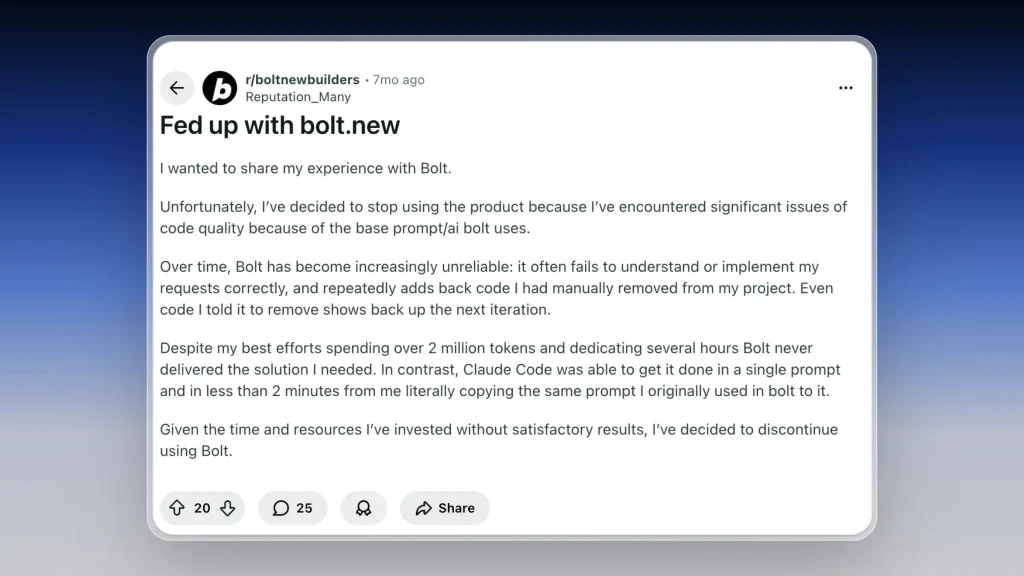
Bolt becomes difficult to rely on once projects move beyond simple use cases.
Its output quality is heavily constrained by the base AI behavior it uses. As complexity increases, it frequently misinterprets requests, implements changes incorrectly, and reintroduces code that was explicitly removed in previous iterations.
This makes iteration slow and unpredictable. Developers are forced to repeatedly correct the same issues, with changes failing to stick across iterations. Instead of refining a solution, time is spent undoing and redoing work.
In many cases, teams report spending large amounts of tokens and hours without reaching a stable result. The same prompts often produce correct solutions instantly when run through other coding models, highlighting that the limitation is not the prompt, but the system itself.
At that point, Bolt stops being a productivity tool and becomes a bottleneck, which is why many teams choose to switch.
3. Pricing adds up with teams
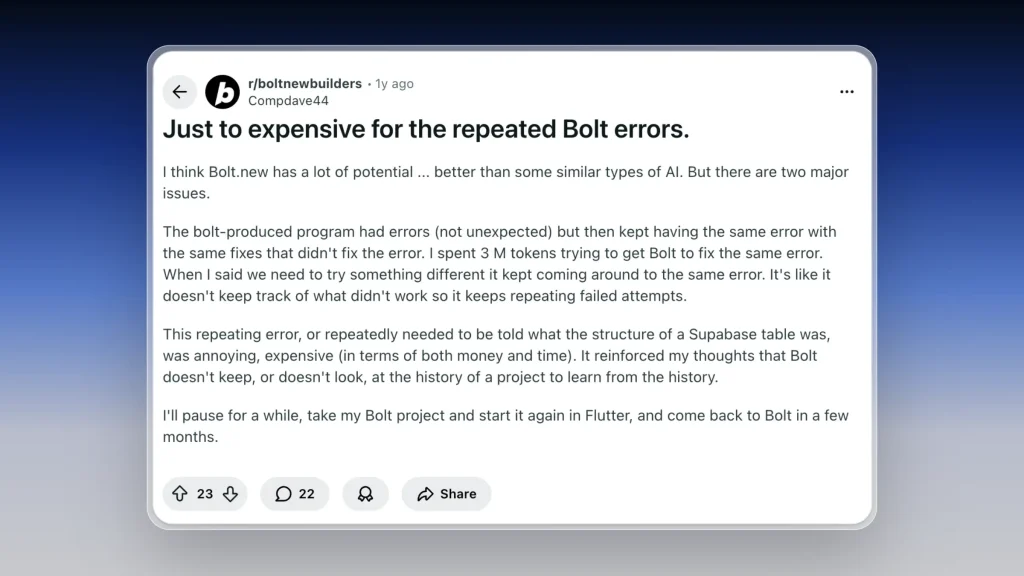
The Pro plan is $20/month, which feels fair for solo devs. But if you’re on the Teams plan, it jumps to $30 per member. That can stack up quickly if you’re working with a crew.
Since Bolt only gives you code (no hosting or UI), some folks feel the value doesn’t scale with the cost. If you’re not coding daily, it might be more than you need.

7 Bolt.new alternatives for building full products (not just code)
If you’re looking for something like Bolt, these apps worth checking out: Shipper.now, Lovable, Replit, Vercel v0, Cursor, Claude, and Windsurf.
That’s the short list. Let’s start with the first app that does it best:
1. Shipper.now
- Rated: 4.8/5 ⭐️ (107 reviews)
- Best for: Turning raw ideas into live, working apps in minutes

Shipper.now is what people reach for after they try Bolt.new and realize they don’t actually want to spend their weekend fighting deployments or figuring out how to hook the pieces together.
If I were to summarize it in 2 bullet points:
- Bolt gives you a nice starting point: a codebase that works.
- Shipper pushes your idea all the way to the finish line.
With Shipper, you don’t download anything, run anything, or debug anything. You describe what you want, and the entire product appears live: frontend, backend, database, hosting, SEO, forms, logic, all already wired up and already online.
The difference becomes obvious the moment you want to change something.
On Bolt, changes mean editing files and thinking about structure.
On Shipper, you just ask:
- “Add a checkout.”
- “Turn this page into a dashboard.”
- “Connect this form to my email.”
- “Rewrite the hero section.”
It updates instantly, like a dev sitting next to you pushing commits in real time.
Bolt is fantastic if you’re technical and want the code. Shipper is for everyone else, the people who want the product, the momentum, and the ability to keep shipping without ever touching the plumbing.
From my own experience, Shipper is the only tool I’ve used that actually gets you to the finish line, not just the starting point.
If you’re tired of “almost there” tools, this one actually delivers.
How much does Shipper.now cost?
- Standard: Free – Build and ship with limited credits and the Shipper badge
- Pro: $25 per user/month – 100 credits/month, remove the badge, teammates coming soon
- Enterprise: Custom – Dedicated support, custom integrations, SSO, data training opt-out
Shipper’s pricing is simple: you only pay when you’re actually shipping more. No weird tiers, no usage traps.
Early users got in while it was free. Now it’s live.
Still cheaper than wasting weeks in dev tools you don’t need.
Should you use Shipper instead of Bolt.new?
Bolt is great if you’re a dev who wants tight control. But if you’re trying to launch fast (without managing the plumbing) Shipper is miles ahead. I’ve used both, and honestly, Shipper felt like skipping 10 steps. No configs, no guesswork. Just results.

| Feature |

|

|
|---|---|---|
| AI Project Advisor | ||
| Made for beginners | ||
| Proactive Suggestions | ||
| AI Audience Research | ||
| App Starter Ideas | ||
| Foreign Language Support | ||
| AI Auto Bug Fixing | ||
| Lock Specific Code Files | ||
| App Cloning | ||
| AI-Improved Prompt | ||
| App Preview: Phone, Tablet, Computer |
→ Shipper vs Bolt (Comparison)
2. Lovable
- Rated: 4.6/5 ⭐️
- Best for: Developers who want clean scaffolding from a single prompt

Lovable pitches itself as a cofounder that codes with you. You describe the app you want to build, and it spins up a full repo with routes, components, and API logic.
Compared to tools that just generate snippets, Lovable feels more like a proper jumpstart.
It’s great if you already live in VSCode or are planning to host on Vercel or Railway. The boilerplate is clean. Pages are structured. You even get docs explaining what’s wired up and how to keep building on top of it.
But it’s still very dev-first. You’ll need to manage deployment, connect any external tools yourself, and customize the logic from there. So while it saves time on scaffolding, you’re still doing the actual “shipping” part manually.
That makes it ideal for devs who want a solid base, but not ideal for solo builders who need something finished and live by the end of the day.
How much does Lovable cost?
Lovable starts free, with paid plans unlocking private projects, more credits, and advanced access controls:
- Free – $0/month: This plan is great for testing the waters. It supports public projects only and allows up to 20 collaborators.
- Pro – $25/month (most popular): This is the best pick for indie developers and small teams. It includes up to 250 credits per month, supports private projects, removes the Lovable badge, allows custom domains, and adds role-based access.
- Enterprise – Custom pricing: Built for larger organizations, this plan includes everything in Pro plus more control and flexibility. It offers SSO, custom integrations, enhanced data privacy options, and dedicated support.
Further Info on Connecting Custom Domains: Bolt, Lovable
Is Lovable better than Bolt.new?
Short answer: Lovable gets you further, but only if you’re comfortable with code.
Bolt is more like a smart scratchpad – you type a prompt, it generates code, and you copy it into your own setup. It doesn’t really structure your app, and it definitely won’t host anything for you.
Lovable gives you the full repo, with routing, styling, and backend already in place. You still need to connect stuff yourself, but it does feel like a proper foundation, especially for full-stack apps.
Here’s how they compare:
- Bolt.new is for devs who want AI help while coding
- Lovable is for devs who want the first version of a real project scaffold
- Shipper.now is for anyone who wants the actual app up and running – no dev experience needed
Shipper doesn’t just help you start faster, it takes you all the way to launch, with backend, frontend, automations, and SEO already done. No setup. No stitching.
If you’ve tried both Lovable and Bolt, Shipper is probably the tool you wished they were.
If you’re leaning toward Lovable, check out this detailed review of the platform. If you still can’t make up your mind about it, see our top picks for Lovable alternatives that go even further.
3. Replit
- Rated: 4.5/5 ⭐
- Best for: Running and debugging code instantly in the browser

Replit isn’t trying to build your whole product – it’s trying to make coding feel more like typing into Google Docs. It’s an in-browser IDE where you can write code, run it, test things, and even deploy from the same tab. No local setup. No config hell.
You can spin up a Python script, launch a full-stack app, or try AI agents like Replit Ghostwriter and Replit Agent. There’s even a community where people remix each other’s projects, which is great for learning or collaborating.
But at the end of the day, Replit is still a dev tool. It gives you flexibility and power, but it also expects you to know what you’re doing. You’re writing code, debugging errors, managing state, and choosing your stack. Nothing is “just done” for you.
It’s perfect if you love coding and want everything in one place. Not so perfect if your goal is to skip the code part and just get the product live.
Spoiler: Replit is fast, but not always flexible – full review here.
Shipper was built for non-devs. Here’s how it stacks up against Replit
How much does Replit cost?
Replit has flexible plans depending on how deep you want to go, from hobbyist to full-stack pro:
- Starter – Free: This plan includes 10 development apps with temporary links, access to public apps only, and a trial of Replit Agent. Perfect for experimenting and learning the platform.
- Replit Core – $20/month: You get full access to Replit Agent, Claude Sonnet 4, and GPT-4o. It includes unlimited public and private apps, $25/month in usage credits, and the ability to deploy live apps. Additional usage is billed separately.
- Teams – $35/user/month: Built for teams that need shared resources and role management. Includes everything in Core, plus $40/month in credits, centralized billing, 50 viewer seats, role-based access, and private deployments.
- Enterprise – Custom pricing: Designed for larger orgs with specific security and privacy needs. Includes everything in Teams, plus SSO, SCIM, audit logs, custom viewer seats, and dedicated support. Annual commitment required with a 20-user minimum.
Which is better, Replit or Bolt.new?
Depends what you want – but they’re built for totally different things.
Replit is a full online coding platform. Think: VSCode in the browser with extra tools. You write, test, and deploy code right inside the editor. It’s great for solo devs, students, and anyone who loves that terminal life.
Bolt.new is way lighter. It’s like texting an AI assistant for code snippets. Helpful if you’re working in your own local setup, but it doesn’t give you the full picture. No file system. No live preview. No way to run things out of the box.
Neither of them really builds the full product for you. That’s where Shipper.now pulls ahead of both.
Shipper doesn’t just help you code – it builds the whole thing for you. Frontend, backend, hosting, SEO, and logic, all done. You describe the idea, and Shipper ships the working app.
So:
- Replit = Best for coding projects from scratch
- Bolt.new = Best for quick AI coding help
- Shipper.now = Best for actually launching the product
If you’ve hit the limits with Replit, these Replit alternatives are worth exploring.
4. v0 by Vercel
- Rated: 4.6/5 ⭐
- Best for: Generating clean React UI components with AI

v0 by Vercel is like having a superpower inside your UI workflow. You describe a component in natural language – “a pricing table with 3 tiers and toggle switch for annual/monthly” – and v0 spits out real React code, styled with Tailwind, and ready to paste into your app.
It’s fast, the code is clean, and it’s tightly integrated with the rest of the Vercel ecosystem. If you’re already deploying on Vercel or syncing with GitHub, it fits right in. For front-end work, it feels more like an AI design tool than a dev tool.
But v0 stops at the component level. It won’t give you a full product, or connect your backend, or handle logic across pages. It’s more of a smart UI builder than a full app generator.
You still need to wire things up, set up APIs, write your logic, and push to production yourself. That’s where tools like Shipper or Lovable go further – v0 shines in the design-to-code slice, not the launch-ready flow.
When v0 stops short, some v0 alternatives keep going – all the way to live.
How much does v0 by Vercel cost?
v0 uses a credit-based system with monthly plans for individuals, teams, and enterprises:
- Free – $0/month: Includes $5/month in usage credits, access to the
v0-1.5-mdmodel, deploys to Vercel, and GitHub sync. Great for light or casual use. - Premium – $20/month: Comes with $20 in monthly credits, access to
v0-1.5-lg, v0 API, higher file limits, and the ability to import directly from Figma. Ideal for power users and designers who need more control. - Team – $30/user/month: Adds shared credit pools, collaboration tools, centralized billing, and team chat sharing. Credits are distributed per seat and refresh monthly.
- Enterprise – Custom pricing: Offers everything in Team, plus SAML SSO, priority processing, dedicated support, and privacy-focused defaults (training opt-out by default).
Is v0 better than Bolt.new?
They’re solving different parts of the workflow, so it depends on what “better” means to you.
Bolt is focused on writing and understanding code with AI. It helps developers generate logic, snippets, or helper functions as they go. It doesn’t give you UI, layouts, or deployable components.
v0, on the other hand, is like a frontend copilot. It won’t generate your backend logic or API routes, but it will spit out beautiful React components from plain text prompts. You still need to assemble them into something usable.
If you’re a designer who wants dev-quality output fast, v0 feels magical. If you’re a dev looking for help writing logic or testing ideas, Bolt may be more useful.
But if what you really want is to skip all the glue work and just have a product, neither gets you there.
That’s where Shipper.now comes in, bridging the gap completely.
You describe what you want. It builds the product. Frontend, backend, logic, SEO, live hosting – all done.
So:
- v0 is great for UI
- Bolt is great for code
- Shipper is great for launching the actual thing
PS: We’ve compared the last two tools separately: V0 vs Replit.
PPS: We also tested v0 in this in-depth review.
5. Cursor
- Rated: 4.4/5 ⭐️
- Best for: Turning your editor into a full-blown AI assistant

Cursor feels like the AI version of VSCode that actually keeps up with your brain. You get a familiar IDE environment, but now it can explain files, refactor chunks, write new features, and debug, all while you stay in flow.
It’s not just one-off prompts, either. Cursor’s agents run in the background, suggest changes in context, and even have a bug-fixing bot that hunts down issues proactively.
That said, Cursor is still made for devs. If you’re not comfortable in Git, writing logic, or deploying manually, it’s not going to hand you a finished product. It’s a co-pilot, not a pilot.
How much does Cursor cost?
Cursor’s plans are straightforward and scale based on usage:
- Hobby: Free – Great for getting started with light usage. Limited agent access and tab completions. Includes a 2-week Pro trial.
- Pro: $20/month – Full access to AI agents, unlimited tab completions, and larger context windows.
- Ultra: $200/month – Supercharged version of Pro with 20× usage on all AI models and priority feature access.
- Teams: $40/user/month – Adds admin tools, centralized billing, privacy mode enforcement, and SSO.
- Enterprise: Custom pricing – Includes seat management, usage controls, and priority support.
Is Cursor better than Bolt.new?
Cursor is great if you want a smarter dev environment without changing your workflow. You stay in your editor, and AI meets you there – quietly powerful, no extra fluff.
Bolt, on the other hand, is more about direct code generation and building snippets fast. Cursor gives you a broader toolkit, but assumes you already know what you’re doing.
Neither gives you a full working product out of the box.
If your goal is to build something live without stitching 12 tools together, Shipper.now is the better route.
- Cursor is your AI co-pilot
- Bolt is your AI assistant
- Shipper is your AI shipper: it turns your idea into an actual product, fast.
Not sure if Cursor or Shipper is the better fit? This post goes into the key differences
6. Claude by Anthropic (Claude.ai)
- Rated: 3.7/5 ⭐️
- Best for: Thoughtful writing, long-context analysis, and coding help inside terminal

Claude is like the thoughtful friend of AI tools. Less flashy than some others, but extremely smart and calm under pressure.
It’s known for being great at long conversations, deep code understanding, and handling complex requests with a steady hand.
You can use Claude to write, edit, brainstorm, analyze PDFs, understand codebases, or even help organize your life with tools like Google Calendar or Notion (via integrations).
If you’re a dev, Claude Code lets you use it straight from the terminal – great for inline debugging or script generation.
Where Claude shines most: giving structured, clear answers with lots of context. But it’s not always the fastest, and the product still feels more assistant than builder.
You’ll get help thinking, writing, and coding – but you’re still the one wiring everything up.
That’s why tools like Shipper.now go a step beyond: Claude helps you think, Shipper actually builds.
How much does Claude cost?
- Free: Basic chat, content creation, code generation, and web search – all free with account
- Pro: $17/month billed annually – More usage, Claude Code in terminal, unlimited Projects, Workspace integrations
- Max: From $100/month – 5–20x usage vs. Pro, higher limits, early features, priority access
- Team: $30/user/month (min 5 users) – Everything in Pro + admin tools, billing controls, more usage
- Enterprise: Custom pricing – Adds SSO, SCIM, audit logs, advanced permissions, and more
Is Claude better than Bolt.new?
Honestly, they’re built for different use cases.
Claude is better at thinking with you – outlining logic, drafting docs, reviewing code, organizing ideas. Bolt is better at doing code with you – writing and editing snippets inline as you work.
You might use both. But neither replaces the full launch flow.
Shipper.now fills that gap:
You describe your app → it builds the actual product.
Frontend, backend, logic, live hosting – no terminal, no stitching, no extra agents.
So:
- Claude is great for planning
- Bolt is great for coding
- Shipper is great for shipping
7. Windsurf
- Rated: 4.5/5 ⭐️
- Best for: Fast, customizable agent flows with multi-model support

Windsurf is all about flexibility. You can call agents powered by OpenAI, Claude, Gemini, and even xAI – and switch between them as needed.
It’s less polished than others but gives you full control over what’s happening behind the scenes.
Think of it like a multi-tool for devs who want options. You get app deployment (up to 5 per day), custom models, and prompt routing. It’s also the only one here offering its own SWE-1 model: optimized for code and currently running at 0 credits per prompt.
It’s not a full dev environment though. You’ll still be context-switching between Windsurf, your IDE, and wherever you deploy. If your goal is to just ship without juggling tools, Windsurf gives you the flexibility but not the finished product.
That’s where something like Shipper.now comes in – it lets you start and finish in one place.
How much does Windsurf cost?
- Free: $0 per user/month – 25 monthly prompt credits, 1 daily app deploy, access to all major models
- Pro: $15 per user/month – 500 monthly credits, 5 daily deploys, SWE-1 model included
- Teams: $30 per user/month – same credits, plus team billing, analytics, priority support, optional SSO
- Enterprise: From $60 per user/month – 1,000 credits, RBAC, full access control, SSO, hybrid deployments
Is Windsurf better than Bolt.new?
Windsurf is like the API toolbox – very open, highly flexible. Bolt feels tighter and more integrated inside your IDE. If you like configuring everything yourself, Windsurf wins. If you want things to just work as you type, Bolt is smoother.
But if you’re looking to actually launch something fast, both tools still keep you in builder mode.
With Shipper.now, you skip all that.
Type your idea → watch it go live.
Frontend, backend, logic, and SEO all done in one place – no switching, no stitching.
So:
- Windsurf is for AI explorers
- Bolt is for IDE coders
- Shipper is for actual shippers 💡
Still looking for the right fit? We also reviewed the top BASE44 and Von.dev alternatives.
How to Choose Your Best Bolt.new Alternative
The best way to choose a Bolt.new alternative? Ask yourself what’s slowing you down. Still stitching things together? Struggling to hand off to non-dev teammates? Or maybe Bolt feels more like a starting point than a full launchpad.
Every tool in this list solves a real pain. Some ship the whole product, not just the code. Others cut out wiring and manual setup. It depends how much building you want to do, or skip entirely.
- Do you still need to code or wire things manually?
- Does it ship a live, launched product or just preview code?
- Can non-devs actually use it end to end?
- Does it handle frontend, backend, and hosting for you?
- Is it made to build full apps, or just MVPs?
- Does it help you go from idea to revenue?
How We Test Bolt.new Alternatives
We don’t just scroll landing pages, we build actual projects in each tool. From signup to shipping, we test how fast and real it feels. That’s how we find the tools that don’t just promise speed, but actually deliver.
- Build & Launch Experience: 30% – Can we go from idea to live product quickly?
- Ease of Use: 20% – Is the UI smooth, or do we hit blockers?
- No-Code Friendliness: 15% – Can non-technical users do real work?
- Product Completeness: 15% – Does it cover frontend, backend, and deploy?
- AI Helpfulness: 10% – Does the AI build smart, or just scaffold?
- Support & Community: 10% – Can we get unstuck when things break?
That’s how we spot the real deal, not just demo flash.
Final Verdict: Which Bolt.new Alternative Should You Pick?
Bolt.new gives you fast code generation and a sleek interface. But once the code’s ready, you’re left figuring out deployment, backend wiring, SEO, and editing tools. It’s like getting halfway to launch, then hitting pause.
Shipper.now skips the middle step. You just describe what you want, and it builds the whole thing live: SEO-ready, hosted, and editable. No coding, no setup, no waiting.
Best Bolt.new Alternatives by Use Case:
- For shipping a live product instantly → Shipper.now
- For full-stack code generation → Lovable
- For in-editor coding help → Cursor
- For brainstorming and debugging → Claude
- For multi-file editing in big codebases → Windsurf
- For browser-based coding experiments → Replit
- For React-first prototyping → Vercel v0
Most tools stop at giving you code. Shipper gives you a working product: ready to share, sell, or grow. It’s the shortcut when you don’t want to deal with deployment or dev ops.
If your goal is to launch fast without the tech maze, Shipper.now is your move. It doesn’t just generate, it ships.
→ Compare Bolt’s top two alternatives: Lovable / Shipper
Bolt.new Alternatives: FAQs
1. What’s the best app for building a full website from just an idea?
If you’re looking for the fastest way to turn an idea into a real, editable website, Shipper.now is the best choice. You don’t need templates, boilerplate code, or a deployment setup. Just type what you want, like “a landing page for my newsletter” or “a portfolio site for an indie game”, and it creates the whole thing live, instantly.
Unlike Bolt.new, which stops at code generation, Shipper.now gives you the finished product – fully hosted, SEO-ready, and editable on the spot. No dev handoff. No waiting.
2. Is there a free Bolt.new alternative that actually ships a live website?
Yes, Shipper.now has a free plan that lets you create and publish a real website, not just export code or preview components. You won’t need GitHub, Vercel, or a manual deploy step. Just describe your project and hit publish.
| Feature | Bolt.new | Shipper.now |
|---|---|---|
| Free Plan | Yes, code only | Yes, includes live publish |
| Live Website Hosting | ❌ Requires setup | ✅ One-click publish |
| No-Code Editing | ❌ Dev-focused | ✅ Full visual editor |
If you’ve been stuck exporting code you can’t run, this is your way out.
Another free and also VC-funded Bolt alternative is Floot.
3. Why does Bolt.new feel fast at first but becomes harder to maintain?
Bolt.new feels fast at the start because it skips UI design and jumps straight to components. But once you want to iterate – change a layout, tweak copy, fix responsiveness – you’re back in dev mode. That’s where teams stall.
Shipper.now avoids this trap by giving you a live, editable site right away. No builds. No commits. Just click and change anything: SEO, text, layout, even structure. That speed stays with you at every stage.
4. Can I use Shipper.now without knowing how to code?
Definitely. Shipper.now was built for non-technical founders, creators, and anyone with an idea. You don’t need to touch React or understand Tailwind. Just type your idea like you’re chatting with a friend, Shipper handles the rest.
You’ll get a real, hosted site with a visual editor that lets you change sections, headlines, meta tags, and more. It’s like having a dev and a designer in one tool, without needing either.
5. What makes Shipper.now better than code-generating tools like Bolt.new?
Most code-gen tools give you “components” or “apps” that still need work: a hosting setup, code cleanup, maybe even a dev to finish the job. Shipper.now skips the mess and gives you a live product from the first click.
You’re not just generating a front-end, you’re publishing a working site that’s ready for users, SEO, payments, forms, whatever you need. And if you want to tweak it later? No rebuilds or redeploys – just edit and go.
Earn 50% + lifetime recurring commissions
Share Shipper with your audience and get paid every month, for life.
Earn 50% + lifetime recurring on every sale
Share Shipper with your audience and get paid every month, for life — no cap on earnings.
Earn 50% + lifetime recurring on every sale
Share Shipper with your audience and get paid every month, for life — no cap on earnings.






