
Top 7 Replit Alternatives To Build Apps & Sites With AI


Tired of hitting roadblocks with Replit alternative searches that go nowhere? Let’s change that.
Most lists just throw “Top 12 Replit alternatives” at you and hope something sticks. Half the tools don’t even do what Replit does. Others assume you’re a senior designer or developer (or both).
Replit is great for quick prototyping, but if you’re building something long-term, its limits show fast – especially when it comes to custom workflows, serious deployment, or shipping something that’s actually production-ready.
This list is different. I picked and manually tested 7 tools that can take your ideas further. Whether you want to move beyond Replit’s sandbox feel, or you’re just tired of debugging in the browser, these picks are worth a scroll.
TLDR: All Replit Alternatives
We didn’t just Google “Replit competitors” and make a list. We’ve built real projects inside Replit, tested the platforms below, and compared how fast and flexible they are for getting real stuff shipped.
This page isn’t sponsored. Just honest comparisons from folks who ship weekly and know when a tool gets in your way – or helps you move faster.
Read our full review methodology →Latest updates.
We re-checked all pricing, features, and platform screenshots to keep things current. If a tool changed their UI or added something new, it’s reflected here.
We also improved section clarity across the board: shorter paragraphs, clearer tables, and tighter comparisons between each alternative.
Finally, we fine-tuned how we talk about Shipper.now so it’s crystal clear who it’s for and what makes it different from dev-focused tools.
What is Replit?
Replit is an all-in-one coding workspace in your browser. You can write, run, and deploy code without needing to install anything. It supports dozens of languages and gives you a fast way to prototype, collaborate, or even launch apps.
A lot of indie devs, students, and hobbyists love it because it removes the setup friction. Everything runs in the cloud, and you get a live preview of your project instantly. It’s simple, fast, and beginner-friendly.

Here’s what’s packed into the Replit dev environment:
- Browser-based IDE
- Built-in hosting and deployment
- Support for 50+ languages
- Ghostwriter AI coding assistant
- Real-time multiplayer editing
- Repl database and built-in packages
It’s great for learning and quick builds – but once you grow past the basics, some tradeoffs start to show.
You can read our full breakdown of Replit here.
Now let’s dig into why you might want another tool.
Why look for a Replit alternative?
Replit makes it easy to jump into code with zero setup. But once you’re working on real projects or shipping things at scale, its simplicity can feel like a ceiling instead of a launchpad.
If you’ve hit roadblocks with performance, limits on flexibility, or pricing that doesn’t match your use case, you’re not alone. A lot of people start on Replit, then switch when they outgrow the sandbox.
Here are the common drawbacks:
1. Limited control over environment

Replit runs your code in its own sandboxed container – which means you don’t get full control over the runtime. That’s fine for basic projects, but for anything custom or resource-heavy, it’s a bottleneck.
You might run into strange bugs, limited package support, or weird behavior that doesn’t match your local dev setup. That makes debugging way harder than it should be.
2. Performance can lag
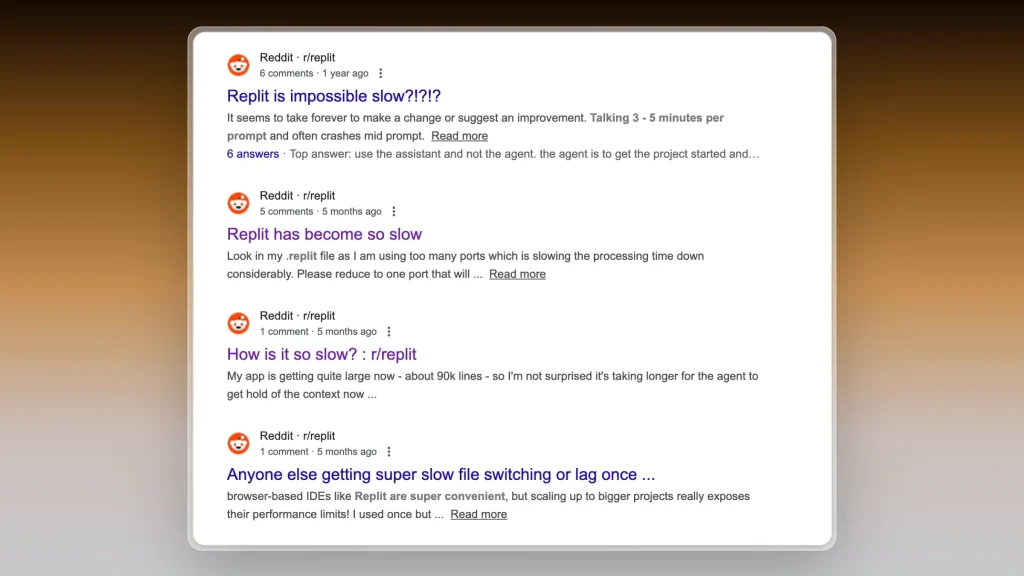
Because everything runs in the cloud, you’re at the mercy of Replit’s servers. Sometimes your projects spin up slow, or the IDE feels sluggish – especially on free plans.
For small scripts it’s fine, but bigger apps can feel clunky. If speed and reliability matter to your workflow, this becomes a problem fast.
3. Not ideal for pro dev workflows
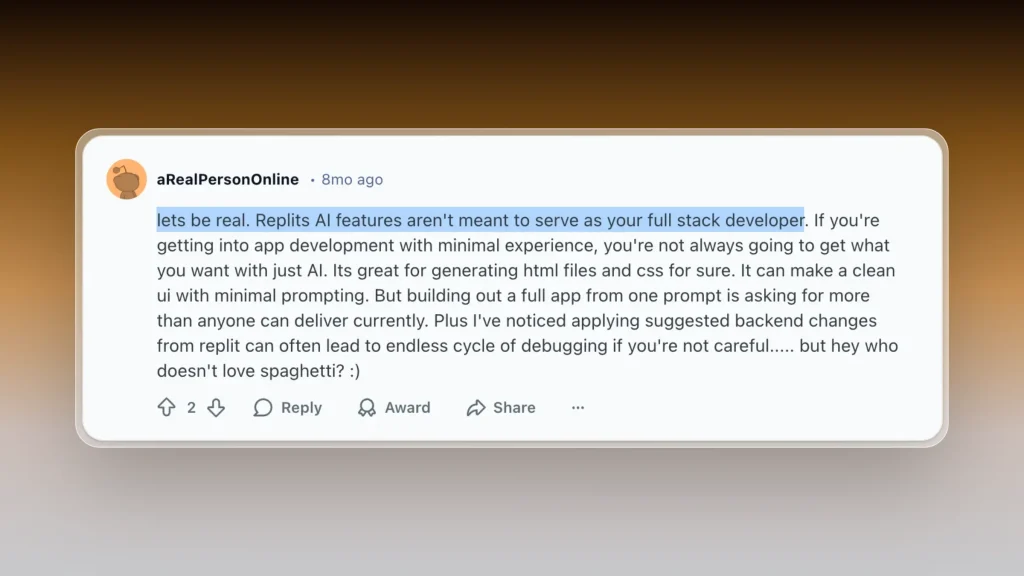
Replit is designed to keep things simple, which means it skips over a lot of deeper dev tools. You don’t get full control over versioning, CI/CD, or advanced deployment options.
If you’re building production-grade software, you’ll likely need to move to a more flexible environment or integrate a bunch of outside tools.
Beside, Replit always adds their badge which you more often than not have to remove through coding.
4. Pricing doesn’t scale well
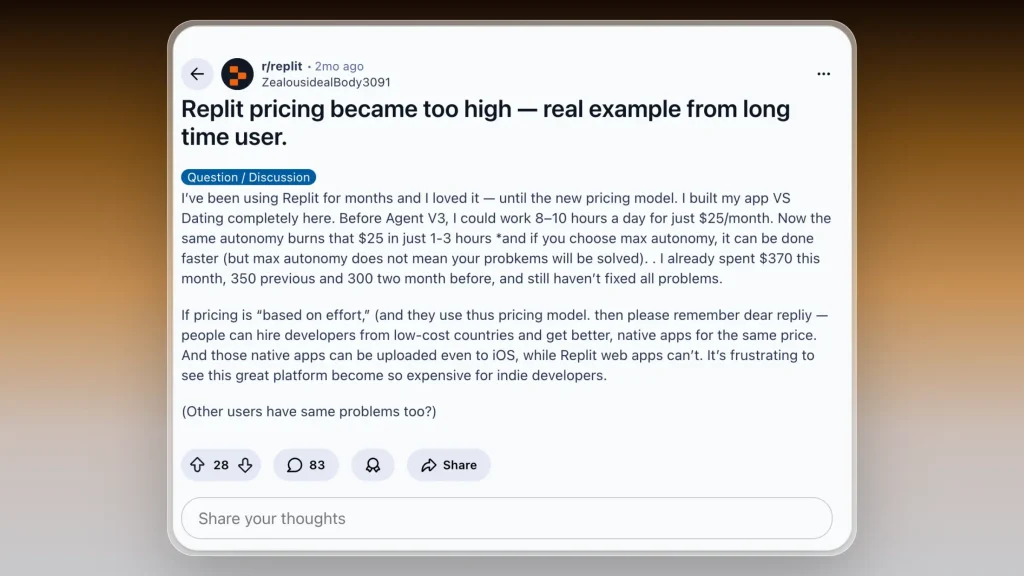
Replit’s free plan is generous, but once you need more storage, private repos, or better performance, it jumps to $20/month. And Ghostwriter (their AI assistant) costs extra on top.
For what you get, some devs feel like they’re paying more than necessary. Especially when other platforms give you full control and hosting for the same price or less.

→ How to cancel your Replit membership
7 Replit alternatives for building, launching and editing apps faster
The best Replit alternatives right now are: Shipper.now, Lovable, Bolt.new, Cursor, v0, Windsurf, and CoPilot.
That’s the short answer.
But if you want the full breakdown – use cases, pros, pricing, and why people switch – here’s the deep dive. Let’s start with the top Replit alternative overall.
1. Shipper.now – the best Replit alternative for launching fast without coding
- Rated: 4.8/5 ⭐ (107 reviews)
- Best for: Makers, founders, and solo devs who want to go from idea to live app in hours

Shipper is what Replit never figured out: instant execution without needing to think like a developer or a designer.
You type the idea, and Shipper turns it into a live product – not a folder of files, not a half-working preview, but a real app that’s deployed, SEO-ready, and instantly editable.
Replit gives you a code editor.
Shipper gives you momentum.
Shipper is a full-stack product builder hiding inside a chat interface. Behind the scenes, it assembles the same things a seasoned engineer would (React, Tailwind, backend logic, deployment config) but you never have to see any of it unless you want to.
You focus on the idea.
Shipper handles the engineering.
That’s the real difference:
- Replit is incredible if you want to tinker and control every detail.
- Shipper is for people who want to build and launch 10x faster.
It’s the closest thing to teleporting from a spark of an idea to a live product you can share in the same hour.
How much does Shipper.now cost?
- Standard: Free – Build with limited credits and Shipper badge
- Pro: $25 per user/month – 100 credits/month, remove badge, teammates coming soon
- Enterprise: Custom – Dedicated support, custom integrations, SSO, opt out of data training
Shipper keeps pricing simple. You only upgrade when you’re shipping more.
No lock-ins, no surprise overages.
Should you use Shipper instead of Replit?
Replit is amazing if you’re a coder who wants a flexible playground. But if your goal is to launch *products* instead of write scripts, Shipper saves you hours. I didn’t touch a terminal, didn’t write a line of code, and still shipped something real. That’s the game-changer.

| Feature |

|

|
|---|---|---|
| AI Project Advisor | ||
| Made for beginners | ||
| Proactive Suggestions | ||
| AI Audience Research | ||
| App Starter Ideas | ||
| Foreign Language Support | ||
| AI Auto Bug Fixing | ||
| Lock Specific Code Files | (soon) | |
| App Cloning | ||
| AI-Improved Prompt | ||
| App Preview: Phone, Tablet, Computer | (soon) |
👉 Full comparison of Shipper vs Replit
2. Lovable
- Rated: 4.6/5 ⭐
- Best for: beginner-friendly AI coding and small team collaboration

Lovable is one of the most known AI coding platforms – while newer, it’s still gaining traction, mostly among indie makers and learners.
It takes heavy cues from Replit, but strips things down into a simpler, friendlier interface that’s more about collaboration than raw dev power.
You can create public or private projects, invite up to 20+ collaborators, and start coding instantly using their AI agent in a visual environment. Instead of bombarding you with layers of dev tooling, Lovable focuses on ease, clarity, and community.
You don’t need to know how to set up environments or mess with terminals.
That said, Lovable has real limits. It’s not built for serious production work or deploying live apps.
There’s no real backend layer, no external integrations, and the whole token-credit system can feel like guesswork if you’re doing more than casual testing.
Still, for people who just want to “try things out” in a safe space with others, Lovable creates a cozy on-ramp. It won’t suit everyone – but it knows who it’s for.
How much does Lovable cost?
- Free: $0/month – Public projects, up to 20 collaborators
- Pro: $25/month – Adds 250 credits/month, private projects, custom domains
- Enterprise: Custom pricing – Includes SSO, integrations, support
Lovable has generous free features, but the moment you want private projects or a real domain, you’ll hit the Pro wall. You also don’t get unlimited usage – credits can disappear fast if your team uses the AI heavily.
→ Explaining Lovable’s Pricing
Is Lovable better than Replit?
If you’re early in your coding journey or just want a collaborative playground, Lovable feels easier and more welcoming than Replit. It trims away all the dev clutter and gets you straight into AI-assisted creation without worrying about servers, tokens, or IDE quirks.
But Replit still dominates when it comes to depth. You can build, test, and deploy real apps with full-stack capabilities. It’s also better for solo devs who want control and extensibility.
That said, both platforms still leave a gap: you get tools to code but not to ship.
That’s where Shipper.now flips the script. With Shipper, you skip the whole coding phase and go straight from idea to live, editable site – in minutes. It’s the fastest path if you’re building something real.
Exploring tools like Lovable? These Lovable alternatives help you go further, faster.
If you’re leaning toward Lovable, this review might help.
3. Bolt.new
- Rated: 4.1/5 ⭐
- Best for: devs building with AI models and custom token usage

→ Replit vs Bolt (Full Comparison)
Bolt.new is like having a programmable OpenAI playground with project-level memory.
It’s built for developers who want fine control over how tokens are used, what context is saved, and how different agents interact. Think Replit meets GPT, with a heavy API-first mindset.
It lets you build public or private AI agents, drop in your own data, and control everything from prompt engineering to memory. The UI feels lightweight but powerful, and the developer docs are surprisingly well written for an indie tool.
That said, it’s very token- and usage-centric. You’ll need to plan around token limits, daily caps, and memory management. Bolt.new expects you to think like an engineer.
It’s great if you’re prototyping AI agents, not so great if you’re trying to ship a polished software or launch a SaaS.
If you like tinkering with agents and prompts, it’s a playground. If you just want to ship a working tool your customers can use, you’ll hit friction fast.
If Bolt lost context in your edits (again), you’re not alone.
→ Shipper handles it better
How much does Bolt.new cost?
- Free: $0 – Public/private projects, 1M tokens/month, 150K daily limit
- Pro: $20/month – Starts at 10M tokens, no daily limit, bigger file uploads, rollover tokens
- Teams: $30/month/member – Adds team billing and shared access
If you’re building solo agents, the free and Pro tiers are solid. But if you’re scaling up a product or adding a front-end, Bolt won’t get you there alone.
Is Bolt.new better than Replit?
If your goal is to build and test custom AI agents, yes, Bolt.new beats Replit on that front. It’s designed for token-heavy use cases and offers better memory control and context window flexibility. You’re building agents, not full-stack apps.
But for anything beyond backend logic – landing pages, forms, payment flows, real users – Bolt.new leaves you hanging. Replit at least gets you closer with frontend and backend in one place. And neither is a true launch platform.
Bolt beats Replit for agents, but there are other Bolt.new alternatives worth trying too.
However, Shipper.now skips all the config and goes straight from idea to live app, without needing to manage tokens or file uploads. If you’re trying to launch something real, Shipper.now surpasses both: fast, no code, and live in minutes.
We gave Bolt a proper spin – here’s how it went.
4. Cursor
- Rated: 4.4/5 ⭐️
- Best for: developers who want ChatGPT-5 inside their code editor

→ Cursor vs Replit (Full Comparison)
Cursor is a modified version of VSCode with an AI assistant baked in. You get autocomplete, bug fixing, refactoring help, and full-blown codegen using GPT-4.
Unlike Copilot, Cursor lets you ask questions about your own codebase, edit files with natural language, and run code inline.
Where it really shines is understanding context. You can highlight a messy function and ask for improvements – or even say “add Stripe to this project,” and it’ll scaffold it out across multiple files. It also keeps memory of your repo, so follow-up requests feel smarter.
Cursor is built for speed. It opens fast, runs fast, and doesn’t flood you with UI distractions. It feels like VSCode with superpowers, not like a new tool you have to learn from scratch. That makes it easy to adopt for devs who live in their editor.
But it’s still a code-first experience. If you’re not comfortable editing files or deploying manually, Cursor won’t get you all the way to launch.
It’s an assistant, not a full build-and-ship solution.
How much does Cursor cost?
- Hobby: Free – Best for light usage. Limited access to agents and completions, but comes with a 2-week Pro trial.
- Pro: $20/month – Unlocks full AI agent access, unlimited completions, and bigger context windows.
- Ultra: $200/month – Everything in Pro, but 20× the usage limits and faster access to new features.
- Teams: $40/user/month – Designed for collaboration, with team billing, admin controls, and SSO.
- Enterprise: Custom – Offers enterprise-grade tools like usage caps, advanced security, and dedicated support.
For solo devs, the free plan is already powerful. The paid plan unlocks deeper context memory and better model performance if you’re building serious apps.
Is Cursor better than Replit?
If you already live in VSCode and want GPT help while coding, Cursor is a clear win.
It’s faster, cleaner, and way more focused than Replit’s IDE. Replit tries to do everything – Cursor stays in its lane and nails the dev workflow.
But Cursor stops short of product delivery. No UI builder, no form editor, no instant publishing. Just you, your code, and AI in the editor. That works great for hackers – not for launchers.
That’s where Shipper.now takes the lead. It doesn’t ask you to choose between speed and power. You type the idea, it ships the product – visually, live, and fast.
No editor, no config, no tokens. Shipper goes beyond both tools and turns your idea into a product people can use today.
Both Cursor and Shipper aim to speed up app building, but they work differently. Here’s how they compare
5. V0 by Vercel
- Rated: 4.6/5 ⭐
- Best for: building polished frontends fast using AI

→ Replit vs v0 (Full Comparison)
v0 is like having a frontend developer in your pocket. You describe the UI you want, and it spits out real, editable React code.
It’s especially good at generating landing pages, dashboards, and forms – clean Tailwind-based layouts that you can copy-paste straight into your repo.
One thing people love is how it supports real iteration. You can tweak your prompt or highlight a section of the UI to improve it, and v0 will regenerate just that piece.
It’s more like collaborating with a designer who happens to write code.
That said, it’s not made for backend logic or full-stack apps. You’ll need to wire up the data side yourself or pair it with tools like Supabase.
Also, while the generated code is decent, you’ll still need React skills to clean things up and deploy.
If your project lives and dies on frontend polish, v0 is a fun way to shortcut design and layout. But it stops short of getting you to a working MVP without dev work. That’s where something like Shipper takes over.
If v0 sounds close but not complete, check out these top v0 alternatives that go all the way to MVP.
How much does v0 cost?
- Free: $0/month – Includes $5 in usage credits, access to the base model (v0-1.5-md), Vercel deploys, and GitHub sync. Good for casual or personal projects.
- Premium: $20/month – Adds $20 in credits, access to the larger v0-1.5-lg model, API usage, Figma import, and higher file limits. Built for power users and solo designers.
- Team: $30/user/month – Includes team-wide credit sharing, collaboration features, and centralized billing. Perfect for small teams working together.
- Enterprise: Custom – Everything in Team, plus SAML SSO, dedicated support, privacy-safe defaults, and priority queues.
→ How to pick the best V0 plan
Is v0 better than Replit?
They serve different jobs. Replit is a full coding environment with serverside support, while v0 is a UI generation playground.
If you’re trying to ship a fully functional app, Replit gets you closer out of the box. But if all you care about is fast frontend drafts, v0 wins.
For most solo builders, though, neither is the full answer. That’s where Shipper.now comes in – it gives you both UI and backend, fully live in one click. No stitching parts together, no deployment setup. It just ships.
→ Full comparison of Replit vs V0
→ Full review of V0 after we actually built with it.
6. Windsurf
- Rated: 4.5/5 ⭐️
- Best for: writing and editing code with help from local AI models

Windsurf is an AI dev tool with a twist. It runs everything locally. That means your code never leaves your machine, which is a big win for privacy-conscious teams or folks working on sensitive projects.
Its main strength is pair programming. You type, it suggests completions. You highlight, it explains. You ask questions in natural language, and it points you to relevant parts of the codebase.
It feels like GitHub Copilot with more context and less cloud.
Windsurf is especially popular among teams who want fast AI help without uploading code to the internet. It’s also great for offline workflows or locked-down enterprise environments.
But it’s not built for launching products. It won’t spin up a UI, scaffold a database, or deploy anything.
It’s for devs who already know what they’re building and want help writing better code, faster.
How much does Windsurf cost?
- Free: $0/user/month – 25 monthly prompt credits, 1 daily app deploy, and access to all major models.
- Pro: $15/user/month – 500 credits/month, 5 daily deploys, and access to the SWE-1 model.
- Teams: $30/user/month – Same credits as Pro, with team billing, usage analytics, priority support, and optional SSO.
- Enterprise: Starts at $60/user/month – 1,000 credits, full RBAC, advanced access controls, hybrid deployment options, and enforced SSO.
Is Windsurf better than Replit?
If you’re already a developer and care about keeping your code local, Windsurf is a solid choice. But Replit gives you a whole hosted dev environment with collaboration, hosting, and runtime, all in one.
Still, if what you want is to launch something, neither one handles that out of the box. That’s why Shipper.now remains the go-to if your goal is to go from idea to live app without any of the plumbing.
7. Copilot
- Rated: 4.4/5 ⭐
- Best for: autocomplete-style AI coding inside your IDE

GitHub Copilot needs no intro. It’s the OG of AI coding tools, and still the most widely used. It plugs into VSCode and other IDEs to suggest lines, complete functions, and answer code-related questions in real time.
It shines when you’re already deep into a codebase. Writing tests? It’ll scaffold them. Refactoring something messy? It’ll offer a cleaner rewrite. For experienced devs, it’s like having a second brain typing next to you.
But it doesn’t give you a full app. No UI, no backend, no deployment. Just code suggestions inside your editor. That’s powerful, but also means you still need to manage the full dev stack yourself.
Copilot also lacks app-level thinking. It won’t help you choose frameworks, structure your MVP, or decide what tools to use. It’s reactive, not strategic.
How much does CoPilot cost?
- Free: $0/month – Includes 50 chat/agent requests and 2,000 code completions per month. Access to Claude 3.5 Sonnet, GPT-4.1, and other models.
- Pro: $10/month or $100/year – Unlimited completions and chats, access to GPT-4.11, Claude 3.7/4 Sonnet, Gemini 2.5 Pro, and more. Also includes 6× more premium requests than the free tier.
- Pro+: $39/month or $390/year – Adds full access to all models including Claude Opus 4 and o3, with 30× premium requests compared to the free tier. Designed for heavy users who need flexibility and cutting-edge models.
Is Copilot better than Replit?
Copilot is for local devs who already have an environment set up. Replit is for people who want to start coding from anywhere, in the browser, with no setup. If you’re a beginner or want an all-in-one IDE, Replit wins.
But neither tool helps you launch actual products. For that, Shipper.now is the better bet. You skip configs, UIs, backends, all of it. Just describe what you want, and get a working app in minutes.
We’ve also covered the best Buildglare alternatives and Uizard alternatives if you’re interested!
How to Choose Your Best Replit Alternative
What’s making you second guess Replit? Too much code? Not enough structure? Or maybe it’s just not getting you to the “launched” part fast enough.
This list skips the dev clutter and zeroes in on tools that actually help you ship. Some are lighter, some are smarter, and one of them builds your whole app from a single message.
- Do you still need to write and debug all the code?
- Can you launch something without spinning up an IDE?
- Does it handle backend, frontend, and hosting?
- Can teammates or clients interact without code?
- Are you building full products or just testing ideas?
- Does the tool help you finish, not just start?
How We Test Replit Alternatives
We don’t just read docs and nod, we build full projects inside every tool. The goal? See how far we can get from idea to live app without falling into dev-mode.
- Build & Launch Speed: 30% – How fast can we go from prompt to product?
- No-Code Access: 20% – Can non-devs actually use it without breaking things?
- AI Support Quality: 15% – Does the AI feel helpful, or just throw code?
- Full-Stack Coverage: 15% – Frontend, backend, logic – can it all be built here?
- Editor Experience: 10% – Is it smooth or stuck in dev-mode?
- Collaboration & Sharing: 10% – Can others edit, review, or ship with you?
That’s how we find tools that go beyond “looks cool” and actually get stuff built.
Final Verdict: Which Replit Alternative Should You Pick?
Replit is great for quick tests and browser-based coding, but it stops at code. You still have to wire things up, debug, and figure out hosting yourself. That’s fine for devs, but not ideal if you’re trying to ship something fast.
Shipper.now flips the script. No IDE, no config, no waiting. You drop an idea, and it spits out a real, live product – hosted, responsive, and editable. It’s not just dev-friendly. It’s launch-ready.
Best Replit Alternatives by Use Case:
- For shipping a live product instantly → Shipper.now
- For full-stack code generation → Lovable
- For in-editor coding help → Cursor
- For brainstorming and debugging → Claude
- For multi-file editing in big codebases → Windsurf
- For browser-based coding experiments → Bolt.new
- For polished UI generation → v0 by Vercel
If you’re done tinkering and ready to build something real, Shipper.now is the shortest path from idea to launch. No dev experience needed, and no surprises after you hit “generate.”
We’ve tried them all, and nothing ships faster than Shipper.
You don’t just code. You create.
Replit Alternatives: FAQs
1. What’s the best alternative to Replit?
The best alternative to Replit if you want to build and ship an app without touching code is Shipper.now. While Replit is great for devs, it still expects you to write logic, debug, and deploy. Shipper skips all of that: you just describe your idea and it builds a live product for you.
- Go to Shipper.now and type something like “an AI resume builder app.”
- It turns that idea into a live, editable site or app in seconds.
- You can tweak anything visually (text, structure, logic) without code.
Fun fact: Replit is VC funded, and another AI app builder that’s also VC funded is Floot.
2. Do professionals use Replit?
Yes, some professionals use Replit – mostly for quick prototypes, teaching, or collaborative coding. But it’s not usually the tool of choice for shipping production-grade products. It’s more of an in-browser coding sandbox than a shipping platform.
That’s why pros who want to move fast often pair Replit with other tools, or skip it altogether. With Shipper.now, professionals can skip dev setup and get a live product out the door in one sitting.
| Use Case | Replit | Shipper.now |
|---|---|---|
| Prototyping | ✅ Great for quick tests | ✅ Describe and build instantly |
| Production Shipping | ⚠️ Needs hosting + cleanup | ✅ Live, SEO-ready from day one |
| Code Collaboration | ✅ Strong | ❌ Not code-based |
| Client Handoffs | ❌ Not client-friendly | ✅ Editable live sites |
3. Can Replit build websites?
Technically yes, you can code and host a basic site using Replit. But you’ll need to write everything from scratch (HTML, CSS, JS), configure hosting, and manage updates manually.
Shipper.now skips all of that. You describe the site you want, and it builds a real, live version you can edit and publish instantly. It’s better for creators and founders who want a functional site now, not after a weekend of coding.
4. Is there a Replit alternative with no coding required?
Yes, Shipper.now is a true no-code Replit alternative that doesn’t require any technical setup or scripting. While Replit puts you in a code editor, Shipper puts you in the driver’s seat: just describe your app or site in plain English.
- Open Shipper.now and type your idea (e.g. “a waitlist site for my AI course”).
- It creates a full working version with editable copy, pages, and logic.
- You publish it live – no IDE, no deployment, no plugins.
Earn 50% + lifetime recurring commissions
Share Shipper with your audience and get paid every month, for life.
Earn 50% + lifetime recurring on every sale
Share Shipper with your audience and get paid every month, for life — no cap on earnings.
Earn 50% + lifetime recurring on every sale
Share Shipper with your audience and get paid every month, for life — no cap on earnings.






