
v0 vs Cursor: I’ve Used Both So You Don’t Have To!


I’ve spent a good amount of time bouncing between v0 and Cursor, and they each scratch a very different itch. v0 feels like that AI designer friend who hands you polished layouts and components with almost no effort. Cursor feels like the AI engineer who sits beside you, rewrites your code, reorganizes your entire project, and somehow understands your repo better than you do. So even though they both fall under the “AI builder” category, they live in completely different worlds.
If you’ve been wondering which one fits the way you build, I’ve been there too. I tried v0 because I wanted fast, clean UI without touching a million styling decisions. And I used Cursor when I needed raw coding power and deep control over how things work under the hood. What surprised me is how opposite they are: one is visually led, the other is code led, and choosing between them really depends on what kind of builder you are.
My goal with this guide is to make that choice easier. I’ll walk you through how each tool works, what they’re genuinely great at, and where they fall short. If you’re a designer, a developer, or somewhere in between, I’ll help you understand which one matches your workflow and why.
P.S.: I’ll also introduce another tool, Shipper (worth considering), which is a great alternative to both. It not only matches what v0 and Cursor offer, but often beats them on features, ease of use, and cost.
Here’s what I’ll compare in this guide so you can skim as you go:
- What v0 actually does well
- Where Cursor clearly stands out
- Which one fits different types of builders
- How they compare on difficulty, speed, and workflow
- And when Shipper ends up being the easier path
Summary of v0 vs Cursor
If you are in a hurry and just want the short version, this table gives you the main differences between v0, Cursor, and Shipper at a glance. It covers who each tool is best for, how hard they are to use, how fast you can ship, and where they shine or fall behind.
| Feature |

|

|

|
Winner |
|---|---|---|---|---|
| Best for | Design led web apps and pages | Developers & technical users | Non-technical creators | Depends on your background |
| Ease of Use | v0, Shipper | |||
| AI Assistance | All | |||
| Learn Curve | Shipper | |||
| Build Speed | Shipper | |||
| Customization | All | |||
| Templates | Shipper, v0 | |||
| Team Tools | v0 | |||
| AI Bug Fixing | Cursor, Shipper | |||
| AI Advisor | Shipper | |||
| AI Researcher | Shipper | |||
| Pricing | $20/mo | $20/mo | $25/mo | v0, Cursor |
The intersection of v0 and Cursor is Shipper 🙂
v0 shines for beautiful interfaces and Cursor is a power tool for people who live in code. Shipper sits in the middle. You describe what you want once and get a complete app that looks good, works properly, and is ready to launch.
- • AI codes the app for you
- • Edit layout and content visually
- • Advisor suggests features and growth ideas
- • Go live on the web in 1 click
Overview of v0 and Cursor
What is v0?
v0 is Vercel’s AI-powered interface builder. You describe the UI you want, and v0 generates production-ready React components that fit nicely into the Vercel ecosystem. It focuses heavily on design quality, clean structure, and outputs that developers can quickly ship without reinventing patterns.
Even though v0 can write structure and components for you, it still leans toward people who understand the basics of web development. Think of it as a shortcut into beautiful UI rather than a full no-code tool. You still control the code once something is generated.
A lot of people use v0 when they want fast prototyping and visually polished websites without spending days on CSS. It’s great at turning rough ideas into elegant interfaces that you can immediately build upon.
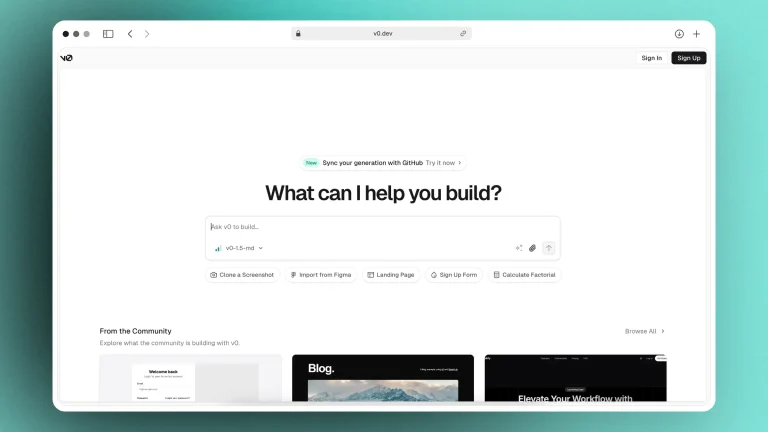
v0 is best known for…
- Beautiful UI output
v0 consistently produces clean, modern components using industry-standard UI patterns. - Strong integration with Vercel tools
Everything works smoothly with Vercel hosting, deployments, and Next.js projects. - Fast prototyping
You can go from a text prompt to a working UI layout in minutes. - Component-level control
Developers can tweak the code however they want after generation.
Why you might prefer v0 over Cursor
v0 is the better pick when you care deeply about front-end visuals and want a starting point that already looks polished. Cursor can write UI too, but v0 is more opinionated and produces layouts that feel more cohesive out of the box. If your priority is design quality and working inside the Vercel ecosystem, v0 typically feels smoother.
Shipper, on the other hand, goes a step beyond both. It doesn’t just generate UI or code; it builds the full product foundation in one place. Shipper handles the design, the backend logic, the marketing steps, the “what should I do next,” and even helps you shape a business idea rather than just an interface or repo.
(You can read more related articles on V0 Alternatives)
What is Cursor?
Cursor is an AI-powered coding environment designed for developers who want AI woven directly into their workflow. It looks and feels like a fast, lightweight VS Code that constantly collaborates with you. Instead of switching between ChatGPT and your editor, Cursor merges both worlds so you can generate, refactor, and debug code inside the editor itself.
Cursor is especially strong for people who already understand development. It doesn’t hide the complexity of coding; it tries to accelerate it. You stay in full control of your codebase, and Cursor suggests changes, catches issues, and automates repetitive work.
Teams that rely on GitHub workflows also like Cursor because it integrates deeply with repos, branches, versioning, and code review logic.

Cursor is best known for…
- Deep AI coding assistance
Write, refactor, and fix code with extremely detailed prompts directly inside the editor. - Full repo awareness
Cursor always understands your entire project, not just the snippet in front of you. - Great for debugging
It can analyze your errors, find inconsistencies, and suggest fixes. - GitHub-centered workflow
Ideal for teams working in branches, PRs, CI/CD, and modern engineering practices.
Why you might prefer Cursor over v0
Cursor is the clear winner when you want more control over logic, backend systems, and full-stack complexity. If you already write code and want an AI assistant that fits into your development workflow, Cursor will feel more powerful and flexible than v0. It’s basically a supercharged coding partner that works across your entire repo, not just UI.
Shipper still stands apart from both, though, because it removes the need to manage a repo in the first place. It builds your product from the prompt and gives you a clean place to edit visually, adjust logic, and launch. No setup. No juggling tools. No technical overhead. Something Cursor and v0 are not designed to solve.
What are they best suited for
v0 is best for people who want results that look good immediately. It’s a design-first tool, so you get polished UI sections, components, and full pages without touching Figma. If you already have a sense of how you want things to appear on screen and you’re comfortable refining the code afterward, v0 feels very natural. It’s especially suited for founders, designers, or frontend-leaning developers who want to move fast without obsessing over backend logic on day one.
Cursor is made for technical users who want AI living inside their actual development workflow. It works like a coding partner that understands your project structure, your tech stack, and the files you’re editing. Cursor is great when you’re building real production features, debugging issues, or shipping a full-stack product. If you write code every day and want an assistant that speeds up everything from refactoring to creating new features, Cursor is the better fit.
Shipper sits comfortably between both worlds. You don’t need designer instincts like you do with v0, and you don’t need engineering experience like you do with Cursor. One prompt can generate a product that looks clean, behaves properly, and includes the foundations of an actual business. You can edit visually, ask for improvements, and publish a working version in minutes. It’s best suited for non-technical founders, solo builders, and anyone who wants to turn an idea into something real without juggling UI tools, code editors, or deployments.
Side-By-Comparison
| v0 | Cursor | Shipper | |
|---|---|---|---|
| Best for | ⭐⭐ UI and quick prototypes | ⭐⭐⭐ Full-stack coding | ⭐⭐⭐ Non-technical founders |
| Integrations | ⭐⭐⭐ Vercel tools | ⭐⭐⭐ GitHub workflows | ⭐⭐⭐ Visual builder + Advisor |
| Learning curve | ⭐⭐ Medium | ⭐ Low | ⭐⭐⭐ Very easy |
Other related articles
What is the main difference between v0 and Cursor?
v0 is a design engine. It creates the UI layer quickly, cleanly, and beautifully. It’s meant to give you a polished front-end without needing to open Figma or handwrite components.
Cursor is a coding engine. It works across your entire repo, helping you write logic, fix bugs, build APIs, and ship production backends. It’s meant for developers who want deeper control, not just UI generation.
Both are strong in their own lanes, but they don’t overlap much. One is for design-first creation. The other is for code-first development.
Shipper is built for an entirely different kind of user: someone who wants to turn one idea into a working product without juggling five tools or learning how to deploy things manually. Unlike v0 and Cursor, Shipper handles the UI, the logic, the structure, the deployment, and even the next steps for launching the business behind it. It feels less like a tool and more like having a tiny founding team inside your pocket.
Price Comparison: v0 vs Cursor
When comparing v0 and Cursor, their pricing reflects their target users. v0 offers affordable plans for designers focused on quick UI generation, while Cursor is priced for heavy coding workflows, with higher limits and advanced features for engineering teams.
If you prioritize visual building, v0’s plans are more accessible. For deep coding assistance and powerful models, Cursor’s premium options provide greater value.
Shipper offers a single flat plan for founders looking to develop a complete product from their ideas.
| Plan / Pricing | |
|
|
Winner |
|---|---|---|---|---|
| Free plan | $0/mo, $5 credits, 7 msgs/day | Free, limited usage | No free tier, demo only | v0, Cursor |
| Main individual plan | $20/mo + credits | $20/mo, higher limits | $25/user/mo, 100 credits | Depends on coding needs |
| Power tiers for heavy users | $30–$100/user/mo | $60 or $200/mo | Enterprise (custom) | Cursor for code, Shipper for teams |
| Team plans | $30/user/mo | $40/user/mo + SSO | Teammates coming soon | v0 today, Shipper later |
| Enterprise | Custom, SSO, SLAs | Custom, admin tools | Custom, SSO, support | Depends on company |
| AI usage model | Credits + tokens | Usage per model calls | Credits for full builds | Shipper for finished products |
| Pricing | $0 → enterprise | $0 → $200/mo | $25/user/mo → enterprise | Cursor for coders, Shipper for founders |
v0 pricing highlights
- Free – $0 per month, includes $5 of monthly credits, deploys to Vercel, GitHub sync, Design Mode, 7 messages per day.
- Premium – $20 per month, includes $20 of credits plus daily free credits and higher limits.
- Team – $30 per user per month with shared credits and centralized billing.
- Business – $100 per user per month with training opt out and more controls.
- Enterprise – custom pricing with SAML SSO, RBAC, priority performance, and SLAs.
v0 uses a credits and tokens model on top of the base subscription. The app plans cover product usage, then there is separate model pricing for the v0 Agent and their medium or large models, billed per million tokens. This suits teams that already understand token based billing and want tight control over infra spend.
For most solo builders, the Free and Premium tiers are enough to ship sites and simple apps while you experiment with templates and Design Mode. Teams that are already on Vercel get extra value, since billing and deployment stay inside the same ecosystem.
Cursor pricing highlights
- Hobby – Free, includes a one week Pro trial, limited Agent requests, and limited Tab completions.
- Pro – $20 per month, extended Agent limits, unlimited Tab, background Agents, and maximum context windows.
- Pro+ – $60 per month, everything in Pro with roughly 3x usage on supported models.
- Ultra – $200 per month, everything in Pro with around 20x usage and priority access to new features.
- Teams – $40 per user per month, everything in Pro plus team billing, analytics, privacy controls, RBAC, and SAML or OIDC SSO.
- Enterprise – custom pricing with pooled usage, invoice billing, SCIM, audit logs, and advanced admin controls.
On top of this, Cursor offers a Bugbot add-on, with its own free and paid tiers for automated code review and bug fixing across pull requests. Pricing is focused on usage and model access, so it fits companies that want to push a lot of AI coding volume through a single IDE and need clear controls for security and spend.
If you are a professional engineer or a team lead, the value of Cursor grows with the number of hours you spend coding. The more you live in your editor and GitHub, the easier it is to justify Pro, Pro+, or Teams compared to tools that only help with surface-level code generation.
Shipper pricing highlights
- Standard – entry-level plan for people testing ideas with smaller credit needs.
- Pro – $25 per user per month, 100 credits per month, everything in Standard, removes the Shipper badge, and gets access to teammates soon.
- Enterprise – custom pricing with dedicated support, custom integrations, SSO, and training opt out.
Shipper uses a credit-based model that maps to real product output instead of raw tokens. Credits cover AI building, redesigns, refinements, and Advisor sessions that help with copy, marketing, monetization, and product structure. The idea is simple: one monthly price gives you enough capacity to build and ship full products, not just snippets of code.
For non-technical founders, this is often cheaper than hiring even one developer. The pricing page shows that a single US or EU based developer can easily cost around four thousand dollars per month, while a Shipper plan that lets you ship similar output sits around fifty to one hundred dollars. If you care more about getting a working app and less about counting tokens, Shipper’s credit model is usually the easiest to reason about.
Features Comparison: v0 vs Cursor
Once you understand pricing, the next big question is simple: Which one actually helps you build faster, better, or with less frustration? That’s what this section is for. Instead of broad claims, we’ll compare how each tool behaves when you’re actually building, the UI, the coding workflow, the intelligence of the AI, and the final step of getting your app live.
Each tool has a very different personality.
v0 feels like a polished design studio.
Cursor feels like a powerful engineering assistant.
Shipper feels like a co-founder who handles both product and technical thinking.
Let’s break it down feature by feature so you can see where each one shines.
1. UI & Visual Building
The UI layer is often where people feel the biggest difference between these tools. Some want drag-and-drop simplicity, others want full code control, and others just want the AI to assemble the structure before they refine anything.
This feature is all about how easily you can turn an idea into a clean, navigable interface.
1.1. v0’s UI & Visual Builder
v0 is built with design-first creators in mind. Its interface feels immediately approachable if you care about layouts, spacing, and visual polish.
- A smooth visual editor that behaves like a design tool
- Generates components in React + Tailwind with clean code
- Large library of templates and example UIs
- Great for quickly producing landing pages, dashboards, and marketing sites
In practice: You describe a UI, v0 drafts it, and you refine it visually. You rarely have to touch the code unless you want to. It’s perfect for people who want beauty and structure with minimal technical overhead.
1.2. Cursor’s UI & Visual Builder
Cursor doesn’t aim to be visual, and that’s intentional.
- Everything happens in the code editor
- The UI is generated through prompts, but you refactor manually
- No drag-and-drop, no design mode, no preview canvas
- Ideal for developers who want precision at the code level
In practice: Cursor gives you scaffolding, but the final UI depends entirely on your coding skill. It’s extremely powerful, but only for those comfortable editing JSX/TSX.
1.3. Shipper’s UI & Visual Builder
Shipper tries to offer the best of both worlds without overwhelming non-technical users.
- AI can draft entire screens from a single sentence
- Visual editing is intuitive, move, resize, adjust without coding
- Layout suggestions help prevent “ugly UI” mistakes
- Code is available if you want it, but not required
In practice: Shipper feels like a co-pilot that generates UI structure and then lets you refine interactively. Ideal for founders who want fast results without writing CSS.
1.4. Who does UI building better?
If what you need is stunning UI quickly, v0 offers the most polished experience. Cursor satisfies developers who insist on controlling everything in code. Shipper is best for beginners, but in raw “UI power,” v0 edges ahead.
Winner: v0 (Shipper best for beginners, but v0 wins overall)
2. Coding Workflow & Refactoring
This feature is where Cursor truly differentiates itself. If your priority is engineering workflows, complex logic, or long-term code maintenance, the tools behave very differently.
2.1. v0’s Coding Workflow
v0 generates code behind the scenes, but it’s still a design-forward tool.
- Good for small-to-medium components
- Less flexible when modifying deep logic
- Limited debugging assistance
- Best suited for front-end UI, not application logic
In practice: v0 is not where you’d build an entire production backend or advanced application logic.
2.2. Cursor’s Coding Workflow
Cursor is the closest thing to having an AI engineer inside your IDE.
- AI Agent understands your file structure and dependencies
- Refactors entire repositories with a single instruction
- Debugs code and suggests fixes
- Background agents improve your code even when not prompted
- Deep integration with GitHub for PR reviews
In practice: Cursor is built for engineering teams who want speed and power in a familiar code-based environment.
2.3. Shipper’s Coding Workflow
Shipper supports code, but doesn’t force it on you.
- You can open a code editor, but you’re never required to
- AI updates code behind the scenes as you refine the app
- Advisor explains technical concepts in simple language
- Great for founders who don’t want to spend hours debugging
In practice: Shipper provides “coding without coding,” but it’s not meant to compete with Cursor for heavy engineering tasks.
2.4. Who handles coding better?
Cursor dominates here. It’s simply a superior coding tool, and developers will feel at home instantly. v0 and Shipper serve different audiences.
Winner: Cursor
3. AI Agents & Guidance
As AI becomes the new “operating system” for building software, how each tool guides your thinking matters more than ever. Some tools help you with code, others with design, and others with product strategy.
3.1. v0’s AI Guidance
v0’s AI is strongest at UI generation.
- Great at producing components and layouts
- Helps brainstorm design variations
- Limited outside of UI and front-end scaffolding
In practice: If your priority is adjusting design details, v0’s AI feels helpful and responsive.
3.2. Cursor’s AI Guidance
Cursor is like having an AI senior engineer on your team.
- Helps you understand errors
- Rewrites entire modules on command
- Optimizes functions, improves performance, restructures logic
- Not built for business or product decisions
In practice: Cursor’s AI keeps you moving efficiently as long as your questions are code-related.
3.3. Shipper’s AI Guidance
Shipper’s Advisor is broader and more strategic.
- Helps with copywriting, UX, onboarding flows, and naming
- Suggests product directions and growth steps
- Can analyze your app and tell you what’s missing
- Feels like having a technical mentor + product strategist
In practice: Shipper reduces uncertainty for first-time builders in a way the other two tools simply don’t address.
3.4. Who does AI guidance better?
Cursor is the best if your world is code. Shipper is the best if your world is building a product, not just writing functions.
Winner: Shipper
4. Deployment & Launch
The final step of building an app is getting it live, and this is often where beginners get stuck. Each tool has a different approach.
4.1. v0’s Deployment
Because it’s part of the Vercel ecosystem:
- Deployment is extremely smooth
- You get stable hosting, predictable performance, and great DevOps defaults
- Easy to integrate with GitHub
In practice: If you want production-grade hosting without thinking, v0 is a great choice.
4.2. Cursor’s Deployment
Cursor doesn’t deploy apps itself.
- Assumes you already use AWS, Vercel, or similar
- Meant to complement an engineering workflow, not replace it
- Perfect for teams with DevOps pipelines already in place
In practice: Flexible but not beginner-friendly.
4.3. Shipper’s Deployment
Shipper aims to make launching frictionless.
- One-click deployment inside the platform
- Handles hosting, SSL, environment variables
- Helps you connect a domain
- Removes DevOps for non-technical users
In practice: Shipper reduces the “last mile anxiety” most founders feel when trying to go live.
4.4. Who does deployment better?
v0 wins for developers who want reliability and freedom. Shipper wins for beginners, but since this feature is technical, the win goes to v0.
Winner: v0
Customer Support: v0 vs Cursor
When something breaks, behaves strangely, or just refuses to deploy, customer support suddenly becomes more important than any feature on the pricing page. A good support system saves you hours, keeps your project moving, and prevents you from getting stuck on problems you shouldn’t have to solve alone.
That’s why this section looks at how v0 and Cursor support their users, and how Shipper compares.
v0 support options
v0 uses the broader Vercel support ecosystem, which is well-established but tiered depending on your plan. Most help is self-serve unless you’re on business-level contracts.
What v0 offers:
- ✔️ Help Center & Documentation
Clean, detailed guides for UI, templates, deployment, and credits usage. - ✔️ Community forums via Vercel
Users ask questions publicly and rely on other developers to answer. - ✔️ Email support (Team & Business plans)
Available only on paid team tiers. - ✔️ Priority support for Enterprise
Includes SLAs, performance guarantees, and faster response times.
If you’re on a free or individual plan, support is mostly self-directed. Bigger teams on Vercel Business or Enterprise get structured help and technical response times. v0 is reliable, but not very hands-on for smaller builders.
Cursor support options
Cursor is built for developers, and their support system reflects that, strong documentation, strong technical reporting tools, but not as much “starter-friendly” handholding.
What Cursor offers:
- ✔️ Extensive documentation
Covers models, usage, debugging workflows, integrations, and settings. - ✔️ GitHub-based issue reporting
Developers can surface problems connected to repos. - ✔️ Email support (Teams & Enterprise)
More structured help for paid organizations. - ✔️ Priority access for Ultra + Enterprise
Faster escalations, account management, and higher-level guidance. - ✔️ Active community (X, Discord-style threads)
Although not formally centralized, many devs share fixes.
Cursor support is excellent for developers who know what they’re looking for. However, new founders or non-technical users may feel like the documentation assumes prior engineering knowledge.
Shipper support options
Shipper is built for people who want to build products, not debug infrastructure, so its support is intentionally more accessible and more human.
What Shipper offers:
- ✔️ Live chat support inside the app
Real humans, not just automated responses. - ✔️ Email support for all users
Nobody is locked behind a paywall for help. - ✔️ Discord server for real-time community help
Builders help each other, share wins, and troubleshoot. - ✔️ r/Shippernow Subreddit
Open space for questions, feedback, and project showcases. - ✔️ Advice from The Advisor
A built-in AI guide that explains problems in simple language and tells you what to fix next.
Unlike v0 and Cursor, Shipper puts more emphasis on accessible support, especially for beginners. Even without a technical background, you always have somewhere to ask questions, and someone to help.
What we always wanted v0 and Cursor to be
Both v0 and Cursor shine in their own lanes. v0 gives you great visuals but leaves you stuck the moment you need real product logic. Cursor is amazing for engineering tasks but expects you to already know how to code, which makes it tough for beginners or founders who want to move quickly without getting lost in error messages.
That’s where Shipper steps in. It fills the gaps both tools leave open: it explains things simply, builds complete apps from a single idea, and guides you through product, design, and growth, not just code. Instead of choosing between a visual builder or a coding assistant, you get both, working together.

Shipper gives you everything you wish v0 and Cursor offered in one place:
- AI that builds the entire app, not just screens or functions
- Visual editing without coding, perfect for first-time builders
- An AI Advisor that explains, guides, and suggests improvements
- Fast deployment, handled for you in one click
- A tool designed for non-technical founders, not just developers
With Shipper, the question isn’t “Can I build this?” but rather “What should I build next?” It’s the easiest way to turn ideas into real, working products, without switching between multiple tools.
The intersection of v0 and Cursor is Shipper 🙂
v0 shines for beautiful interfaces and Cursor is a power tool for people who live in code. Shipper sits in the middle. You describe what you want once and get a complete app that looks good, works properly, and is ready to launch.
- • AI codes the app for you
- • Edit layout and content visually
- • Advisor suggests features and growth ideas
- • Go live on the web in 1 click
The Verdict: What’s Better, v0 vs Cursor
After spending enough time inside both v0 and Cursor, the truth is that each one shines in completely different moments. v0 feels like a fast companion when you want clean UI screens without touching code. Cursor feels like having an AI engineer sitting beside you, powerful, precise, and ready to debug what would normally take hours. They’re both great, just for different kinds of builders.
If your workflow is mostly visual and you want something that generates polished components instantly, v0 pulls ahead. It removes a lot of friction for designers and founders who prefer starting from layout before thinking about logic. Cursor, however, becomes the natural winner the moment real engineering work begins. It handles complex files, long debugging sessions, and multi-step refactors in a way v0 simply wasn’t built to.
But here’s the interesting part: even when using both tools together, there’s still a missing piece. Neither v0 nor Cursor is built to guide non-technical founders from idea → app → launch. One stops at UI; the other expects you to continue the rest of the journey in code. That’s where many builders start to feel stuck.
Shipper solves that gap in a way that feels… refreshing. Instead of choosing between a visual builder or a coding assistant, you get a tool that actually combines both. It explains decisions, builds complete features from one prompt, and helps you polish the product instead of wrestling with syntax errors or UI quirks.
So if you’re choosing strictly between v0 and Cursor, pick the one that matches your workflow: v0 for visuals, Cursor for engineering. But if you’re looking for the tool that helps you actually ship something real, without bouncing between multiple apps, Shipper quickly becomes the more obvious answer.
In the end, the best tool isn’t the one with the longest feature list. It’s the one that helps you build faster, understand your product better, and keep momentum. And right now, that’s exactly where Shipper stands.
The intersection of v0 and Cursor is Shipper 🙂
v0 shines for beautiful interfaces and Cursor is a power tool for people who live in code. Shipper sits in the middle. You describe what you want once and get a complete app that looks good, works properly, and is ready to launch.
- • AI codes the app for you
- • Edit layout and content visually
- • Advisor suggests features and growth ideas
- • Go live on the web in 1 click
FAQ: v0 vs Cursor
1. What’s cheaper, v0 or Cursor?
Both tools offer free tiers, but their paid plans differ depending on how you work.
- v0 Premium is $20/month with monthly credits included.
- Cursor Pro is also $20/month, but includes coding-focused upgrades like unlimited Tab completion.
Cursor becomes more expensive at higher tiers (Pro+ and Ultra), while v0’s pricing grows mainly when teams scale. Your total cost depends on whether you use more coding power (Cursor) or interface generation (v0).
2. Is v0 or Cursor better for beginners?
v0 is generally easier for beginners because it focuses on UI generation, components, and quick prototypes. It requires less technical knowledge and gives fast visual results.
Cursor assumes you’re comfortable working with code, GitHub, and debugging workflows. It’s more powerful for developers, but it comes with a steeper learning curve.
3. How is v0 different from Cursor?
v0 is a visual-first builder that focuses on layouts, components, and polished UI screens. It’s ideal for early product exploration, mockups, and small features.
Cursor is a developer assistant designed for real engineering tasks, refactoring, debugging, writing complex code, and managing entire repositories.
In short:
- v0 = UI generation
- Cursor = full-stack coding
4. Which tool is better for full-scale app development?
Cursor is generally the better fit once you move beyond prototype-level work. It handles:
- multi-file updates
- long debugging chains
- backend logic
- real-world engineering workflows
v0 can support early development, but it isn’t built to manage production-level codebases on its own. For long-term development, Cursor provides more depth and flexibility.
Earn 50% + lifetime recurring commissions
Share Shipper with your audience and get paid every month, for life.
Earn 50% + lifetime recurring on every sale
Share Shipper with your audience and get paid every month, for life — no cap on earnings.
Earn 50% + lifetime recurring on every sale
Share Shipper with your audience and get paid every month, for life — no cap on earnings.






