
Top 5 Meku Alternatives for AI App Building (All Tested)


I ended up writing this guide on Meku alternatives because of how my very first experience with Meku went.
- I tried to build a simple app (a Trello alternative)
- But it broke almost immediately
- The AI said “click here to fix it” message, so I clicked…
And the same thing happened again. And again.
After a few loops of that, I just closed the tab and moved on.
It wasn’t the end of the world, but it made me step back and think about how many AI app builders I’ve tried over the last few years. I’ve tested pretty much all of them at this point – the popular ones, the experimental ones, the polished ones, and the ones that fall apart the moment you ask for something slightly unusual.
So instead of trying to force Meku to work, I figured I’d put together the list I wish I had when I first started exploring this space. These are the alternatives that actually held up when I tried to build real projects, not just toy demos.
#1 Meku Alternative
Shipper takes the same kind of prompt you tried in Meku and actually gets you to a working product. No fix loops. No “try again” errors. Just a full app or site you can edit visually and publish.
- ✔ Prompt to real app
- ✔ No-code friendly
- ✔ Fixes bugs alone
- ✔ Great AI assistance
What is Meku.dev?
Answer: Meku.dev is an AI tool that builds web apps and websites from a prompt.
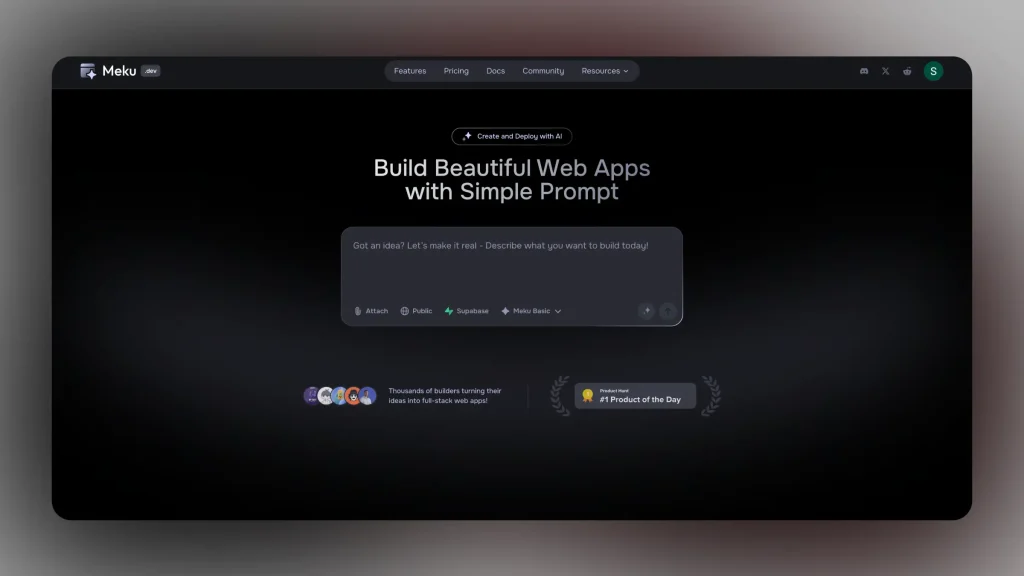
You describe what you want, and it generates the code, the layout, and a working preview you can edit. It’s meant for people who want AI speed but still want real code they can export and customize.
Think of it as an AI no-code app builder that tries to handle the heavy lifting and give you a functional app without starting from zero.
Why Look For a Meku Alternative?
1. It doesn’t always deliver what it promises
I tested Meku.dev hoping for “one prompt full site” and there were times it stalled, gave errors, or looped back to “Click here to fix” without really solving the issue.
2. Limited guidance for non-technical users
While Meku.dev is pitched to developers and makers alike, many non-technical users report feeling lost once the prompt ends and editing begins. The learning curve and required familiarity with things like React, Tailwind, or GitHub integration still show up.
3. Scaling and customization can be rough
When you push beyond the basics, especially with complex logic, custom design, or large apps, Meku.dev tends to get less smooth. Some reviews point out limitations in customization, export workflow, or infrastructure flexibility once you try to go big.
Listed: The 5 Best Meku.dev Alternatives for AI Web App Building
Currently, these are the best Meku alternatives: Shipper, Lovable, Base44, Cursor and Replit.
Let’s start tackling them one by one.
1. Shipper
Website → shipper.now

When Meku kept looping on me with the “click here to fix” message, Shipper was the first tool that actually pulled me out of that frustration cycle. I typed the same idea into Shipper that Meku struggled with, and instead of error messages or half-finished layouts, it built something that looked and behaved like a real product on the first try. It wasn’t magic, but it felt like someone finally understood what I wanted.
The thing that separates Shipper from Meku is how predictable it feels.
You write a prompt and it doesn’t just generate screens – it builds the whole structure, thinks ahead, and fills in the parts you forgot to mention. If something breaks or you want to change direction, you don’t get stuck in a fix loop. You just tell it what to do next, and it adjusts everything around your new idea.
Another difference: Shipper isn’t just trying to write code fast.
With The Advisor, it sees the bigger picture of what you’re building.
Who it’s for. How it should look. What the flow should feel like.
It even suggests ways to position the idea or make the site easier to navigate. None of the “you’re on your own after generation” feeling you get with Meku.
And because most of the technical glue (APIs, auth, databases, routing) happens behind the scenes, you don’t hit that wall where the AI stops helping and you’re suddenly expected to debug frontend code yourself.
If your main issue with Meku was consistency or reliability, Shipper is the closest thing I’ve found to a “type your idea and relax” experience.
Pros of Shipper
- Builds full apps and websites from one prompt, not just the UI.
- No “fix loops” – edits feel smooth and predictable.
- Super friendly for non technical users.
- Great suggestions for flow, design, and clarity.
- Handles all background technical work for you.
Cons of Shipper
- Moves fast with updates, so you’ll see new features often.
- Advanced devs may want more manual code control.
- Because it thinks ahead, it’s a bit opinionated (in a good way).
Best for
Anyone who wants a stable, beginner friendly AI builder that doesn’t break the moment the idea gets a little bigger.
What’s better, Meku or Shipper?
From my own experience, Shipper was far more consistent. Meku has great potential, but it struggled with basic builds and kept dropping me into those “try again” loops. Shipper, on the other hand, actually finished the project, handled edits cleanly, and didn’t make me debug things the AI created. If you want something that just works from the first prompt, Shipper feels noticeably more reliable.
What else should you know about Shipper?
Shipper doesn’t stop at generating a layout.
It tries to understand your idea and shape it into something that feels like a real product. It helps with structure, design, copy, and even the kind of small details most builders ignore.
And if you’re not technical, that’s where it shines – you don’t need to know what an API or a route is. You just talk to it and it handles the rest.
#1 Meku Alternative
Shipper takes the same kind of prompt you tried in Meku and actually gets you to a working product. No fix loops. No “try again” errors. Just a full app or site you can edit visually and publish.
- ✔ Prompt to real app
- ✔ No-code friendly
- ✔ Fixes bugs alone
- ✔ Great AI assistance
2. Lovable
Website → lovable.dev

Lovable showed up for me when I had a simple idea and just wanted something fast. After the frustration of testing Meku (and trying to explain the idea five times), I turned to Lovable and typed something like “simple multi-page website for a freelancer” and within minutes I had a working structure I could edit visually and tweak without feeling lost.
The main difference between Lovable and something more advanced like Shipper is that Lovable doesn’t lead you through strategy or deep architecture. It gives you a clean foundation and gives you the room to own the idea rather than letting the tool run it. That made it feel much more comfortable when I was building prototypes or early concepts.
If you’re building something straightforward and don’t need the builder to think five steps ahead, Lovable makes the process feel relaxed and fun. It won’t hold your hand as much as some tools, but it also won’t try to unlock features you’re not ready for.
Pros of Lovable
- Very fast to get started and super accessible.
- Clear visual editing and minimal complexity.
- Great for prototypes or simple sites.
- Friendly for non technical users.
Cons of Lovable
- Less proactive with ideas and business-level guidance.
- Not ideal if you expect highly custom flows or complex logic.
- You need to know what you want to a certain degree – it won’t lead the vision.
- Limited flexibility compared to top-tier builders.
Best for
Someone who has a clear, simple website idea and wants to turn it into reality quickly without the tech being the barrier.
But hey, if Lovable’s not the right tool for you, there’s always something else. We’ve written more about that in our Top Lovable Alternatives guide.
3. Base44
Website → base44.com

Base44 was one of the smoother tools I tried after Meku, mostly because it doesn’t overwhelm you. It gives you a visual editor, built-in backend features, and a pretty friendly workflow for building small to medium projects. It’s not as proactive or polished as the top builders, but it’s stable, predictable, and easy to understand.
What I liked most is that Base44 doesn’t make you juggle databases or external tools. Everything is built in, so you can get a working site up without wiring different services together. It’s a good middle ground if you want something more structured than Lovable but not as opinionated as Shipper.
Pros of Base44
- Clean editor with built-in backend and database.
- Good for beginners who want simple structure without confusion.
- Stable and predictable — not too many surprises.
- Easy to build basic dashboards, portals, and small apps.
Cons of Base44
- Not as powerful or proactive as top AI builders.
- Limited when you push beyond simple logic.
- Lacks deeper guidance for product decisions.
- You may outgrow it if your idea scales.
Best for
Beginners who want a calm, hassle-free builder with built-in backend tools and minimal setup.
Not fancying this tool? Top Base44 Alternatives
4. Cursor
Website → cursor.com

Cursor is where I ended up when I wanted full control and didn’t mind getting closer to real code. After trying tools like Meku – which promised everything but struggled with execution – Cursor felt like the opposite.
It doesn’t pretend to be no-code.
It gives you an AI-powered IDE that actually delivers.
When I tested it, the biggest difference was reliability. You write a prompt, and Cursor creates real files, real components, and fixes errors without looping or breaking. It’s basically VS Code with an AI that understands your whole project.
BUT, it’s definitely not for beginners. You need to be comfortable with file structures, frameworks, and editing code directly. And so, if you like the idea of AI helping you build, but you don’t want to be locked into a visual builder, Cursor is one of the most solid choices.
Pros of Cursor
- Real code generation and project-wide understanding.
- Great for fixing bugs, refactoring, and adding features.
- Works like an AI-supercharged VS Code.
- Extremely reliable for technical projects.
Cons of Cursor
- Not suited for non technical users.
- Requires comfort with code and frameworks.
- No visual editing or drag-and-drop.
- Not ideal if you want a quick, simple website.
Best for
People who want full control, real code, and an AI assistant that understands the whole project — not a no-code builder.
Take a look at Cursor’s latest financial statistics!
5. Replit
Website → replit.com

Replit was one of the first tools I went after Meku failed to generate a stable build. It’s not a traditional no-code tool, but the AI inside Replit is strong enough that you can build full websites and apps without feeling like you’re drowning in code. The difference is that Replit gives you real files, real structure, and an editor that doesn’t crash when something gets complicated.
When I tested it, the AI handled bug fixes, refactoring, and full component generation without looping or breaking, something Meku struggled with.
But Replit expects you to meet it halfway.
You don’t need to be a senior developer….
But you should be comfortable inside a code editor.
If you like the idea of AI helping you build but want more reliability and control than visual builders offer, Replit feels remarkably solid.
Pros of Replit
- Real code generation with strong AI support.
- Very reliable for technical builds.
- Great for learning or improving coding skills.
- Fast previews and easy deployment.
Cons of Replit
- Not beginner friendly.
- Requires comfort with code and file structures.
- More hands-on than prompt-only builders.
Best for
Anyone who wants AI-assisted coding, full control, and a reliable way to build real production websites or apps without relying solely on a visual interface.
Not technical? Check out these Replit alternatives.
How to Choose a Meku Replacement
Now that you’ve seen the best replacements for Meku, the choice mostly comes down to how you prefer to build and how much control you want.
Each tool solves Meku’s weak spots in a different way…
So here’s a simple way to narrow it down:
1/ Do you want something that actually finishes the build from the first prompt? Go with Shipper. It’s the smoothest upgrade from Meku and doesn’t break when your idea grows.
2/ Do you prefer something lightweight and beginner friendly? Pick Lovable. Great for simple sites and no pressure if you’re just experimenting.
3/ Want full control with real code instead of chasing errors? Choose Cursor or Replit. They’re rock solid for technical users and never loop mid-generation.
4/ Need a calmer workflow with built-in backend tools? Base44 is a safe middle ground if you want simple logic without touching infrastructure.
5/ Building something you want to scale later? Prioritize tools that handle structure, auth, data, and routing properly, not just pretty UI.
The key is this:
If Meku held you back because of looping errors or unfinished builds, you want a tool that can handle both your first prompt and your next ten edits without collapsing. Pick the one that matches your style, not just the promise on the homepage.
How We Test Meku Alternatives
When we review Meku alternatives, we don’t rely on demos or marketing pages.
We take the exact same prompts that caused issues in Meku and rebuild them across every other platform. The goal is simple: see which tools actually ship a working product instead of getting stuck in loops or half-finished builds.
Here’s the testing framework we use:
1/ Reliability of the First Build: 30 percent
Does the app or site generate fully on the first try, or does it break like Meku often does?
2/ Editing and Iteration: 20 percent
Can you change your idea without everything collapsing or looping back into “Fix this” prompts?
3/ AI Stability and Error Handling: 15 percent
When something goes wrong, does the tool recover cleanly or freeze the way Meku sometimes does?
4/ Beginner Experience: 15 percent
Can non technical users build without touching code or debugging AI mistakes?
5/ Depth of Features: 10 percent
Does the builder give you real functionality like auth, data, routing, and logic, not just UI?
6/ Learning Curve: 10 percent
How quickly can someone start building without reading docs or configuring frameworks?
I didn’t write this after skimming Meku’s homepage. I actually tried it, ran into the same loops everyone talks about, and then rebuilt those ideas across every alternative.
No sponsorships, no paid placements — just real testing, and honest notes from someone who’s been building apps for a long time.
Read our methodology →All Meku Alternatives Compared
Final Verdict: Which Meku Alternative Should You Pick?
If Meku kept you stuck in loops or left your build half-finished, the simplest takeaway from all our testing is this: some tools are fun to try, but only a few can actually carry a project to the finish line.
Shipper.now is the one that consistently did the job. Same prompts, same ideas, but with full apps that generated cleanly, updated reliably, and didn’t fall apart on the second edit. If you want the “type it once and watch it take shape” experience Meku aims for, this is where you’ll feel that click.
Different builders shine in different places, though, so here’s the quick map:
- Shipper.now → when you want the whole thing built from one prompt
- Lovable → when you want simple, friendly prototyping
- Base44 → when you prefer slower, calmer building with built-in backend
- Cursor → when you want to touch real code and keep full control
- Replit → when you want AI coding plus instant hosting
- Bolt.new → when you need boilerplate and a dev-friendly start
The real verdict is simple:
Choose the tool that moves you forward without babysitting it.
For most people leaving Meku, that ends up being Shipper – not because it’s louder or flashier, but because it quietly finishes the work you expected from the start.
#1 Meku Alternative
Shipper takes the same kind of prompt you tried in Meku and actually gets you to a working product. No fix loops. No “try again” errors. Just a full app or site you can edit visually and publish.
- ✔ Prompt to real app
- ✔ No-code friendly
- ✔ Fixes bugs alone
- ✔ Great AI assistance
FAQ: Meku.dev Competitors
1. Is Meku.dev any good?
Meku.dev has potential and some impressive features, but many users (including myself) found it unreliable for full builds. Frequent “fix loop” errors and incomplete outputs make it better for testing ideas than shipping products.
2. What’s better than Meku AI?
There are a handful of tools that outperform Meku when it comes to actually delivering working builds. For example:
- Shipper.now — it generates full apps from one prompt, handles logic & hosting, and edits reliably.
- Lovable — perfect for simple prototypes with minimal friction.
- Cursor / Replit — ideal if you want coding with AI but full control.
If Meku left you stuck, one of these will likely feel like an upgrade rather than a restart.
3. Is there a free alternative to Meku.dev AI?
Yes, many of the alternatives offer free tiers or trial plans. For instance, Shipper.now and Lovable both allow you to start without paying, so you can test an idea and see whether the workflow works for you before investing.
Other alternatives guides:
Anything | Same | Rocket | Blink | Floot
Earn 50% + lifetime recurring commissions
Share Shipper with your audience and get paid every month, for life.
Earn 50% + lifetime recurring on every sale
Share Shipper with your audience and get paid every month, for life — no cap on earnings.
Earn 50% + lifetime recurring on every sale
Share Shipper with your audience and get paid every month, for life — no cap on earnings.






