
Bolt vs Replit (2026): Which’s Better for App Building?


I’ve used both Replit and Bolt long enough to see why people constantly compare them. They solve similar problems in completely different ways. Replit feels like a huge creative playground where millions of people build apps, experiment, and vibe code without worrying about setup. Bolt feels more like a focused, professional cockpit built for people who want fast, production-ready output with a strong coding agent steering the work.
Both tools excel in different areas:
- Replit is great for creative freedom, allowing you to remix ideas and benefit from AI while keeping things user-friendly.
- Bolt is more focused, enabling quick generation of polished apps, managing larger projects, and utilizing powerful agents to test and refine your code.
If you’re undecided, I’ll guide you through their real-world use, AI capabilities, and which tool suits your product vision. This isn’t a biased comparison; both tools have unique strengths. I’ll help you determine which one aligns best with your workflow and project goals.
P.S.: I’ll also introduce another tool, Shipper, which is worth considering. It not only matches what Replit and Bolt offer, but often beats them on features, ease of use, and cost. If you’ve ever wished for a tiny founding team in your pocket that handles code, design, and product thinking together, that part will be interesting.
Here’s what I’ll compare in this guide:
- How fast Replit and Bolt take you from idea to something working
- How technical each tool feels once you start editing
- How beginner friendly they are
- AI depth and real day-to-day experience
- Pricing and long term value
- Where each one wins, and where the cracks show up
Summary of Replit vs Bolt
If you are in a hurry and just want the quick picture, this table is your snapshot. It sums up how Replit, Bolt, and Shipper compare on the things that matter when you are trying to turn an idea into a working product.
You can skim it now, pick out what stands out for your use case, and then dive into the deeper sections later if you want the full breakdown.
| Feature |

|

|

|
Winner |
|---|---|---|---|---|
| Best for | Vibe coding and agents for all skill levels | Professional builders shipping production apps | Non-technical founders and small teams | Depends on your background |
| Ease of use | Replit, Shipper | |||
| Setup experience | Shipper | |||
| AI assistance depth | All | |||
| Learning curve | Shipper | |||
| Build speed (idea to live app) | Bolt, Shipper | |||
| Backend & infrastructure | Bolt, Shipper | |||
| Templates & starter projects | Replit, Shipper | |||
| Team & collaboration tools | Replit, Bolt | |||
| AI bug fixing & testing | Bolt, Shipper | |||
| Business building guidance (Advisor) | Shipper | |||
| Pricing | Free tier plus paid plans | Free tier plus paid plans | $25/mo and up | Replit, Bolt (raw price) |
The intersection of Replit and Bolt… is Shipper 🙂
Shipper sits right where Replit’s creative freedom and Bolt’s production-focused agents meet. Describe your idea once, and Shipper builds the entire app for you, including the backend, workflows, and a clean UI you can keep refining without switching tools.
- • AI builds the full app
- • Edit visually in seconds
- • Advisor helps with product & strategy
- • Go live in 1 click
Overview of Replit and Bolt
Replit and Bolt are two of the most talked-about AI coding tools today, and for good reason. Both can take an idea and turn it into working software, but they approach the process in very different ways. Before comparing them feature by feature, let’s take a moment to understand what each tool actually is and where it shines.
What is Replit?
Replit is a cloud-based development environment where anyone can build software directly in the browser. It’s known for making programming feel approachable, even if you’ve never touched a code editor before. You open a workspace, type a prompt, and Replit’s Agent starts shaping the app with you.
Replit is also a huge creative playground. Millions of people use it to learn, experiment, and ship small projects without worrying about environment setup or complicated tools. It feels like a space where you can try anything, ask the Agent for help, and slowly grow your confidence.
What makes Replit unique is its blend of simplicity and community. Whether you’re editing a project, remixing someone else’s idea, or running a workflow, everything feels fast and beginner friendly. It encourages you to build through natural language rather than wrestling with code.

Replit is best known for…
- Vibe coding
Replit makes building feel casual and intuitive. You type what you want, and the Agent handles most of the structure. - Autonomous agents
Replit Agent 3 can build, test, refine, and even research online to complete the task. - In-browser coding workspace
No installations. Everything runs instantly in the browser. - Built-in database and authentication
You can add users, store data, and integrate APIs without external setup. - Massive community
Millions of public projects you can clone, remix, or learn from.
Why you might prefer Replit over Bolt
Replit is easier to get into if you’re new to building software or if you want a relaxed, beginner-friendly environment for experimenting. The Agent explains things in plain language and makes the whole process feel less intimidating. Bolt is more structured and leans toward professional workflows, while Replit is more welcoming for early builders who want to learn by doing.
Shipper adds another layer on top of both tools. It gives you the same “describe it once” experience as Replit, but also creates the full product structure, UI, logic, and business direction without needing a technical background. Replit helps you code. Shipper helps you build an actual business.
(You can read more related articles on Replit alternatives)
What is Bolt?
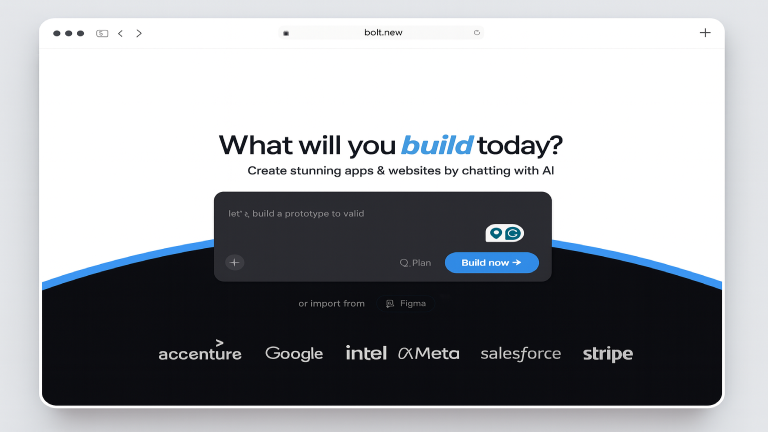
Bolt is a more serious, production-oriented AI building environment. It’s built for people who want clean code, strong agents, and a fast path to real apps without losing control of the technical details. If Replit feels like a playground, Bolt feels like a cockpit where everything is tuned for speed and reliability.
Bolt’s biggest selling point is its agent system. It tests your code, refines it, and fixes issues automatically. When you ask for a feature, Bolt generates a structured, maintainable implementation instead of a quick patch. It’s designed for teams, professionals, and anyone building apps intended to scale.
Bolt also includes a full cloud backend. Hosting, databases, integrations, domains, and SEO tools are built in, so you don’t have to stitch external services together.
Bolt is best known for…
- Powerful coding agents
They test, refactor, and iterate on your code automatically while you build. - Clean, production-ready output
Great for people who want structured code, not quick prototypes. - Scales to larger projects
Handles more complexity than most AI builders. - Visual editor with design system support
Import your design system and build on-brand components. - Full backend suite
Hosting, databases, analytics, auth, domains, and SEO tools built in.
Why you might prefer Bolt over Replit
Bolt is the stronger option if you’re building something serious and want clean code, reliable agents, and infrastructure that scales. It behaves more like a professional development environment, while Replit aims to be broader and more welcoming to beginners.
Shipper sits above both tools when it comes to turning ideas into actual products. Bolt gives you great code. Replit gives you a friendly way to learn. Shipper gives you the entire shape of a business in one place, including strategy, monetization ideas, UX guidance, and AI-driven iteration loops.
(You can read more related articles on Bolt alternatives)
What are they best suited for?
Replit is best for beginners, hobby builders, students, and anyone who wants an easy way to learn, experiment, or create smaller tools without setup. It’s a friendly place to start building software and see fast results.
Bolt is best for professionals, freelancers, agencies, and teams who want to build polished apps with strong code and reliable infrastructure. It’s structured, fast, and far more production-ready out of the box.
Shipper is best for founders and creators who want to go from idea to fully shaped product without needing to be technical. It builds the UI, backend, workflows, and even gives you guidance on product strategy, marketing, and growth.
Side-By-Comparison
| Use Case | Replit | Bolt | Shipper |
|---|---|---|---|
| Full-stack generation | ⭐⭐ Good | ⭐⭐⭐ Strong | ⭐⭐⭐ Complete |
| UI generation | ⭐⭐ Good | ⭐⭐ Good | ⭐⭐⭐ Visual + AI |
| Best for beginners | ⭐⭐⭐ Easiest | ⭐ Harder | ⭐⭐⭐ Easiest |
Related comparisons
What is the main difference between Replit and Bolt?
The main difference comes down to who they are built for and how they expect you to work. Replit focuses on accessibility and making coding feel light, friendly, and creative. You can jump in with little experience and still ship something useful. It’s a great space for learners and hobbyists.
Bolt is more structured and leans toward professional development. The agents test and refine your code, the editor is built for clarity, and the infrastructure supports bigger projects. Bolt assumes you are serious about shipping something polished.
Shipper sits in a different category. Unlike Replit and Bolt, Shipper is built for founders who want more than code. It creates the full product foundation from a single prompt, including UI, logic, database, API routes, and a growth plan. Instead of only helping you build an app, it helps you build a small business with clear next steps and a product strategy you can understand.
Shipper becomes the tiny founding team that non-technical builders never had:
design, product thinking, marketing, and working software, all in one place.
Price Comparison: Replit vs Bolt
If you are trying to decide where to spend money long term, pricing matters just as much as features. Replit, Bolt, and Shipper all have free options, but they scale in different ways once you start building seriously.
The table below gives you the quick snapshot. After that, I’ll walk through each tool’s pricing highlights in plain language so you know what you are actually paying for.
| Plan |
|
|
|
|---|---|---|---|
| Free tier | Starter – $0 | Free – $0 | Free builder demo |
| Main individual plan | Replit Core – from $25/mo ($20/mo yearly) | Pro – $25/mo | Pro – $25/user/mo |
| Team plan | Teams – from $40/user/mo ($35 yearly) | Teams – $30/user/mo | Custom (per team) |
| Enterprise | Custom pricing | Custom pricing | Custom pricing |
| Billing model | Monthly credits per plan | Token-based usage per plan | Credit-based usage per workspace |
| Best fit | Learning, agents, small teams | Production apps and dev teams | Founders building full products |
Replit pricing highlights
- Starter – Free
Includes Replit Agent trial, 10 development apps with temporary links, public apps only, and limited autonomous build time. - Replit Core – from $25/month ($20/month billed yearly)
$25 in monthly credits, personal workspace, full Agent access, app and automation building, autonomous app testing, and access to Connectors. - Teams – from $40/user/month ($35 billed yearly)
Everything in Core, plus centralized billing, role-based access control, private deployments, and credits granted upfront on annual plans. - Enterprise – custom pricing
Custom credit allowances, SOC 2, SSO/SAML, SCIM, advanced privacy controls, and tailored enterprise features.
Replit’s pricing is built around credits. Each paid tier gives you a monthly credit pool that powers Agent usage, apps, and connectors. If you are mostly experimenting or learning, the free Starter tier is usually enough. Once you start running more serious agents or collaborating with a team, Core or Teams becomes the natural step.
Bolt pricing highlights
- Free – $0
Public and private projects, 300K tokens per day, 1M tokens per month, Bolt branding on websites, 10 MB file upload, hosting, up to 333K web requests, unlimited databases. - Pro – $25/month
No daily token limit, starts at 10M tokens per month, no Bolt branding, 100 MB file upload, up to 1M web requests, unused tokens roll over, custom domains, SEO boosts, expanded database capacity. - Teams – $30/month per member
Everything in Pro, plus centralized billing, team access management, admin controls, private NPM registries, design system knowledge, token rollover. - Enterprise – custom
Advanced security, SSO, audit logs, compliance support, dedicated account manager, 24/7 support, custom workflows and integrations, flexible billing, and data governance options.
Bolt’s pricing revolves around tokens. The free plan is generous enough to build and host real projects, but once you want more stability, web traffic, and serious AI throughput, Pro becomes the main choice. Teams and Enterprise are clearly aimed at organizations that need control, governance, and guaranteed support.
Shipper pricing highlights
- Free – $0
Try the full builder and Advisor on a limited credit pool so you can see how idea to product feels inside Shipper. - Pro – $25/user/month
Enough credits each month to build, iterate, and keep updating your product, more projects, removal of the Shipper badge, and access to Advisor-driven improvements. - Enterprise – custom
Custom credit allowances, SSO, dedicated support, integration help, and the ability to opt out of data being used for training.
Shipper keeps pricing simple on purpose. Instead of juggling complex token charts or credit matrices tied to separate features, you mainly think in terms of “how much product work” you want to do each month. The same credits cover building, iterating, and using the Advisor, which makes it easier for founders and small teams to budget.
The intersection of Replit and Bolt… is Shipper 🙂
Shipper sits right where Replit’s creative freedom and Bolt’s production-focused agents meet. Describe your idea once, and Shipper builds the entire app for you, including the backend, workflows, and a clean UI you can keep refining without switching tools.
- • AI builds the full app
- • Edit visually in seconds
- • Advisor helps with product & strategy
- • Go live in 1 click
Features Comparison: Replit vs Bolt
Now that you’ve seen where each tool sits in terms of pricing, let’s look at the features that actually shape the day-to-day building experience. This is the part most people care about, because it shows how these tools feel once you’re inside them.
Some features affect how quickly you can get started. Others influence how much you need to know, how safely you can experiment, and how much the AI truly helps you. I’ll break each one down in a practical way so you can see where Replit shines, where Bolt is strongest, and where Shipper adds a different type of experience.
1. Setup Complexity
Setup complexity is all about how long it takes to go from “I have an idea” to seeing something real on the screen. Some platforms throw you straight into a file editor. Others give you a quiet ramp where the AI builds the foundation for you. Each approach suits a different type of builder.
1.1. Replit’s setup complexity
Replit is one of the easiest places to start writing code without touching anything local. You open the dashboard, pick a template, and you’re already inside a running workspace. It feels like hopping into a sandbox where you can build anything without thinking about environments, package setups, or config files.
Replit setup highlights:
- Instant cloud-based coding
- Clean onboarding for beginners
- Templates for Python, JavaScript, Node, and more
- Replit Agent can scaffold basic structures
It’s a great place for learning, experimenting, and spinning up small ideas quickly. But when you start building something larger, you will find yourself managing dependencies, setting up backend folders, or configuring integrations manually.
1.2. Bolt’s setup complexity
Bolt takes a different route. Instead of choosing templates, you describe what you want, and Bolt generates the entire full-stack project in one pass. In under a minute, you have a running app with routes, components, logic, and even database scaffolding.
What makes Bolt fast at setup:
- Full-stack generation from one prompt
- No local installs
- Hosting included
- Works well for professional prototypes and MVPs
Bolt’s start is impressive, but it expects you to be comfortable making adjustments afterward. Once the first version is generated, the tool feels more like a coding cockpit than a beginner playground.
1.3. Shipper’s setup complexity
Shipper removes setup entirely. There are no templates, repo choices, folders, or integrations for you to configure. You describe the product once, and Shipper creates everything: frontend, backend, logic, flows, and navigation. It’s the closest thing to skipping setup and jumping straight into building.
Shipper setup experience:
- No decision-making upfront
- No framework selection
- No manual environment preparation
- AI builds the full structure of the app automatically
You simply sign up, type what you want to create, and the app is generated. It’s the only tool where setup doesn’t feel like a phase at all.
1.4. Who does setup complexity better?
Replit is ideal for beginners who want something easy and safe to explore.
Bolt is perfect for developers who want full-stack scaffolding instantly.
Shipper is the only tool where the concept of setup disappears.
Winner: Shipper – wins setup complexity because you jump straight from idea to product without touching configuration.
2. Technicality
Technicality determines how much you need to know before building something meaningful. Coding knowledge, architecture decisions, debugging skills, design intuition, some tools expect these, and others remove them entirely.
1.2. Replit’s technical requirements
Replit welcomes beginners, but the deeper you go, the more technical it becomes. It’s essentially a cloud IDE, so you’re still writing actual code, managing files, and understanding how things connect. Replit Agent helps, but it doesn’t remove the need to understand the basics.
Replit expects you to know or learn:
- Basic programming concepts
- How to structure a project
- How to debug AI-generated code
- How to use packages and environment variables
Replit is great for learning and exploring coding, but you are still the one making architectural decisions.
2.2. Bolt’s technical requirements
Bolt sits closer to the developer side. It creates full-stack code fast, but the assumption is that you know how to read and adjust that code. This makes Bolt powerful, but less forgiving if you’re not comfortable with modern frameworks.
Bolt expects familiarity with:
- JavaScript frameworks
- Routes, APIs, and components
- Debugging beyond simple fixes
- Editing code that AI generated
It does not overwhelm you, but it does nudge you into a developer mindset almost immediately.
2.3. Shipper’s technical requirements
Shipper removes technical expectations almost entirely. You don’t need to write code, design layouts, or understand backend structures. The system handles all of that and explains things clearly, even if you’ve never built software before.
Shipper handles for you:
- Code
- Logic
- UX decisions
- Workflow design
- Database modeling
- Product structure
- Naming and strategy
The Advisor fills in every gap with plain-language guidance. You stay focused on your idea, not the underlying tech.
2.4. Who handles technicality better?
Replit is great for beginners who want to learn how code works.
Bolt is great for developers who want speed without losing control.
Shipper is the only one where you can build a full product even if you’ve never coded before.
Winner: Shipper – wins technicality because zero coding or design knowledge is required to build a complete product.
3. Version Control
Version control determines how safely you can experiment. If you break something, how hard is it to go back? This becomes important once your app grows beyond a simple idea.
3.1. Replit’s version control
Replit offers a good balance of ease and depth. You can create checkpoints, browse through your edit history, or connect a GitHub repo for more serious versioning. It’s simple enough for beginners but flexible enough when you want more control.
Replit versioning options:
- Automatic history tracking
- Manual snapshots
- GitHub integration for deeper workflows
It’s a friendly system that scales with your technical ability.
3.2. Bolt’s version control
Bolt provides snapshots and regeneration tools that help when something breaks. If you want more control, you can export the project to GitHub and use full Git workflows.
Bolt version tools:
- Snapshots
- Auto-regenerated files
- Deep versioning through GitHub
Bolt’s version control is solid, but best appreciated by teams comfortable with Git.
3.3. Shipper’s version control
Shipper keeps things simple. It automatically stores past versions of your project and lets you roll back the entire app with one click. No branches, no Git, no manual configuration.
Shipper rollback features:
- One-click restoration
- Automatic version snapshots
- No setup required
- Works for beginners without any Git knowledge
It’s ideal for non-technical users who want safety without overhead.
3.4. Who does version control better?
Bolt gives developers deeper control.
Shipper makes the process easier.
But Replit strikes the most balanced middle ground.
Winner: Replit – wins version control because it balances simplicity with GitHub support for larger projects.
4. AI Assistance & Proactiveness
AI can either act like a helpful assistant or a passive code generator. The difference becomes obvious once you start making changes or scaling the project.
4.1. Replit’s AI assistance
Replit Agent helps you code, fix bugs, write functions, and automate everyday tasks. It feels like a supportive co-pilot when you already know what you want the code to do.
Replit AI strengths:
- Code suggestions
- Bug repairs
- Web search for updated info
- Helps with multi-step tasks
- Good balance for beginners and intermediate users
But the Agent mainly responds to commands. It doesn’t drive the direction of your product.
4.2. Bolt’s AI assistance
Bolt’s agents lean heavily into production-quality code. They generate, test, and refine code in a loop, making Bolt strong for teams building serious software.
Bolt AI strengths:
- Full-stack generation
- Auto-testing
- Refactoring
- Handles large projects with higher accuracy
- Predictable output suited for developers
Its intelligence is mostly focused on code quality rather than product strategy.
4.3. Shipper’s AI assistance
Shipper includes a different kind of AI: The Advisor.
Instead of reacting to prompts, it thinks about the product, the user experience, the logic, and even the marketing. It’s the closest thing to having a small founding team inside your app builder.
What the Advisor helps with:
- Code
- UI and UX choices
- Product ideas
- Growth strategy
- Logic improves
- Architecture decisions
- Onboarding flows
- Naming, messaging, and positioning
It is the only AI system that feels proactive instead of reactive.
4.4. Who does AI assistance better?
Bolt wins for pure coding strength.
Replit wins for versatility and ease.
Shipper wins for thinking about the whole product instead of just the code.
Winner: Shipper – wins AI assistance because The Advisor guides the entire product, not just the code.
5. AI Auto-Bug Fixing
Bug fixing is one of the most underrated parts of building. When errors appear, how well does the tool help you recover?
5.1. Replit’s AI bug fixing
Replit Agent helps fix errors by rewriting snippets or adjusting logic. It’s good for smaller issues or beginner mistakes.
5.2. Bolt’s AI bug fixing
Bolt includes automated testing. It checks your app, finds issues, and fixes them automatically using its internal reflection system. It’s strong for larger, more complex codebases.
5.3. Shipper’s AI bug fixing
Shipper watches your app quietly. When something breaks, it resolves the issue automatically by adjusting logic or layout. This makes it great for non-technical builders.
5.4. Who wins AI bug fixing?
Bolt has the strongest automated system.
Shipper is simpler and easier for non-technical users.
Replit does well, but not as deeply as the others.
Winner: Bolt – wins bug fixing thanks to its automated testing and reflection loops
Customer Support: Replit vs Bolt
When something breaks or you hit a wall, customer support suddenly matters more than any feature on the homepage. It’s the difference between being stuck for hours or getting back to building quickly. That’s why this section looks at how each platform actually supports you when you need help, not just what they advertise.
Both Replit and Bolt offer solid resources, but they approach support differently. And since many people using these tools aren’t full-time engineers, the level of responsiveness and the type of support channels available can shape the entire experience.
Replit support options
Replit has a broad, community-driven support ecosystem, supported by official channels for paid users. Beginners, educators, and hobby developers will find plenty of places to ask questions, though response times vary depending on the channel.
Replit offers:
- Help Center with guides and troubleshooting
- Community forums
- Discord server with active members
- Email support (faster for Core/Teams/Enterprise users)
- Dedicated account help for Enterprise customers
Replit’s model works well if you like learning from the community or digging through documentation. It’s wide but not always fast unless you’re on higher-tier plans.
Bolt support options
Bolt’s support leans more toward professional teams and developers building production apps. Their pricing pages outline a structured support system, especially at the Enterprise level.
Bolt provides:
- Help Center with technical articles
- Email support for paid plans
- Priority assistance for Teams users
- Dedicated account manager for Enterprise customers
- 24/7 availability for large organizations
- Admin controls and provisioning help
Bolt’s support is reliable, but more oriented toward organizations that need stability and compliance. Individual creators get good documentation, but the fastest help is reserved for corporate plans.
Shipper support options
Shipper keeps support personal. Instead of dropping you into a giant forum, we give you direct access to people who can help, plus a community space where builders share advice and ideas in real time. Whether you’re a beginner or a technical user, you get multiple ways to reach the team.
Shipper offers:
- Live support directly in the app
- Email support for all users
- Dedicated Discord server for builders
- Public Subreddit, r/ShipperNow
- Clear documentation written for both non-technical and technical users
Where Replit and Bolt lean heavily on documentation, Shipper combines personal help with community involvement. If you run into an issue, you aren’t left hunting for answers, you always have someone to reach out to.
What we always wanted Replit & Bolt to be
Replit makes it easy for anyone to start building with AI. You can prototype ideas quickly, experiment with agents, and explore coding without feeling overwhelmed. Bolt takes things further by helping teams ship polished, production-ready applications with strong AI-powered coding tools. Both platforms are powerful in their own way, but they still require you to understand the moving pieces of software development. You’re expected to manage infrastructure choices, navigate design decisions, troubleshoot errors, and guide the direction of your product on your own.
This is where Shipper steps in. Instead of expecting you to bridge the gap between “idea” and “real product,” Shipper removes all of that friction. You describe what you want to build, and Shipper turns the idea into a functioning business, complete with UI, workflows, pages, in-app logic, and even guidance on pricing, onboarding flows, and next steps. The Advisor doesn’t just write code; it helps you think through the product like a partner would, covering strategy, structure, growth, and long-term vision.
With Replit and Bolt, you still have to tell the tool what to do. With Shipper, you tell it what you want, and it handles the rest.

Shipper is the only platform in this comparison that builds your app, explains every decision, and guides you through what to improve next.
It feels less like using a tool and more like working alongside a smart, experienced teammate.
Here’s what sets it apart:
- Real business foundations created from a single prompt
- Visual editing with the safety of full code export whenever you want
- The Advisor supports coding, design, pricing, onboarding, security, marketing, and more
- Automatic bug-fixing when something breaks, no searching Stack Overflow
- Beginner-friendly flow without losing power for advanced users
- Launch in minutes without dealing with SDKs, tokens, hosting setups, or integrations
If you’ve ever wished Replit or Bolt had a built-in partner who thinks ahead for you, you’ll feel the difference immediately. Shipper gives you momentum from the first prompt and keeps helping you grow the product long after it’s live.
Give it a try and see how quickly your idea becomes a real, working product, without the usual complexity.
The intersection of Replit and Bolt… is Shipper 🙂
Shipper sits right where Replit’s creative freedom and Bolt’s production-focused agents meet. Describe your idea once, and Shipper builds the entire app for you, including the backend, workflows, and a clean UI you can keep refining without switching tools.
- • AI builds the full app
- • Edit visually in seconds
- • Advisor helps with product & strategy
- • Go live in 1 click
The Verdict: What’s Better, Replit or Bolt?
After spending time inside both platforms, it becomes clear that Replit and Bolt shine in very different ways. Replit feels like a creative playground, a space where ideas flow fast, experiments are encouraged, and AI helps you get from zero to something working in minutes. Bolt, on the other hand, is structured, intentional, and tuned for people who want production-ready software with fewer errors and more control.
If your goal is to learn, tinker, or build through natural language without feeling boxed in, Replit offers a gentle ramp. Its agent-driven workflow and vibe-coding model make it easy to explore ideas at your own pace. But as soon as your project becomes more serious, you’ll feel the limits: you’ll still need to guide the system, adjust code, and flesh out decisions it can’t anticipate.
Bolt flips the experience. It’s more powerful technically, and if you already understand the basics of building apps, it gives you a dependable system to ship polished features. But with that power comes complexity, Bolt assumes you already know what you’re trying to build, and it doesn’t handhold the strategic parts: business logic, product structure, onboarding, pricing, or growth.
And this is where the comparison starts to tilt.
While Replit helps you start and Bolt helps you refine, neither tool carries you through the entire journey. They assist the build, but not the thinking. They accelerate development, but not direction. Once you want clarity on what to do next, you’re on your own again.
Shipper fills that missing layer.
Instead of acting like a coding assistant or a fast editor, it behaves like a partner, something that understands the product you’re trying to create and helps you shape it. The Advisor handles not just development but strategy: who the product is for, how it should look, what screens it needs, how it should onboard new users, and what to improve next.
If Replit is the most fun place to start building, and Bolt is the most efficient place to refine a project, Shipper becomes the place where an idea fully becomes a product. It ties all the pieces together, design, engineering, logic, and even growth, without requiring expertise in any of them.
So which is better?
Replit for exploration. Bolt for execution.
But if you want one tool that carries you from idea → full business, Shipper is the only one that does it out of the box.
The intersection of Replit and Bolt… is Shipper 🙂
Shipper sits right where Replit’s creative freedom and Bolt’s production-focused agents meet. Describe your idea once, and Shipper builds the entire app for you, including the backend, workflows, and a clean UI you can keep refining without switching tools.
- • AI builds the full app
- • Edit visually in seconds
- • Advisor helps with product & strategy
- • Go live in 1 click
FAQ: Replit vs Bolt
1. What’s cheaper, Replit or Bolt?
Both tools offer free plans, but Bolt’s paid tier starts at $25 per month, while Replit’s Core plan starts at $20 per month when billed annually. In terms of raw price alone, Replit is slightly cheaper for most users.
Bolt becomes more expensive if you need higher token capacity or team features, while Replit’s pricing scales based on credits and plan type. If you care more about cost than capabilities, Replit usually wins this comparison.
2. Is Replit or Bolt better for beginners?
Replit is generally easier for new builders because its interface is straightforward and its agent assists with setup and experimentation. Bolt leans more toward experienced users who know what they want to build and prefer a structured, production-ready workflow.
If you’re new and want less setup and fewer technical decisions, Replit is the more comfortable place to start. Bolt becomes more appealing once you already understand the basics of building apps.
3. How is Replit different from Bolt?
Replit is a flexible environment for coding, prototyping, and vibe-style building. It’s designed for exploration and creativity. Bolt is more streamlined and optimized for shipping polished, production-ready apps with fewer errors.
In simple terms:
- Replit = experiment freely
- Bolt = ship professionally
They overlap in many areas but serve different moments in the builder journey.
4. Which tool is better for building a full product?
Bolt gives you stronger production tools, testing flows, and refactoring support, which helps when you’re building something real. Replit can get you from idea to prototype quickly, but you’ll need more manual work to take it to a finished product.
However, neither tool guides the business side, onboarding, logic, pricing, marketing, or user flow decisions. That’s the gap Shipper fills, since it handles both the build and the direction.
Other comparisons to Bolt.new
Shipper | Lovable | Base44 | Cursor | V0
Earn 50% + lifetime recurring commissions
Share Shipper with your audience and get paid every month, for life.
Earn 50% + lifetime recurring on every sale
Share Shipper with your audience and get paid every month, for life — no cap on earnings.
Earn 50% + lifetime recurring on every sale
Share Shipper with your audience and get paid every month, for life — no cap on earnings.






