
Shipper.now Review 2026: Is It Worth the Price for You?


Every few days someone pops into my inbox with the same question:
“David… What do you actually think about Shipper?”
It shows up everywhere. Twitter DMs, Discord, email, even in Facebook groups where people compare AI builders all day. Half the time it’s from folks I’ve never met.
And sure, they know I’m building Shipper.
But that’s not really why they ask.
They want the behind the scenes review. The honest take. The stuff you only notice when you use the product daily, break it, fix it, and rely on it to get actual projects shipped.
So instead of typing the same answer over and over…
I figured I’d put everything in one place!
If you’re checking out Shipper or just want a straight, no-nonsense view of what it’s good at and where it still needs work, this review should give you a clear picture.
TL;DR – Get to know Shipper
| Factors | Quick answer |
|---|---|
| What Shipper does | Turns a prompt into a working web app with frontend, backend, database, hosting, and a visual editor. |
| Who it’s for | People who have ideas but don’t want to wrestle with boilerplate, setups, or endless debugging. Builders who want speed. |
| How fast it is | Most apps spin up in under a minute. Bigger ones take a bit longer. |
| Your control | Full code access. You can edit everything. Shipper doesn’t lock you in a template box. |
| Where it shines | Quick prototypes, MVPs, internal tools, small apps that you want live the same day. |
| Where it still needs work | Long, complex projects with lots of dependencies can require hand-holding. Occasionally you’ll hit a weird build edge case. |
| What surprised me most | How much time it saves once you get into a rhythm. The gap between idea and a live link gets really small. |
What is Shipper?
Answer: Shipper is an AI app builder that creates complete apps from 1 message to an AI. The best part is you don’t have to know how to code, design or do marketing!
You describe what you want, Shipper generates the full project, and you can edit anything through code or the visual editor.
It handles the messy parts: frontend, backend, routing, database, API integration, hosting, and all the little config pieces that usually slow people down.

The goal is simple: get you from idea to something real, fast.
Whether you’re trying to build an MVP, an internal tool, a B2B SaaS, a client project, or just want to test weird ideas in a safe sandbox, Shipper keeps everything in one workflow so you don’t have to jump between five tools.
If you want speed without giving up control of your code, this is exactly the type of product Shipper is trying to be.
Who is Shipper Best For?
Answer: Shortly, it is great for everybody!
Technical or not, Shipper clicks best for people who want to build but don’t feel like wrestling with the usual dev setup grind. It’s for folks who care more about shipping than polishing webpack configs at midnight.
Here’s who tends to get the most out of it:
- Beginners starting out with app building
- Indie hackers and solo founders
- People validating a SaaS idea
- Designers or PMs who want to build without waiting on engineering
- Agencies that need to deliver client projects faster
- Technical founders who want to skip boilerplate
- Non-technical folks who want an actual app, not just a prototype
- Makers who love to experiment and test ideas quickly
- Growth teams spinning up internal dashboards and tools
- Students learning by building real projects
- Anyone moving from “I have an idea” to “Here’s a link, try it”
In the next section, we can walk through Shipper’s main features, with the same honest take: what works well and what still needs tightening.
The cheat code to app building
Shipper handles the boring parts for you. You describe the idea, it builds the structure, the pages, the logic and gives you clean code you can keep improving.
- • Real code you can edit
- • Visual tweaks in seconds
- • AI Advisor for changes
- • Publish instantly
Features at Shipper: What You Get
Before diving into each feature, it’s probably useful to set the stage.
Shipper isn’t one of those “AI builders” that spits out a demo page and calls it a day. The whole idea is to cover the full loop: generate the app, let you edit it, let you iterate, and then get it live without jumping through a million hoops.
1. AI App Builder
Ease of Use – 5/5⭐
Speed – 5/5⭐
Output Quality – 4.5/5⭐
When I first started using Shipper, I tried doing things the old way: setting up a project, wiring routes, adding UI, connecting APIs, setting up auth, database, the usual checklist. It works, but it’s slow, and if you’re juggling multiple ideas or client projects, it drains momentum fast.
That’s where the AI App Builder makes a difference.
It takes your description and turns it into a full working app in a minute or two. Not just a layout, but an actual project with structure, logic, and the bones of something you can grow into a business.
If setups and boilerplate are eating your time…
Then the AI Builder is the shortcut you wish you had earlier.
Here’s the simple flow:
- Describe what you want.
- Add extra details if needed.
- Shipper generates the full project.
- Review everything.
- Start editing with code or the visual editor.
The builder gives you a strong starting point.
Then you shape it into whatever you want next.
2. Visual Editor
Ease of Use – 5/5⭐
Speed of Iteration – 4.5/5⭐
Flexibility – 4.5/5⭐
After the app is generated, the Visual Editor is usually the next stop. It lets you rearrange layouts, swap components, adjust styles, and move blocks around without breaking anything.
The best part is how it keeps you in flow.
You don’t jump between files or worry about imports.
You just shape the app the way you want it to look.
If you’re the kind of person who thinks visually, this part feels like cheating.
The workflow is simple:
- Click into any part of the UI
- Edit structure or styling
- Preview changes instantly
- Switch to code whenever you want deeper control
It’s fast, and it removes a lot of friction from the early build process.
3. The AI Advisor
Usefulness – 4.8/5⭐
Accuracy – 4.5/5⭐
Idea Expansion – 5/5⭐
This is the part that feels closest to having a teammate.
The Advisor talks you through what your product needs next, helps you fix broken logic, and can generate new components or features based on simple instructions.
You describe what you’re trying to do, and it handles the technical steps in the background.
If you’ve ever wished you could brainstorm with an engineer while building, this covers a lot of that gap.
Typical flow:
- Tell The Advisor what you want updated
- It explains its plan
- It applies the changes
- You review and refine as needed
It’s especially helpful when you’re pushing the app toward something that feels like a real product or business.
4. Hosting and Deployment
Ease of Use – 5/5⭐
Speed – 5/5⭐
Reliability – 4.5/5⭐
Going live used to be a full chore: configs, domains, builds, debugging the deploy pipeline, then hoping it works. With Shipper, you click publish and you get a live link.
That’s it.
It sounds simple, but the psychological shift is huge.
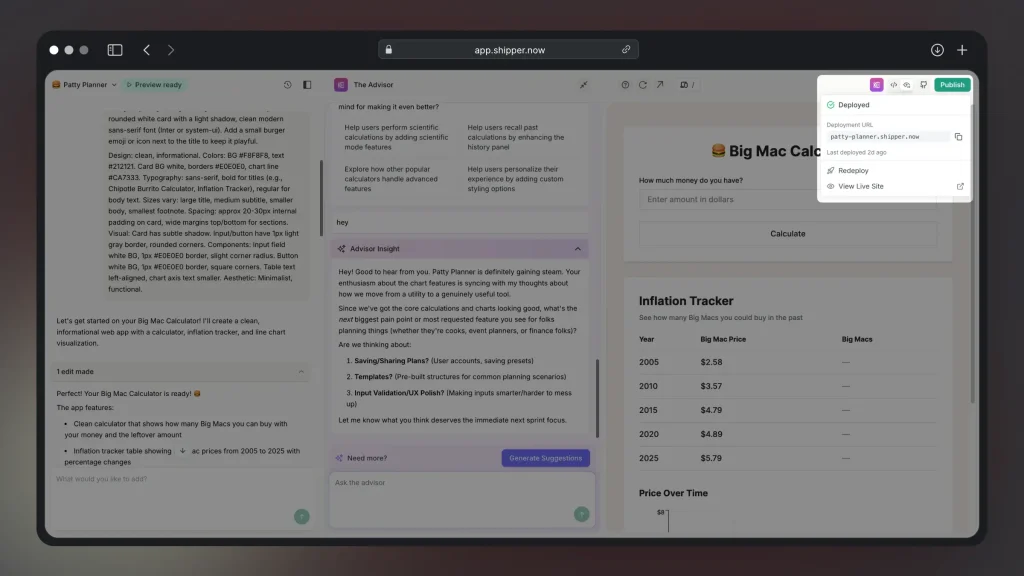
The moment your app is live, it feels real. You can show it to someone, test it with users, even charge for access if you’ve added payments.
The deploy button is what turns ideas into something you can share or sell.
Flow:
- Build your app
- Click “Publish”
- Get your live link in seconds
No setup pain, no weird errors, no interruptions.
5. Code Ownership
Transparency – 5/5⭐
Freedom – 5/5⭐
Long-term Safety – 4.7/5⭐
One thing people worry about with AI builders is lock-in.
With Shipper, you can export the entire project any time.
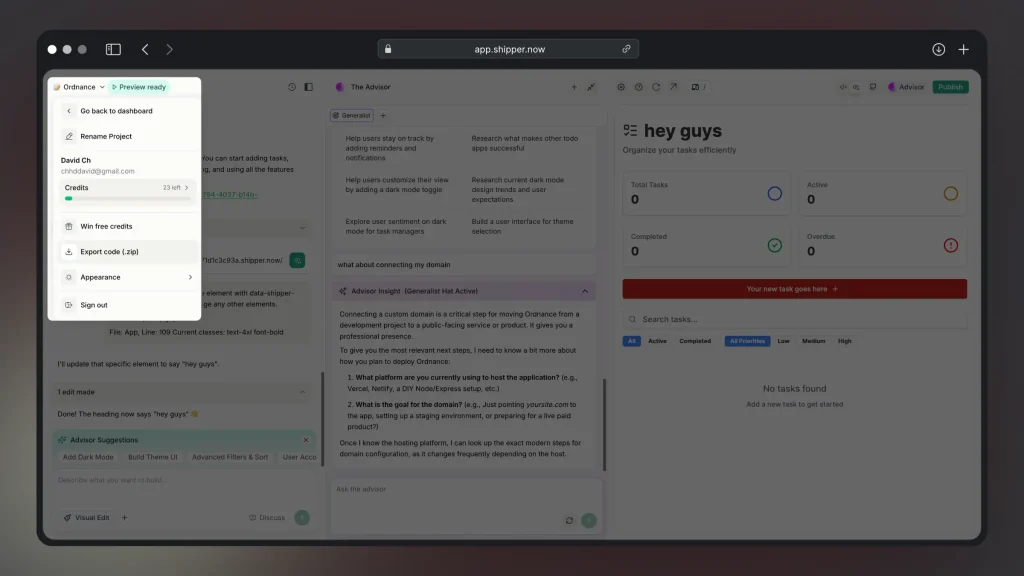
Full React + TypeScript code.
Clean file structure. All dependencies included!
It removes the fear of being trapped on a platform and makes it easier to commit to building something serious.
The flow is simple:
- Go to project settings
- Click export
- Download your full codebase
You can bring it local, self host it, or hand it to your developer.
No strings attached!
Pros & Cons of Shipper.now
After spending a lot of time building real projects with Shipper, a few things became pretty clear. Some parts feel incredibly smooth and save hours, and a few things still need polishing.
Here’s the honest breakdown from actually using it day to day.
Overall, Shipper moves fast and makes building way more enjoyable.
It’s not perfect, but the tradeoff is speed – you get to test ideas and push things live without getting buried in setup or broken configs. If you want to build products instead of wrestling with frameworks, it’s definitely worth trying.
Shipper Plans: How Much Does It Cost?
Shipper uses a credit system, which ends up being pretty straightforward once you see the math. Every build, regeneration, or Advisor action uses credits, and you pick a monthly plan based on how often you build.

| Credits | Price (USD) |
|---|---|
| 100 | $25 |
The nice part is you can scale up only when you actually need more builds.
Most people start with 200 or 400 credits until they figure out how often they build. The bigger plans are usually for agencies, teams, or anyone running several projects at once.
If you’re just testing ideas, the smaller plans are enough. If you’re building a full product or trying multiple versions of something, the bigger plans make more sense.
Shipper Contact: Customer Support
Staying in touch with someone on the team is pretty straightforward. If you ever get stuck or want to flag something, there are a few quick ways to reach us:
- On-site support bubble
The chat bubble in the bottom right corner is the fastest way to reach us while you’re inside the app. - Email
Works well for longer messages, bug reports, or anything that needs a bit more context. - Discord (direct access to founders)
This is where most of the conversations happen. You can ask questions, share progress, or get help in real time. - Subreddit @ r/ShipperNow
There’s also a small community on the ShipperNow subreddit where people share projects and ask questions.
Support stays pretty close to the product, so you usually end up talking to someone who actually understands what’s going on under the hood.
Shipper Alternatives & Competitors
When you start building with Shipper, it’s natural to wonder: how does it stack up against all the other tools out there? There are a handful of platforms trying to solve the same “prompt → app” problem, each with different strengths, trade-offs, and target users.
Below is a comparison table that shows where Shipper lands compared to a few of the most notable alternatives and competitors.
Use it to check what matters most to you.
| Feature | |
 |
 |
 |
 |
 |
 |
|---|---|---|---|---|---|---|---|
| AI Project Advisor | |||||||
| Made for beginners | |||||||
| Proactive Suggestions | |||||||
| AI Audience Research | |||||||
| App Starter Ideas | |||||||
| Foreign Language Support | |||||||
| AI Auto Bug Fixing | |||||||
| Lock Specific Code Files | |||||||
| App Cloning | |||||||
| AI-Improved Prompt | |||||||
| App Preview: Phone, Tablet, Computer |
We have a separate guide with alternatives to Shipper. Though, the tools in the table above are Shipper’s main competitors.
Here’s how they compare:
- Shipper vs Cursor
- Shipper vs Lovable
- Shipper vs Bolt
- Shipper vs Replit
- Shipper vs V0
- Shipper vs Base44
Now that we spoke about all these other tools,
There’s just 1 more question to ask…
Final Verdict: Should You Use Shipper to Build Your App?
If your goal is to move from an idea to a finished, working product without getting buried in setups, configs, or endless rewrites, Shipper is one of the closest things to a real shortcut you can take right now. It gets you from nothing to something you can share, test, or even charge for in a ridiculously short amount of time.
A lot of platforms help you “prototype.”
Shipper goes further.
The apps it generates are real and ready to grow.
Sure, you might still tweak things, fix logic, or adjust layouts along the way. But the heavy lifting is already done for you. Instead of spending weeks getting to the first version, you get there in minutes and use the saved time on the parts that actually matter: features, users, feedback, revenue.
If you want the fastest path from idea to a finished product, Shipper is worth it.
The cheat code to app building
Shipper handles the boring parts for you. You describe the idea, it builds the structure, the pages, the logic and gives you clean code you can keep improving.
- • Real code you can edit
- • Visual tweaks in seconds
- • AI Advisor for changes
- • Publish instantly
FAQ: Shipper.now
1. What is Shipper used for?
Answer: Shipper is used to build apps from simple messages.
Shipper helps you turn an idea into a working web app fast. You describe what you want, and it generates the full project for you – frontend, backend, database, hosting, everything. It’s great for MVPs, internal tools, client projects, or even full products you plan to sell.
2. Is Shipper like Cursor or Lovable?
Answer: Closer to Lovable than Cursor.
- Shipper sits in a similar space, but the focus is different.
- Cursor leans more toward helping developers write code faster.
- Lovable focuses on no-code style visual building.
Shipper bridges both worlds: you get an AI builder that generates a real codebase, plus a visual editor and an Advisor that helps you shape the product as you go. It’s built for people who want a complete app, not just snippets or prototypes.
3. Is Shipper a free app?
Shipper isn’t a free app. No free plan, but it has a free demo.
The smaller plans are affordable if you’re experimenting or validating ideas, and you can scale up only when you need more builds or bigger projects. You always own the exported code, no matter the plan.
Earn 50% + lifetime recurring commissions
Share Shipper with your audience and get paid every month, for life.
Earn 50% + lifetime recurring on every sale
Share Shipper with your audience and get paid every month, for life — no cap on earnings.
Earn 50% + lifetime recurring on every sale
Share Shipper with your audience and get paid every month, for life — no cap on earnings.






