
Bolt vs Cursor Comparison: The Best Choice in 2026



I’ve used both Bolt and Cursor long enough to understand why developers constantly compare them. Bolt is the tool I reach for when I want a full-stack app running fast, the kind of experience where you describe what you want and the whole project appears in the browser like magic. Cursor, on the other hand, feels like upgrading VS Code with an AI partner who actually understands your entire codebase and helps you refactor, debug, and ship cleaner code.
Over time, I’ve learned that they’re excellent at very different things. Bolt excels at speed, scaffolding, and taking ideas from zero to deployed without setup. Cursor shines when the work gets deeper, maintaining real projects, writing complex logic, or collaborating with a team. Their strengths don’t compete; they complement different stages of real-world development, and that’s exactly what I’ll help you break down.
If you’re torn between them, you’re not alone. I’ve had moments where Bolt saved me hours on greenfield builds, and other times when Cursor felt like a second brain keeping my codebase sane. So in this guide, I’ll walk you through the parts that matter most when choosing the right tool for your workflow.
P.S.: I’ll also introduce another tool, Shipper (worth considering), which is a great alternative to both. It not only matches what Bolt and Cursor offer, but often beats them on features, ease of use, and cost.
Here’s what I’ll compare in this breakdown:
- Speed from idea to working app
- AI coding depth and refactoring quality
- Full-stack and backend capabilities
- Collaboration and long-term workflow
- Pricing and who gets the best value
TL;DR: A Quick Comparison of Bolt, Cursor, and Shipper (My Summary)
If you only have a few minutes, this table gives you the big picture. I’ve pulled together the main differences between Bolt, Cursor, and Shipper so you can quickly see who’s better at what, and where each one actually makes sense in real-life workflows.
Think of it as the “decision dashboard” for this whole guide; you can skim this now, then dive into the sections that matter most to how you build.
| Feature |

|

|

|
Winner |
|---|---|---|---|---|
| Best for | Fast full-stack app building in the browser | Developers working in real codebases | Non-technical founders and small teams | Depends on your workflow |
| Ease of use | Bolt, Shipper | |||
| AI assistance | All | |||
| Learning curve | Shipper | |||
| Build speed (idea → live app) | Shipper | |||
| Customization & control | All | |||
| Templates & starters | Bolt, Shipper | |||
| Team & collaboration | Cursor | |||
| AI bug fixing & refactors | Cursor, Shipper | |||
| AI product / roadmap guidance | Shipper | |||
| Beginner-friendly for non-coders | Shipper | |||
| Pricing | $0–$30+/mo | $0–$40+/user/mo | $25+/mo | Bolt, Cursor (on raw price) |
The intersection of Bolt and Cursor… is Shipper 🙂
Bolt is brilliant at spinning up full-stack projects in the browser. Cursor is phenomenal when you’re deep in a real codebase. Shipper sits right in the middle – you describe the product once, and get a live app you can understand, edit, and grow without wrestling with setup or complex tooling.
- • AI builds the full product
- • Edit layout and logic visually
- • AI Advisor suggests next features & positioning
- • Go live in 1 click with hosting included
Overview of Bolt and Cursor
What is Bolt?
I’ve spent a reasonable amount of time inside Bolt, and it’s honestly one of the most exciting “instant app generation” tools out there. You give it a prompt, wait a few seconds, and it spits out a full-stack app you can open, inspect, and edit. It feels like the fastest way to prototype ideas when you want to see something working immediately.
Bolt runs entirely in the browser, so there’s no environment setup, and the AI generates code you can preview instantly if you’re the type who likes seeing results first and deciding “what next?” later. Bolt makes that workflow surprisingly smooth.
But Bolt is still focused on rapid prototyping rather than long-term project structure. Great for starting fast, but once you want deeper refinement, you’ll often need something else to take the project forward.
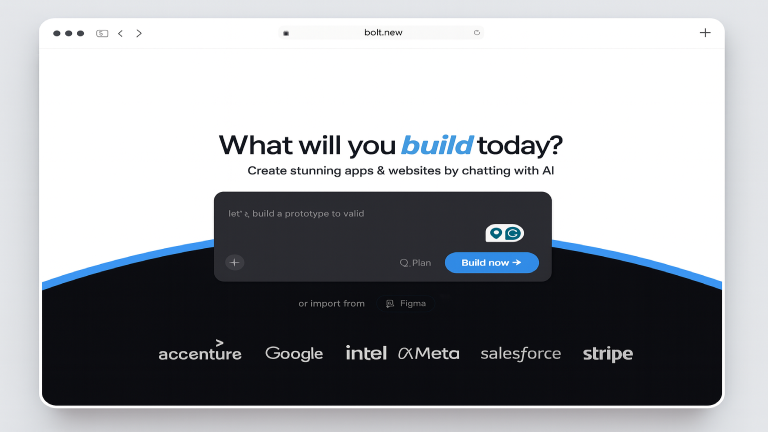
Bolt is best known for…
- Instant full-stack app generation – You describe the idea, and Bolt generates a working prototype fast.
- Browser-based coding – Zero setup. Everything happens inside the Bolt editor.
- AI-assisted code edits – You can ask Bolt to modify specific sections of the generated code.
- Fast iteration loop – Perfect for MVPs, demos, and “show me something now” testing.
Why you might prefer Bolt over Cursor
Bolt wins if speed is everything. If you want an app generated right away without touching your local machine, Bolt is more hands-off and more instant than Cursor. And when you combine this with Shipper, you get the same instant generation plus visual editing, an AI Advisor, and hosting, things neither Bolt nor Cursor fully delivers.
(You can read more related articles on Bolt alternatives)
What is Cursor?
Cursor is the tool I switch to when I’m working inside a real codebase. It’s essentially a developer-first AI coding environment that feels like VS Code with an extra layer of intelligence sitting behind every file and function. If your workflow is more technical or you already understand project structure, Cursor feels incredibly powerful.
Cursor shines when you want AI-driven refactoring, debugging, architecture-level reasoning, or multi-file edits. The more complex the codebase, the more Cursor stands out.

Cursor is best known for…
- Deep AI-assisted coding – Multi-file edits, refactors, debugging, and architecture suggestions.
- Full local development – Ideal for advanced devs working in serious codebases.
- Context-rich code understanding – Cursor reads and reasons across the entire project.
- Tools for large apps – Branching, repos, and long-form coding workflows.
Why you might prefer Cursor over Bolt
Cursor is the better fit if you want long-term maintainability and advanced coding support rather than quick prototyping. Cursor handles complex code elegantly, while Bolt focuses on speed and instant results. Shipper steps above both by giving you an end-to-end environment, idea → app → edits → launch, without needing the heavy technical overhead.
What is Bolt or Cursor best suited for?
- Bolt is best when you want to start immediately, generate something fast, and iterate visually on the concept.
- Cursor is best when you want precision, structure, debugging, and serious code editing. Both are strong, but each feels like half of the full workflow.
- Shipper is best for founders and teams who want to go from idea → full product, with backend, UI, pages, and hosting handled automatically.
Side-by-side summary
| Use Case | Bolt | Cursor | Shipper |
|---|---|---|---|
| Full-stack generation | ⭐ Strong | 🟣 Limited | ⭐⭐⭐ Complete |
| UI generation | ⭐ Good | ⭐⭐ Excellent | ⭐⭐⭐ Excellent (visual builder) |
| Best for beginners | 🟣 Harder | ⭐ Easier | ⭐⭐⭐ Easiest |
Quick links:
What is the main difference between Bolt and Cursor?
Bolt helps you start fast. Cursor enables you to build deep. One is about instant output, the other is about controlled development. Bolt is the “show me something now” tool. Cursor is the “help me build something serious” tool. Both are great, but they live on opposite ends of the workflow.
That’s why Shipper fits right in the center, unlike Bolt and Cursor, Shipper handles the full lifecycle. You describe the idea once, get a complete app, refine it visually or through AI, and deploy instantly. No juggling tools, no switching environments, no setup. It’s the only one that can take you from idea → product → launch without breaking flow.
Price Comparison: Bolt vs Cursor
When you zoom out from features and UX, pricing quickly becomes the deciding factor – especially if you’re choosing between Bolt, Cursor, and Shipper for the long term. Below is a quick side-by-side table so you can see how their free plans, starter tiers, and upgrade paths compare at a glance.
If you’re in a hurry, this table is your shortcut: it shows how each tool charges, who each plan is really built for, and where Shipper fits as the “third option” in the middle of full-stack builders (Bolt) and AI IDEs (Cursor).
| Plan |
|
|
|
|---|---|---|---|
| Free plan | $0 / mo | $0 / mo | $0 – test the full builder |
| Starter plan | Pro – $25 / mo | Pro – $20 / mo | Pro – $25 / mo |
| Higher tiers | Enterprise – custom | Business – $100+ / user | Enterprise – custom |
| Pricing model | Subscription + limits | Credits + usage | Flat subscription + credits |
| Best for | AI app generation | Developers & teams | Founders & full-app builders |
Bolt pricing highlights
- Free – $0 / month
• ~150K AI tokens per day (around 1M/month)
• Hosting included, Bolt branding stays on your projects - Pro – $25 / month
• ~10M tokens per month, no daily cap
• Custom domain support, no Bolt branding, built-in SEO features
• Token rollover for unused usage - Teams – $30 per user/month
• 10M tokens per teammate, pooled usage, and team billing
• Team-level controls and collaboration - Enterprise – Custom
• SSO, audit logs, priority support, and higher token limits for larger orgs
In practice, Bolt’s pricing works best if you’re actively building full-stack apps and expect to hit AI strongly every month. The token model rewards heavy usage: if you’re shipping a lot of experiments or running multiple builds per week, Pro and Teams give you predictable volume without micromanaging every run.
Cursor pricing highlights
- Hobby – Free
• Limited agent/chat usage and Tab completions
• Includes a short Pro trial so you can feel the full product - Pro – $20 / month
• Unlimited Tab completions and “Auto” model usage
• Monthly credit pool for premium models (e.g. higher-end LLMs)
• Faster responses and better performance for daily engineering work - Ultra / Power – $200 / month
• Designed for heavy users with ~20× the Pro usage pool
• Priority execution and early access to new capabilities - Teams – $40 per user/month
• All Pro features plus centralized billing and org-level controls
• Admin panel, usage analytics, privacy/compliance controls - Enterprise – Custom
• SAML SSO, SOC 2, RBAC, SCIM, pooled credits, dedicated support, invoice billing
Cursor’s pricing is tuned for developers who live in the editor every day. If most of your time is spent inside code, Pro gives you a very affordable “AI pair programmer,” while Teams and Enterprise make sense once multiple squads rely on Cursor for code reviews, refactors, and Bugbot-style automation.
Shipper pricing highlights
- Standard (Free)
• $0, with around 5K signup credits to try real builds
• Hosting, database, and auth included; Shipper badge stays visible - Pro – $25 per user/month
• ~25K build credits per month
• Custom domain support, no Shipper badge
• SEO-oriented features and more generous usage for active builders - Scale – Custom
• Higher limits, 1-on-1 support, and deeper integrations for teams who want to run multiple products through Shipper
Shipper’s pricing makes the most sense if you care about turning prompts into working products, not just code. The free tier lets you test the full experience, while Pro sits in the same range as Bolt and Cursor but focuses your spend on shipped apps: credits go into live builds, domains, and production-ready projects rather than just editor time.
As always, prices and limits can change, so it’s worth checking each tool’s live pricing page before making a final decision.
The intersection of Bolt and Cursor… is Shipper 🙂
Bolt is brilliant at spinning up full-stack projects in the browser. Cursor is phenomenal when you’re deep in a real codebase. Shipper sits right in the middle – you describe the product once, and get a live app you can understand, edit, and grow without wrestling with setup or complex tooling.
- • AI builds the full product
- • Edit layout and logic visually
- • AI Advisor suggests next features & positioning
- • Go live in 1 click with hosting included
Features Comparison: Bolt vs Cursor
Before choosing between Bolt and Cursor, it helps to look beyond marketing pages and compare how both tools actually behave in real workflows. I’ve used each one enough to know its strengths, weaknesses, and the subtle trade-offs you only notice once you start building.
In this section, I’ll break down the core features side-by-side and show where Shipper fits, especially for people who want speed, clarity, and less friction when bringing an idea to life.
1. Setup Complexity
Getting started should feel simple, not like a full onboarding project. Setup complexity defines how quickly you can move from idea → first build. Some tools make you configure environments, frameworks, and local settings. Others let you focus directly on the product you want to create.
1.1. Bolt’s setup experience
Bolt is designed for quick starts, and it shows:
- Browser-based workspace → no installation needed
- Generates a full project instantly
- Includes backend, database, UI scaffolding out of the box
You can open Bolt, type a prompt, and have a working full-stack app in minutes. That speed is Bolt’s superpower, especially for MVP builders.
1.2. Cursor’s setup experience
Cursor behaves like a supercharged VS Code:
- Requires installation
- Works with your local environment
- Uses your existing frameworks and folder structure
Cursor is powerful, but it assumes you’re comfortable managing dependencies, folders, Git, and your own stack. The setup is heavier, but the control is greater.
1.3. Shipper’s setup experience
Shipper removes setup entirely:
- Sign up
- Describe what you want
- The AI builds everything end-to-end
No frameworks to choose, no environment to fix, no boilerplate. Shipper is genuinely “instant start,” especially for founders, designers, and product-first builders.
1.4. Who does setup complexity better?
Bolt delivers the fastest practical start: no setup, no installs, no friction. Cursor gives power, Shipper gives clarity, but Bolt is unbeatable for instant scaffolding.
Winner: Bolt – smoothest and quickest jumpstart for new projects.
2. Technicality
This feature decides who each tool is built for, engineers, beginners, founders, or product creators. Some platforms assume you know how to code; others allow you to build without touching a line of code.
2.1. Bolt’s technical requirements
Bolt sits in the middle. You can generate an app with no code, but extending it requires at least basic technical comfort:
- You’ll read code to understand what was generated
- Advanced edits require coding
- Good for semi-technical founders and early-stage builders
Bolt makes coding easier, but doesn’t remove the need entirely.
2.2. Cursor’s technical requirements
Cursor is built for developers:
- Full coding environment
- Works best when you understand frameworks
- AI helps, but you still make architectural decisions
If you can code, Cursor feels powerful. If you can’t, it becomes overwhelming quickly.
2.3. Shipper’s technical requirements
Shipper removes technical barriers:
- No coding needed
- No design skills required
- No marketing or engineering knowledge necessary
The Advisor guides decisions, generates everything, and helps shape the entire product — not just the code.
2.4. Who handles technicalities better?
Cursor delivers the deepest technical control and is clearly built for engineers who want flexibility and precision in their workflow.
Winner: Cursor – unmatched technical depth for real developers.
3. Version Control
Version control matters when you iterate, break things, test ideas, or want to undo a mistake.
3.1. Bolt’s version control
Bolt offers basic version management:
- Saves project states
- Allows you to regenerate or revert AI output
- Limited control compared to Git-based workflows
It’s simple, but not fully granular.
3.2. Cursor’s version control
Cursor integrates beautifully with Git:
- Works seamlessly with GitHub and GitLab
- Supports branches, commits, merges
- Ideal for engineers building long-term projects
It’s sophisticated – but only if you understand Git workflows.
3.3. Shipper’s version control
Shipper brings version control to everyone:
- One-click rollback
- Snapshot history for every project change
- No Git knowledge required
You can experiment freely and revert instantly, which speeds up iteration dramatically.
3.4. Who handles version control better?
Cursor dominates here – engineers get the full Git workflow without compromise. Shipper ties for non-technical users, but Cursor still leads overall.
Winner: Cursor – best-in-class versioning for long-term engineering work.
4. AI Assistance & Proactiveness
This decides how much each tool helps you, not just reactively, but proactively guiding your decisions and improving your product.
4.1. Bolt’s AI assistance
Bolt is strong at:
- Generating full apps
- Updating entire codebases
- Rebuilding screens and flows
But Bolt is reactive; it waits for instructions. It doesn’t guide strategy or point out issues.
4.2. Cursor’s AI assistance
Cursor’s AI feels like a senior engineer:
- Reads your whole codebase
- Suggests improvements
- Refactors and debugs deeply
But Cursor is also reactive; you have to know what to ask.
4.3. Shipper’s AI assistance
Shipper introduces a different model entirely:
- The Advisor guides coding, UX, security, marketing & growth
- Proactively suggests improvements to your app
- Helps with product positioning, funnels, and monetization
- Fixes issues without you needing to ask
It behaves like a smart co-founder, not just a coding tool.
4.4. Who does AI assistance better?
Cursor wins on engineering intelligence. Bolt wins for full generation. But Shipper stands alone on proactiveness; the only tool that doesn’t wait for instructions.
Winner: Shipper – the only strategic, proactive AI among the three.
5. Customer Support
When you’re building with AI tools, customer support becomes more important than most people realize. Features are great, but the moment something breaks, becomes confusing, or doesn’t behave like the demo, the quality of support determines whether you keep going or slow to a halt. I’ve interacted with all three platforms enough to understand the differences in response time, availability, and the kind of help you actually get when you’re stuck.
5.1. Bolt’s Support Options
Bolt provides a clean, modern support system that feels accessible even to beginners. Their support ecosystem includes:
- In-app help widget for quick questions
- Email support for detailed issues
- A growing community on Discord
- Documentation for basic walkthroughs and fixes
Bolt’s team responds reasonably fast, especially for paid users, and most issues get resolved without long back-and-forth. They also publish updates frequently, so the team is clearly active. But their documentation is still catching up with how fast the product evolves.
Bolt is best when you need clear explanations and quick reassurance during early builds.
5.2. Cursor’s Support Options
Cursor leans more toward the developer crowd, and its support reflects that:
- GitHub Issues for technical bugs
- Discord community with active engineers
- Open-source–friendly responses from core contributors
- Strong documentation, especially around coding workflows
Cursor’s support isn’t as “hand-holding” as Bolt’s, but the community is extremely knowledgeable. If you’re a developer who needs help with complex debugging, it’s much easier to find someone who can jump in with real technical guidance. However, non-technical users will struggle — Cursor expects you to speak the language of engineers.
Cursor is best when you need deep technical help, not onboarding help.
5.3. Shipper’s Support Options
Shipper takes a more personal and high-touch approach:
- Live chat support inside the app
- Email support with fast response times
- A dedicated subreddit (r/Shippernow)
- Active Discord server
- Human + AI troubleshooting via The Advisor
- Guided prompts for product decisions, growth, and UX
Shipper stands out because support covers more than bug fixes. You also get help with:
- Product strategy
- Growth
- Troubleshooting features
- Improving user experience
- Deployments and monetization decisions
The platform behaves like a small support team built into your workflow.
Shipper is best when you want support that covers not just coding, but the whole lifecycle of building a product.
5.4. Who Does Customer Support Better?
If you’re a developer dealing with code-heavy issues, Cursor provides the strongest community and deepest technical responses. Bolt wins for friendliness and fast reassurance, especially for beginners. But Shipper offers the broadest, most proactive support, helping with technical issues and the surrounding business decisions.
Winner: Shipper – widest support range and fastest real-world help.
This tool takes the best out of Bolt & Cursor
After working extensively with both Bolt and Cursor, I’ve realized they each do something great, but neither gives you the “complete builder experience.” Bolt moves fast, but it can feel limiting once you need real product decisions. Cursor is powerful but assumes you already know what you’re building and how. There’s always something missing in the middle: speed and clarity, simplicity and strategy.
That’s where Shipper fits perfectly. It takes Bolt’s instant building and Cursor’s intelligence, then adds the part neither one offers, a proactive AI that thinks about your product’s UX, growth, security, and monetization. It feels less like a tool and more like a teammate who understands the full journey from idea to launch.

Shipper gives you everything Bolt and Cursor don’t, in one workspace:
- AI builds the entire app for you (frontend, backend, logic, database)
- Visual editing with zero friction
- A proactive Advisor that guides product decisions
- Instant deployment without DevOps
- Built-in bug fixing and troubleshooting
- Marketing, UX, and growth insights baked into the workflow
Shipper lets you move faster and think bigger, without needing to pick between speed (Bolt) and control (Cursor).
If you’ve ever wished both tools could merge into one smarter, cleaner, more complete builder, Shipper is exactly that. Give it a try and see how much simpler launching can be.
The Verdict: What’s Better, Bolt or Cursor?
After spending enough time building with both Bolt and Cursor, I’ve learned that the right choice really depends on what you value most. Bolt is the one I reach for when I want fast prototypes without worrying about environment setup. Cursor, on the other hand, feels like a super-powered coding companion, incredible when I already know the direction and need tight engineering control.
If you’re a developer who lives inside VS Code, Cursor will feel natural. If you’re a founder validating ideas quickly, Bolt is enjoyable. Both are solid tools, and I’ve built meaningful things with each one. But they both leave gaps, one leans heavily on speed, the other on technical depth.
That’s why I eventually started leaning toward Shipper. It takes the best parts of Bolt (speed, instant builds) and Cursor (intelligence, depth), then fills in all the missing pieces neither one covers. The Advisor, the zero-setup workflow, the way it proactively handles UX, security, and product decisions, none of that exists in Bolt or Cursor.
For me, the biggest shift was realizing that building an app isn’t just “writing code.” It’s decisions, iterations, mistakes, refinements, packaging, storytelling, and launching. Bolt helps with a slice of that. Cursor helps with another slice. Shipper helps with the entire journey, end to end.
That doesn’t mean Bolt or Cursor aren’t useful. They absolutely are. But if you want something that removes friction, simplifies thinking, and moves with you from idea → prototype → product → launch, Shipper becomes the more complete answer.
And that’s really the bottom line here: Bolt is fast, Cursor is powerful, but Shipper is the one that brings everything together in a way that feels intuitive, guided, and actually built for how modern creators work.
If you want a tool that doesn’t just code but helps you build, Shipper is the one I’d bet on.
The intersection of Bolt and Cursor… is Shipper 🙂
Shipper sits right where full-stack builders and AI coding assistants meet. Describe your idea once, and get a complete app you can edit, refine, and launch — all in one place.
- • AI codes the app
- • Edit visually
- • AI Advisor helps you
- • Go live in 1 click
FAQ: Bolt vs Cursor
1. What’s cheaper, Bolt or Cursor?
Both offer similar entry prices, but their cost structures are different. Bolt uses a more predictable credit-style model, which helps founders estimate usage. Cursor leans on a flexible usage-based system that can scale up or down depending on how much you code inside the editor.
If you like predictable billing, Bolt feels easier. If you want elasticity, Cursor gives more control.
2. Is Bolt or Cursor better for beginners?
Bolt is easier for non-technical or semi-technical users because it handles most of the scaffolding and setup. Cursor requires comfort with frameworks, Git, and debugging; it’s clearly made for developers.
If you’re new to building, Bolt gives you a gentler entry point. Cursor becomes a better fit once you already know how to code.
3. How is Bolt different from Cursor?
Bolt focuses on speed and instant generation, ideal for quick MVPs and prototypes. Cursor behaves like a powerful coding workstation designed for deep edits, refactoring, and long-term engineering workflows.
In practice, Bolt is “generate fast,” while Cursor is “refactor smart.” Choosing between them comes down to whether you want automation or precision.
4. Which one should I choose for long-term projects?
Cursor is better suited for long-term technical work because of its Git integration, code-level control, and engineer-first workspace. Bolt can still handle ongoing projects, but it shines best during early validation and rapid experimentation.
For long-running apps that evolve over time, Cursor gives more structural control. For testing ideas quickly before committing, Bolt is the more efficient pick.
Earn 50% + lifetime recurring commissions
Share Shipper with your audience and get paid every month, for life.
Earn 50% + lifetime recurring on every sale
Share Shipper with your audience and get paid every month, for life — no cap on earnings.
Earn 50% + lifetime recurring on every sale
Share Shipper with your audience and get paid every month, for life — no cap on earnings.






